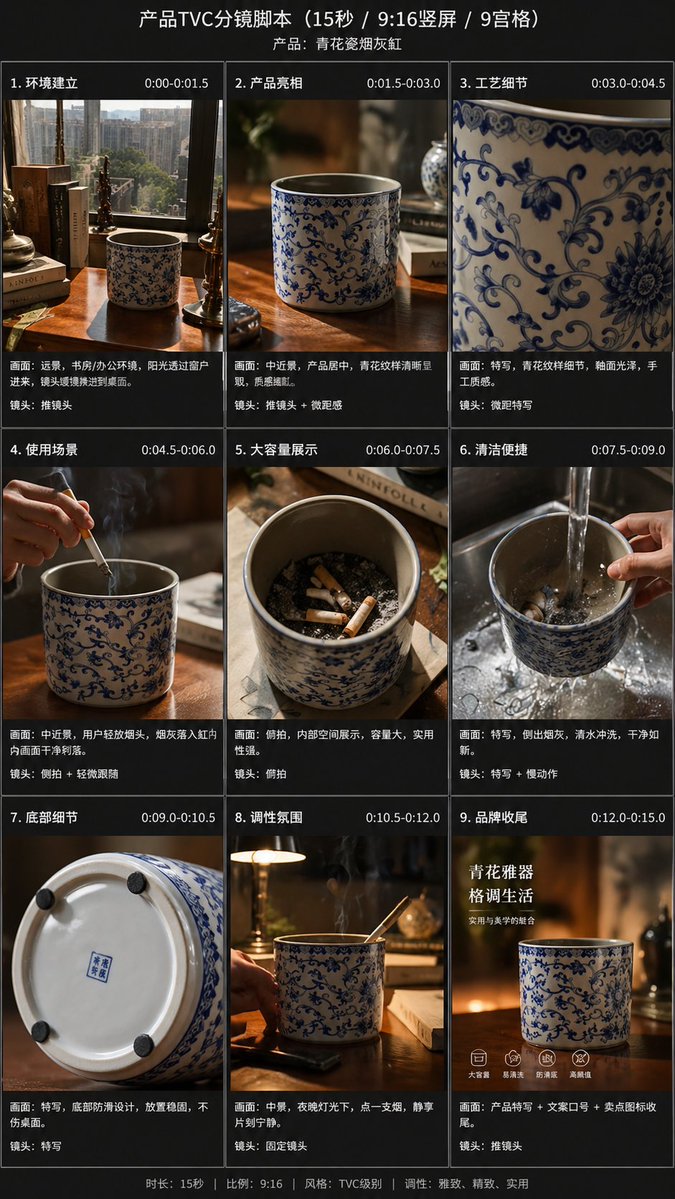
Guion gráfico para anuncio de televisión de producto de 9 paneles
Esta función convierte una sola foto de referencia del producto en un guion gráfico comercial vertical de 9 fotogramas, pulido y profesional, para presentaciones de comercio electrónico, previsualizaciones o planificación de vídeos publicitarios.
Este es un ejemplo GPT Image 2 para Producto y Comercial . Utilice la plantilla lista para copiar que aparece a continuación para generar imágenes similares y revise la atribución de Awesome GPT Image 2 Prompts y los derechos de uso comercial antes de reutilizarla.
Free 1K preview
Generate one preview image instantly, no sign-up required.
Free text preview doesn’t preserve reference-image consistency.
Prompt
Mensaje listo para copiar
Using the provided reference images, transform a single, casually taken product photo into a beautiful e-commerce TVC storyboard project for advertising {argument name="video duration" default="15-second"}, formatted as {argument name="aspect ratio" default="9:16"} vertical screen, and presented in a 9-grid format. Maintain the blue and white porcelain ashtray as the main product, but re-stage it in cinematic advertising shots, adopting warm, high-end lighting effects, shallow depth of field, and exquisite, lifestyle-oriented desktop environments. Add a dark storyboard layout and label each panel with a Chinese title and timeline. Include 9 scenes: 1) A wide shot of the environment, showing the desk, books, window, and product placement; 2) A medium shot of the product on the desktop; 3) An extreme close-up of the blue and white porcelain pattern; 4) A usage scenario, showing a hand placing a cigarette into the ashtray, accompanied by visible smoke; 5) An overhead view showcasing the capacity, displaying multiple cigarette butts inside; 6) A cleaning scene, rinsing in the sink with running water, holding the product; 7) A close-up of the bottom details, showing the bottom and anti-slip pad; 8) A nighttime atmosphere/lifestyle scene, with the product placed on a desk, smoke swirling, accompanied by ambient desk lamp lighting; 9) A brand ending frame, with the product as the core, accompanied by Chinese marketing copy. Add an overall title “Product TVC Storyboard Script (15 seconds / 9:16 vertical screen / 9-grid)” and a product subtitle {argument name="product name" default="Blue and White Porcelain Ashtray"}. Add Chinese scene titles and timestamps to each of the 9 panels, and add a short Chinese descriptive caption below each image, referencing a professional commercial shooting list. Throughout the process, adopt a high-end, realistic commercial photography style, maintaining consistent product branding, elegant Chinese aesthetics, and a concise, high-end storyboard presentation.Variables de solicitud
Marcadores de posición de argumentos editables que se encuentran en la solicitud, con sus valores predeterminados.
Best for
- - Producto y Comercial visual exploration
- - Image generation and reference-image edits
- - Reusable briefs that keep source attribution visible
Change these parts
- - Subject, product, character, or scene
- - Aspect ratio, camera, lighting, and background
- - Brand, text, color, and output constraints
Recommended model and settings
- - Model: gpt-image-2
- - Input mode: Imagen a imagen
- - Aspect ratio: source
- - Commercial status: review original source
How to use this prompt
- 1. Copy the prompt and preserve its structure for the first test.
- 2. Replace the subject, context, and publishing channel.
- 3. Change one camera, lighting, or style variable per iteration.
- 4. Inspect the output, source, text, and rights before reuse.
Limitations, source, and reuse cautions
- - Generated output is an editable draft, not factual, legal, or rights evidence.
- - Review the linked source, people, brands, logos, text, and third-party media before commercial use.
Más casos en esta categoría
Priorizados por categoría, compatibilidad con el modo de entrada, calidad y menor riesgo.






Notas sobre la reutilización y la fuente
Utilice esta opción de forma segura después de previsualizar el caso.
- 1.Copia la solicitud o ábrela directamente en Dovoo con el botón de generación.
- 2.Ajusta las variables, la relación de aspecto y las imágenes de referencia según tus necesidades.
- 3.Antes de publicar o utilizar el servicio de forma remunerada, verifique los derechos de autor, los requisitos de atribución y los riesgos relacionados con la marca o la imagen de la persona.