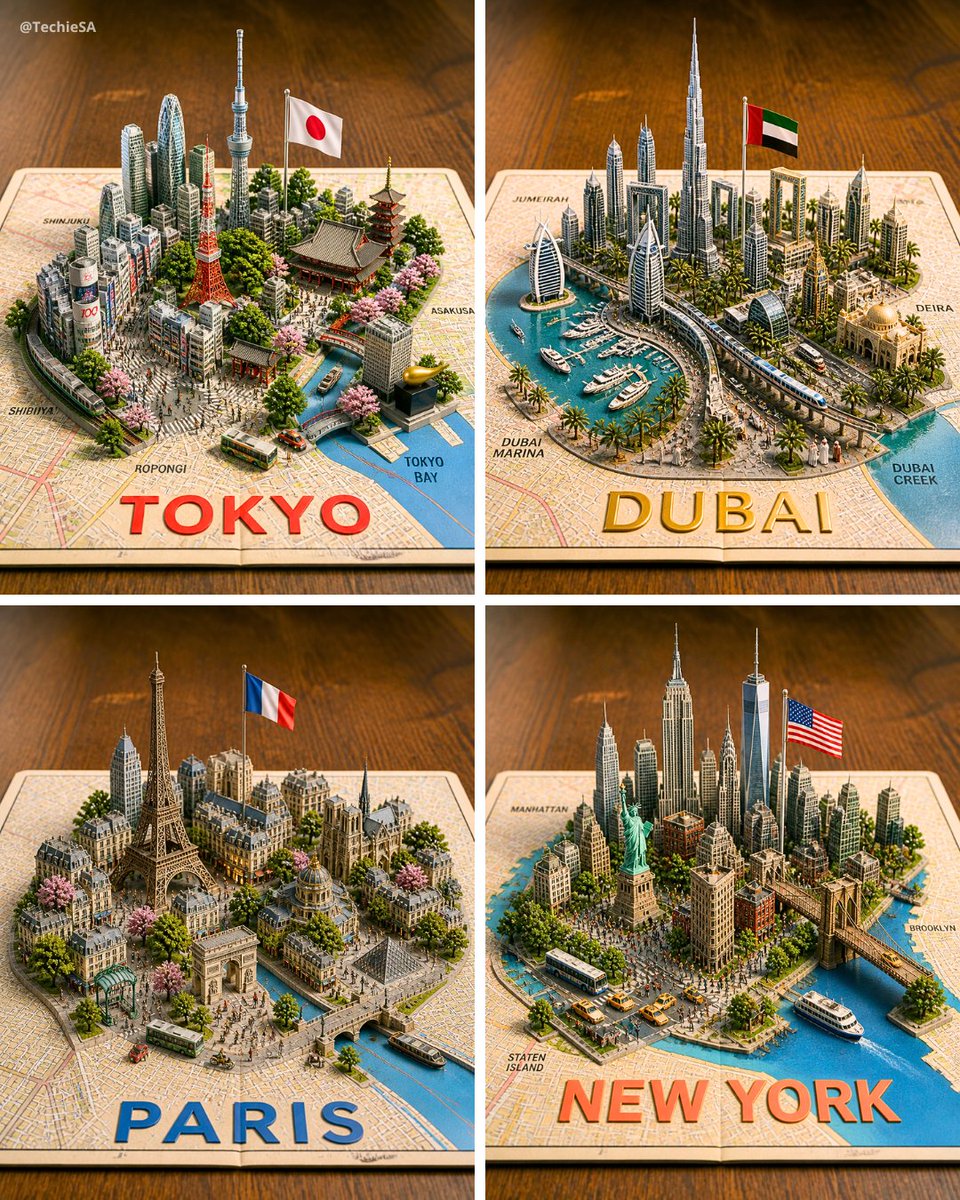
Four 3D Miniature City Maps
Generates a four-panel photorealistic 3D diorama of Tokyo, Dubai, Paris, and New York rising from printed maps for travel or city showcase visuals.
Este es un ejemplo GPT Image 2 para Paisaje y naturaleza . Utilice la plantilla lista para copiar que aparece a continuación para generar imágenes similares y revise la atribución de Awesome GPT Image 2 Prompts y los derechos de uso comercial antes de reutilizarla.
¿Necesitas el conjunto completo de indicaciones? Usa el Paisaje y naturaleza centro de temas para ver más ejemplos relacionados, o abra el GPT Image 2 catálogo de avisos Para ver el índice completo de ejemplos, las estructuras reutilizables y la atribución de fuentes.
Free 1K preview
Generate one preview image instantly, no sign-up required.
3198/4000
Prompt
Mensaje listo para copiar
Goal: Create a photorealistic 3D miniature city-map showcase featuring exactly 4 square panels arranged in a 2×2 grid, each panel showing a famous world city as a raised diorama emerging from a printed paper street map on a warm wooden tabletop.

Canvas: Square image, evenly divided by thin white gutters into four equal quadrants. Use an isometric three-quarter view from above, shallow depth of field, warm studio lighting, crisp miniature details, and realistic shadows.

Layout: The 4 panels are: top-left Tokyo, top-right Dubai, bottom-left Paris, bottom-right New York. Each city sits on an open map sheet with a large bold city name printed along the bottom edge of its panel in bright color. Include small neighborhood labels on the map surface.

Panel 1 — Tokyo: Build a dense miniature Tokyo skyline with exactly 6 key recognizable landmarks: Tokyo Tower, Tokyo Skytree, a traditional pagoda, a large temple roof, a modern cluster of skyscrapers, and a canal leading to Tokyo Bay. Add a Japanese flag on a pole, cherry blossom trees, small buses, tiny streets, and map labels such as Shinjuku, Shibuya, Roppongi, Asakusa, and Tokyo Bay. Large bottom text: {argument name="Tokyo label" default="TOKYO"} in bold red letters.

Panel 2 — Dubai: Build a futuristic Dubai marina diorama with exactly 6 key recognizable elements: Burj Khalifa, Burj Al Arab, twin sail-like towers, Dubai Frame, a yacht-filled marina, and a curving elevated transit line. Add palm trees, modern high-rises, an Emirati flag on a pole, blue water, boats, and map labels such as Jumeira, Dubai Marina, Deira, and Dubai Creek. Large bottom text: {argument name="Dubai label" default="DUBAI"} in bold gold letters.

Panel 3 — Paris: Build a classic Paris miniature with exactly 6 key recognizable landmarks: Eiffel Tower, Arc de Triomphe, Notre-Dame-style cathedral, Louvre-like glass pyramid, Haussmann apartment blocks, and a Seine river with bridges. Add a French flag on a pole, tree-lined boulevards, pink blossoms, tiny buses, pedestrians, and warm stone architecture. Large bottom text: {argument name="Paris label" default="PARIS"} in bold blue letters.

Panel 4 — New York: Build a dense Manhattan miniature with exactly 6 key recognizable landmarks: Statue of Liberty, One World Trade Center, Empire State Building, Chrysler Building, Brooklyn Bridge, and a harbor with ferries. Add an American flag on a pole, yellow taxis, buses, crowded streets, waterfront piers, greenery, and map labels such as Manhattan, Brooklyn, and Staten Island. Large bottom text: {argument name="New York label" default="NEW YORK"} in bold orange-red letters.

Visual style: Hyper-detailed 3D paper-map diorama, realistic plastic-and-paper miniature scale model, tilt-shift photography effect, vibrant but natural colors, warm wooden background, soft bokeh at the edges, high-resolution commercial render quality.

Constraints: Keep exactly 4 panels and exactly the 4 city themes listed. Do not add extra cities. Keep all text legible, with the city names large and centered near the lower edge of each panel. Include a small creator watermark in the top-left corner reading {argument name="watermark text" default="@TechieSA"}.
Variables de solicitud
Marcadores de posición de argumentos editables que se encuentran en la solicitud, con sus valores predeterminados.
Variable
Tokyo label
Por defecto
TOKYO
Variable
Dubai label
Por defecto
DUBAI
Variable
Paris label
Por defecto
PARIS
Variable
New York label
Por defecto
NEW YORK
Variable
watermark text
Por defecto
@TechieSA
Best for
- - Paisaje y naturaleza visual exploration
- - Image generation and reference-image edits
- - Reusable briefs that keep source attribution visible
Change these parts
- - Subject, product, character, or scene
- - Aspect ratio, camera, lighting, and background
- - Brand, text, color, and output constraints
Recommended model and settings
- - Model: gpt-image-2
- - Input mode: Texto a imagen
- - Aspect ratio: source
- - Commercial status: review original source
How to use this prompt
- 1. Copy the prompt and preserve its structure for the first test.
- 2. Replace the subject, context, and publishing channel.
- 3. Change one camera, lighting, or style variable per iteration.
- 4. Inspect the output, source, text, and rights before reuse.
Limitations, source, and reuse cautions
- - Generated output is an editable draft, not factual, legal, or rights evidence.
- - Review the linked source, people, brands, logos, text, and third-party media before commercial use.
Importado de Awesome GPT Image 2 Prompts . Se requiere atribución. El estado de uso comercial es allowed ; revise los derechos de la fuente antes de su uso comercial.
Más casos en esta categoría
Priorizados por categoría, compatibilidad con el modo de entrada, calidad y menor riesgo.

Cute Focus Desk Flat Lay and Kawaii Illustration
Texto a imagen

Matte Black B.AI Keyboard Keycap
Texto a imagen

Studio Portrait of Woman with Sunglasses
Texto a imagen

Tuxedo Cat Photo and Line Art Diptych
Texto a imagen

Orange Rooftop Fashion Photo Prompt
Texto a imagen

Luxury Travel Fashion Portrait Prompt
Texto a imagen
Notas sobre la reutilización y la fuente
Utilice esta opción de forma segura después de previsualizar el caso.
- 1.Copia la solicitud o ábrela directamente en Dovoo con el botón de generación.
- 2.Ajusta las variables, la relación de aspecto y las imágenes de referencia según tus necesidades.
- 3.Antes de publicar o utilizar el servicio de forma remunerada, verifique los derechos de autor, los requisitos de atribución y los riesgos relacionados con la marca o la imagen de la persona.