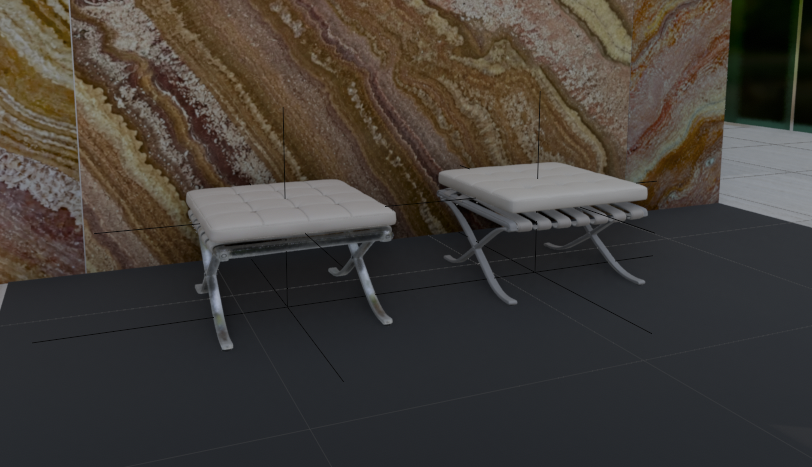
3D Footstool Mesh Comparison
A realistic architectural render showing two white leather footstools side by side in a marble interior for comparing 3D generation quality and materials.
Este es un ejemplo GPT Image 2 para Interiorismo y arquitectura . Utilice la plantilla lista para copiar que aparece a continuación para generar imágenes similares y revise la atribución de Awesome GPT Image 2 Prompts y los derechos de uso comercial antes de reutilizarla.
¿Necesitas el conjunto completo de indicaciones? Usa el Interiorismo y arquitectura centro de temas para ver más ejemplos relacionados, o abra el GPT Image 2 catálogo de avisos Para ver el índice completo de ejemplos, las estructuras reutilizables y la atribución de fuentes.
Free 1K preview
Generate one preview image instantly, no sign-up required.
1683/4000
Prompt
Mensaje listo para copiar
Create a realistic architectural visualization comparing two 3D-generated ottoman stools in an interior showroom scene. Canvas: wide landscape 16:9 render, camera at low eye level looking slightly downward. Scene: two small Barcelona-style footstools placed side by side on a dark charcoal tiled floor, in front of a tall glossy stone wall with dramatic brown, cream, rust, and gold onyx/marble veining; a narrow strip of green-tinted glass or window appears at the far right edge, with pale exterior floor tiles visible beyond. Subjects: exactly 2 footstools: left stool is the HD version, slightly smaller and lower, with a white tufted square cushion divided into a 4-by-4 grid, rounded soft edges, light gray leather straps underneath, and reflective polished metal X-shaped legs; right stool is the Smart Mesh version, slightly larger and cleaner, with a thicker smooth white cushion, parallel white underside straps, and gray polished X-shaped metal legs. Add thin black 3D viewport guide lines or wireframe axis lines crossing through and around both stools, including vertical and horizontal alignment lines, as if shown in a 3D modeling comparison viewport. Materials: white leather cushions with subtle seams and soft highlights, chrome legs with reflections, dark matte floor tiles with faint grout lines, glossy veined stone wall. Lighting: soft indoor studio lighting, moderate shadows, realistic but slightly CGI-rendered look. Composition: left stool around one-third of the frame, right stool around two-thirds, both facing forward at a slight angle, enough floor visible in front, marble wall filling the background. No people, no labels, no UI panels, no watermark.
Best for
- - Interiorismo y arquitectura visual exploration
- - Image generation and reference-image edits
- - Reusable briefs that keep source attribution visible
Change these parts
- - Subject, product, character, or scene
- - Aspect ratio, camera, lighting, and background
- - Brand, text, color, and output constraints
Recommended model and settings
- - Model: gpt-image-2
- - Input mode: Texto a imagen
- - Aspect ratio: source
- - Commercial status: review original source
How to use this prompt
- 1. Copy the prompt and preserve its structure for the first test.
- 2. Replace the subject, context, and publishing channel.
- 3. Change one camera, lighting, or style variable per iteration.
- 4. Inspect the output, source, text, and rights before reuse.
Limitations, source, and reuse cautions
- - Generated output is an editable draft, not factual, legal, or rights evidence.
- - Review the linked source, people, brands, logos, text, and third-party media before commercial use.
Importado de Awesome GPT Image 2 Prompts . Se requiere atribución. El estado de uso comercial es allowed ; revise los derechos de la fuente antes de su uso comercial.
Más casos en esta categoría
Priorizados por categoría, compatibilidad con el modo de entrada, calidad y menor riesgo.






Notas sobre la reutilización y la fuente
Utilice esta opción de forma segura después de previsualizar el caso.
- 1.Copia la solicitud o ábrela directamente en Dovoo con el botón de generación.
- 2.Ajusta las variables, la relación de aspecto y las imágenes de referencia según tus necesidades.
- 3.Antes de publicar o utilizar el servicio de forma remunerada, verifique los derechos de autor, los requisitos de atribución y los riesgos relacionados con la marca o la imagen de la persona.