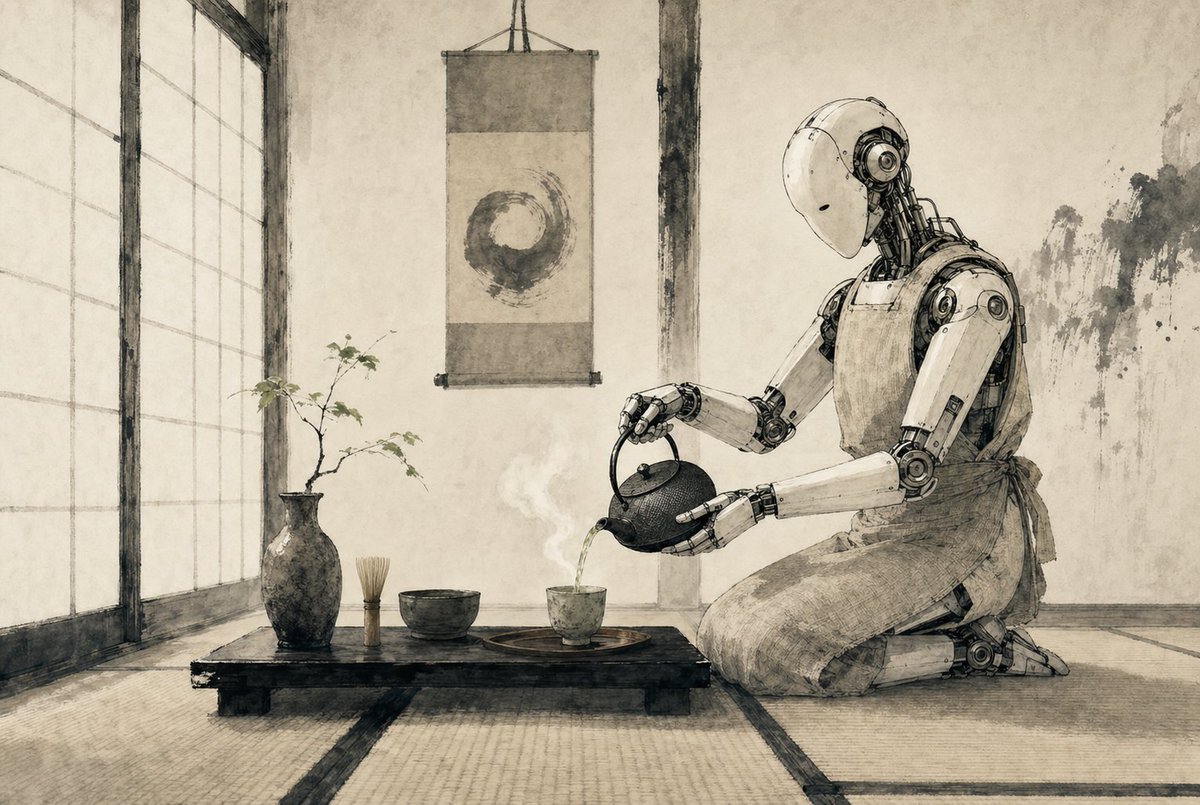
Zen-Teezeremonie-Roboter
Eine minimalistische Szene im Sepia-Tusche-Stil, die einen humanoiden Roboter bei einer japanischen Teezeremonie zeigt, ideal für die Erstellung poetischer Science-Fiction-Editorial-Art oder stimmungsvoller Konzeptbilder.
Dies ist ein GPT Image 2 -Prompt für Illustration & Kunst . Verwenden Sie den unten stehenden, kopierfertigen Prompt, um ähnliche Grafiken zu erstellen, und überprüfen Sie vor der Wiederverwendung Awesome GPT Image 2 Prompts -Quellenangaben sowie die kommerziellen Nutzungsrechte.
Free 1K preview
Generate one preview image instantly, no sign-up required.
Eingabeaufforderung
Kopierfertige Eingabeaufforderung
A serene Japanese tea room rendered as a refined monochrome ink-and-wash illustration on aged parchment, with soft sepia-gray tones, delicate brush textures, and precise hand-drawn linework. On the right side, a humanoid {argument name="robot type" default="service robot"} kneels in seiza on tatami mats, its smooth white shell and exposed mechanical joints depicted with elegant technical detail, gently bowing its head as it pours hot tea from a cast-iron teapot into a small ceramic cup. The robot wears a simple cloth apron tied at the waist, blending traditional tea ceremony etiquette with futuristic machinery. In the center foreground, a low black wooden tea table holds exactly 5 visible tea objects: 1 dark ceramic vase with a thin branch of sparse leaves, 1 bamboo whisk standing upright, 1 tea bowl, 1 small teacup on a round tray, and 1 cast-iron teapot in the robot’s hands. A faint curl of steam rises from the freshly poured tea. Behind the table, a hanging scroll displays a single enso circle painted in expressive brushwork. On the left, tall shoji screens diffuse soft daylight across the room. The walls are plain plaster with subtle wear and ink-like stains, and the overall composition is calm, balanced, minimalist, and contemplative, combining wabi-sabi Japanese aesthetics with quiet science-fiction. Use a wide cinematic composition, eye-level perspective, lots of negative space, and a meditative mood.Eingabeaufforderungsvariablen
In der Eingabeaufforderung befinden sich bearbeitbare Argumentplatzhalter mit ihren Standardwerten.
Best for
- - Illustration & Kunst visual exploration
- - Image generation and reference-image edits
- - Reusable briefs that keep source attribution visible
Change these parts
- - Subject, product, character, or scene
- - Aspect ratio, camera, lighting, and background
- - Brand, text, color, and output constraints
Recommended model and settings
- - Model: gpt-image-2
- - Input mode: Text zu Bild
- - Aspect ratio: source
- - Commercial status: review original source
How to use this prompt
- 1. Copy the prompt and preserve its structure for the first test.
- 2. Replace the subject, context, and publishing channel.
- 3. Change one camera, lighting, or style variable per iteration.
- 4. Inspect the output, source, text, and rights before reuse.
Limitations, source, and reuse cautions
- - Generated output is an editable draft, not factual, legal, or rights evidence.
- - Review the linked source, people, brands, logos, text, and third-party media before commercial use.
Weitere Fälle in dieser Kategorie
Priorisiert nach Kategorie, Kompatibilität der Eingabemodi, Qualität und geringerem Risiko.






Hinweise zur Wiederverwendung und Quellenangabe
Verwenden Sie diese Eingabeaufforderung sicher, nachdem Sie den Fall in der Vorschau angezeigt haben.
- 1.Kopieren Sie die Eingabeaufforderung oder öffnen Sie sie direkt in Dovoo mit der Schaltfläche „Generieren“.
- 2.Passen Sie Variablen, Seitenverhältnis und Referenzbilder an Ihren Anwendungsfall an.
- 3.Vor der Veröffentlichung oder kostenpflichtigen Nutzung sollten Sie die Rechte an der Quelle, die Anforderungen an die Namensnennung sowie die Risiken für die Marke oder das Abbild prüfen.