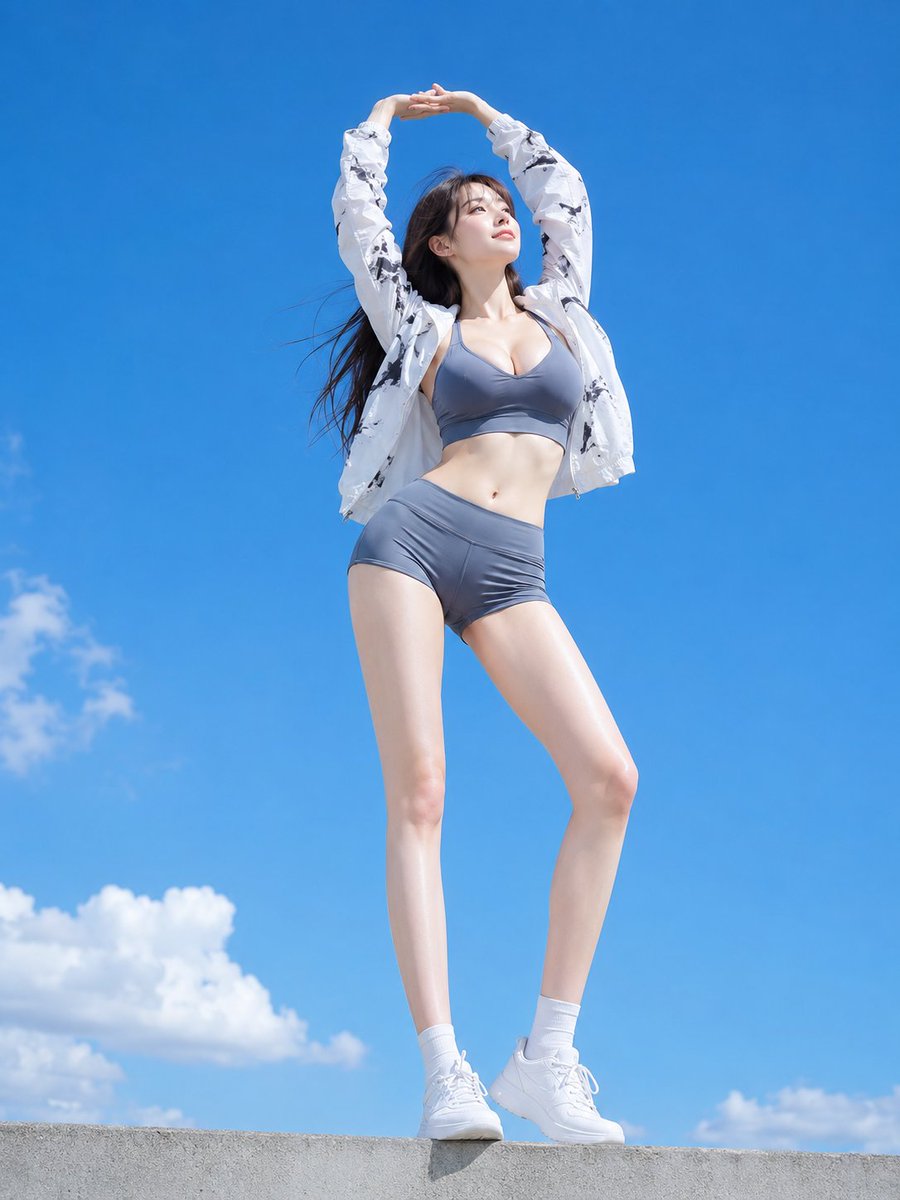
Low Angle Blue Sky Sports Outfit
A prompt for a low-angle photograph of a woman in sports attire reaching toward the blue sky, emphasizing clear lighting and outdoor textures.
Dies ist ein GPT Image 2 -Prompt für Mode & Schönheit . Verwenden Sie den unten stehenden, kopierfertigen Prompt, um ähnliche Grafiken zu erstellen, und überprüfen Sie vor der Wiederverwendung Awesome GPT Image 2 Prompts -Quellenangaben sowie die kommerziellen Nutzungsrechte.
Benötigen Sie den vollständigen Prompt-Satz? Verwenden Sie den Mode & Schönheit Weitere verwandte Beispiele finden Sie im Themen-Hub oder öffnen Sie die GPT Image 2 Prompt-Katalog für das vollständige Beispielverzeichnis, wiederverwendbare Strukturen und Quellenangaben.
Free 1K preview
Generate one preview image instantly, no sign-up required.
2057/4000
Eingabeaufforderung
Kopierfertige Eingabeaufforderung
Subject:
White sleeves extending toward the blue sky

Main Subject:
A {argument name="subject" default="20-something"} woman standing on a low concrete wall, stretching her arms overhead with interlaced hands. Place the full body prominently in the center of the frame, showing {argument name="clothing" default="gray-blue sportswear and a white patterned windbreaker"} against a vast blue sky.

Character and Expression:
A small oval face, thin brown eyes, natural eyebrows, and pale pink lips. Facing the upper right of the frame, looking up at the sky with a gentle smile. Long dark brown hair worn down, flowing to the left of the frame in the wind.

Clothing and Pose:
A gray-blue thin-strap sports top and high-waisted short sports pants. Layered over it is a thin long-sleeved zip jacket with a black abstract pattern on a white background, worn open. White short socks and white platform sneakers. Standing with legs slightly crossed. Arms stretched straight up, hands interlaced overhead.

Background and Light:
Most of the background is a vivid blue sky, with white cumulus clouds at the bottom left and lower edge, and a gray concrete wall at the very bottom. Strong direct sunlight from above brightly illuminates the white sleeves and legs, creating short shadows in the clothing folds.

Composition and Camera:
Vertical 3:4 aspect ratio. A strong low-angle wide-angle camera shot looking up from near the ground, capturing the entire body from the soles of the shoes to the interlaced hands. Position the person tall and large in the center, leaving wide blue sky margins above and to the sides. Place the shoes and wall near the bottom edge, focusing on the person to keep them and the sky clear.

Texture and Style:
A photorealistic live-action photograph taken outdoors at midday. Precisely depict the stretch and luster of the sports fabric, the wrinkles of the thin jacket, the movement of the hair in the wind, and the texture of the white shoes.

Negative:
Changes to the interlaced arms overhead; omission of the white patterned jacket
Eingabeaufforderungsvariablen
In der Eingabeaufforderung befinden sich bearbeitbare Argumentplatzhalter mit ihren Standardwerten.
Variable
subject
Standard
20-something
Variable
clothing
Standard
gray-blue sportswear and a white patterned windbreaker
Best for
- - Mode & Schönheit visual exploration
- - Image generation and reference-image edits
- - Reusable briefs that keep source attribution visible
Change these parts
- - Subject, product, character, or scene
- - Aspect ratio, camera, lighting, and background
- - Brand, text, color, and output constraints
Recommended model and settings
- - Model: gpt-image-2
- - Input mode: Text zu Bild
- - Aspect ratio: source
- - Commercial status: review original source
How to use this prompt
- 1. Copy the prompt and preserve its structure for the first test.
- 2. Replace the subject, context, and publishing channel.
- 3. Change one camera, lighting, or style variable per iteration.
- 4. Inspect the output, source, text, and rights before reuse.
Limitations, source, and reuse cautions
- - Generated output is an editable draft, not factual, legal, or rights evidence.
- - Review the linked source, people, brands, logos, text, and third-party media before commercial use.
Importiert von Awesome GPT Image 2 Prompts . Quellenangabe erforderlich. Status der kommerziellen Nutzung: allowed ; Rechte an der Quelle vor kostenpflichtiger Nutzung prüfen.
Weitere Fälle in dieser Kategorie
Priorisiert nach Kategorie, Kompatibilität der Eingabemodi, Qualität und geringerem Risiko.


Hinweise zur Wiederverwendung und Quellenangabe
Verwenden Sie diese Eingabeaufforderung sicher, nachdem Sie den Fall in der Vorschau angezeigt haben.
- 1.Kopieren Sie die Eingabeaufforderung oder öffnen Sie sie direkt in Dovoo mit der Schaltfläche „Generieren“.
- 2.Passen Sie Variablen, Seitenverhältnis und Referenzbilder an Ihren Anwendungsfall an.
- 3.Vor der Veröffentlichung oder kostenpflichtigen Nutzung sollten Sie die Rechte an der Quelle, die Anforderungen an die Namensnennung sowie die Risiken für die Marke oder das Abbild prüfen.