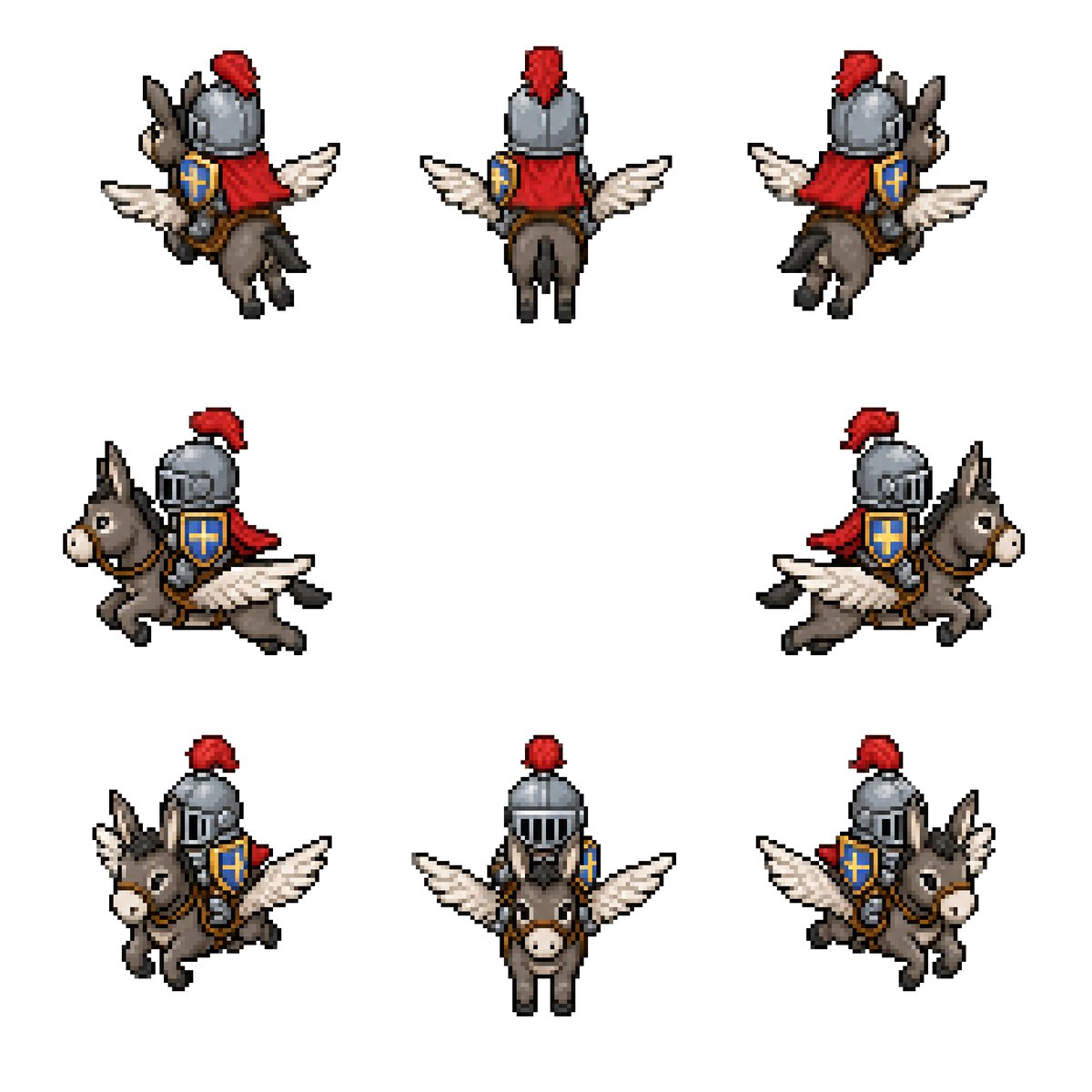
Sprite-Blatt für geflügelten Eselritter
Erzeugt ein 8-Richtung-Retro-Pixel-Art-Sprite-Sheet eines mittelalterlichen Ritters auf einem geflügelten Esel für Fantasy-Spiel-Assets.
Dies ist ein GPT Image 2 -Prompt für Anime & Spiel . Verwenden Sie den unten stehenden, kopierfertigen Prompt, um ähnliche Grafiken zu erstellen, und überprüfen Sie vor der Wiederverwendung Awesome GPT Image 2 Prompts -Quellenangaben sowie die kommerziellen Nutzungsrechte.
Benötigen Sie den vollständigen Prompt-Satz? Verwenden Sie den Anime & Spiel Weitere verwandte Beispiele finden Sie im Themen-Hub oder öffnen Sie die GPT Image 2 Prompt-Katalog für das vollständige Beispielverzeichnis, wiederverwendbare Strukturen und Quellenangaben.
Free 1K preview
Generate one preview image instantly, no sign-up required.
2329/4000
Eingabeaufforderung
Kopierfertige Eingabeaufforderung
Goal: Create a clean pixel-art sprite sheet for a fantasy game asset: {argument name="character concept" default="a medieval knight riding a winged donkey"}.

Canvas: Square 768×768 image on a plain white background, no borders, no UI, no text. Use a crisp retro RPG pixel-art style with visible chunky pixels, dark outlines, limited palette, and subtle dithering/shading.

Layout: Show exactly 8 separate sprites of the same mount-and-rider character, evenly spaced with large white gaps, arranged as 3 sprites on the top row, 2 sprites on the middle row, and 3 sprites on the bottom row. Each sprite should be roughly the same scale and read like an animation/rotation sheet.

Sprite count and views: 1) top-left: rear three-quarter view facing upper-left, 2) top-center: straight rear view, 3) top-right: rear three-quarter view facing upper-right, 4) middle-left: side view traveling left, 5) middle-right: side view traveling right, 6) bottom-left: front three-quarter view facing lower-left, 7) bottom-center: straight front view, 8) bottom-right: front three-quarter view facing lower-right.

Subject details: The mount is a small gray-brown donkey with long upright ears, pale muzzle, black hooves, simple bridle and saddle, and a pair of white feathered wings extended from its sides like a small pegasus. The rider is a compact armored knight wearing a rounded steel helmet with vertical visor slits, a bright red plume, a red cape or cloth drape, brown leather tack, and a blue shield with a gold cross emblem strapped at the side. Use {argument name="armor color" default="steel gray"}, {argument name="cape color" default="red"}, {argument name="shield color" default="blue and gold"}, and {argument name="mount color" default="gray-brown"}. Maintain the same proportions and costume details across all 8 sprites.

Visual style: Classic 16-bit fantasy RPG sprite sheet, isometric/top-down compatible proportions, high readability at small size, black and dark-brown pixel outlines, soft shadowless presentation, minimal anti-aliasing, no blur, no gradients beyond pixel shading.

Constraints: Keep exactly 8 sprites, do not add extra frames, labels, weapons, scenery, background texture, watermark, or character variations. All sprites must depict the same mounted knight and winged donkey from different directions.
Eingabeaufforderungsvariablen
In der Eingabeaufforderung befinden sich bearbeitbare Argumentplatzhalter mit ihren Standardwerten.
Variable
character concept
Standard
a medieval knight riding a winged donkey
Variable
armor color
Standard
steel gray
Variable
cape color
Standard
red
Variable
shield color
Standard
blue and gold
Variable
mount color
Standard
gray-brown
Best for
- - Anime & Spiel visual exploration
- - Image generation and reference-image edits
- - Reusable briefs that keep source attribution visible
Change these parts
- - Subject, product, character, or scene
- - Aspect ratio, camera, lighting, and background
- - Brand, text, color, and output constraints
Recommended model and settings
- - Model: gpt-image-2
- - Input mode: Text zu Bild
- - Aspect ratio: source
- - Commercial status: review original source
How to use this prompt
- 1. Copy the prompt and preserve its structure for the first test.
- 2. Replace the subject, context, and publishing channel.
- 3. Change one camera, lighting, or style variable per iteration.
- 4. Inspect the output, source, text, and rights before reuse.
Limitations, source, and reuse cautions
- - Generated output is an editable draft, not factual, legal, or rights evidence.
- - Review the linked source, people, brands, logos, text, and third-party media before commercial use.
Importiert von Awesome GPT Image 2 Prompts . Quellenangabe erforderlich. Status der kommerziellen Nutzung: allowed ; Rechte an der Quelle vor kostenpflichtiger Nutzung prüfen.
Weitere Fälle in dieser Kategorie
Priorisiert nach Kategorie, Kompatibilität der Eingabemodi, Qualität und geringerem Risiko.






Hinweise zur Wiederverwendung und Quellenangabe
Verwenden Sie diese Eingabeaufforderung sicher, nachdem Sie den Fall in der Vorschau angezeigt haben.
- 1.Kopieren Sie die Eingabeaufforderung oder öffnen Sie sie direkt in Dovoo mit der Schaltfläche „Generieren“.
- 2.Passen Sie Variablen, Seitenverhältnis und Referenzbilder an Ihren Anwendungsfall an.
- 3.Vor der Veröffentlichung oder kostenpflichtigen Nutzung sollten Sie die Rechte an der Quelle, die Anforderungen an die Namensnennung sowie die Risiken für die Marke oder das Abbild prüfen.