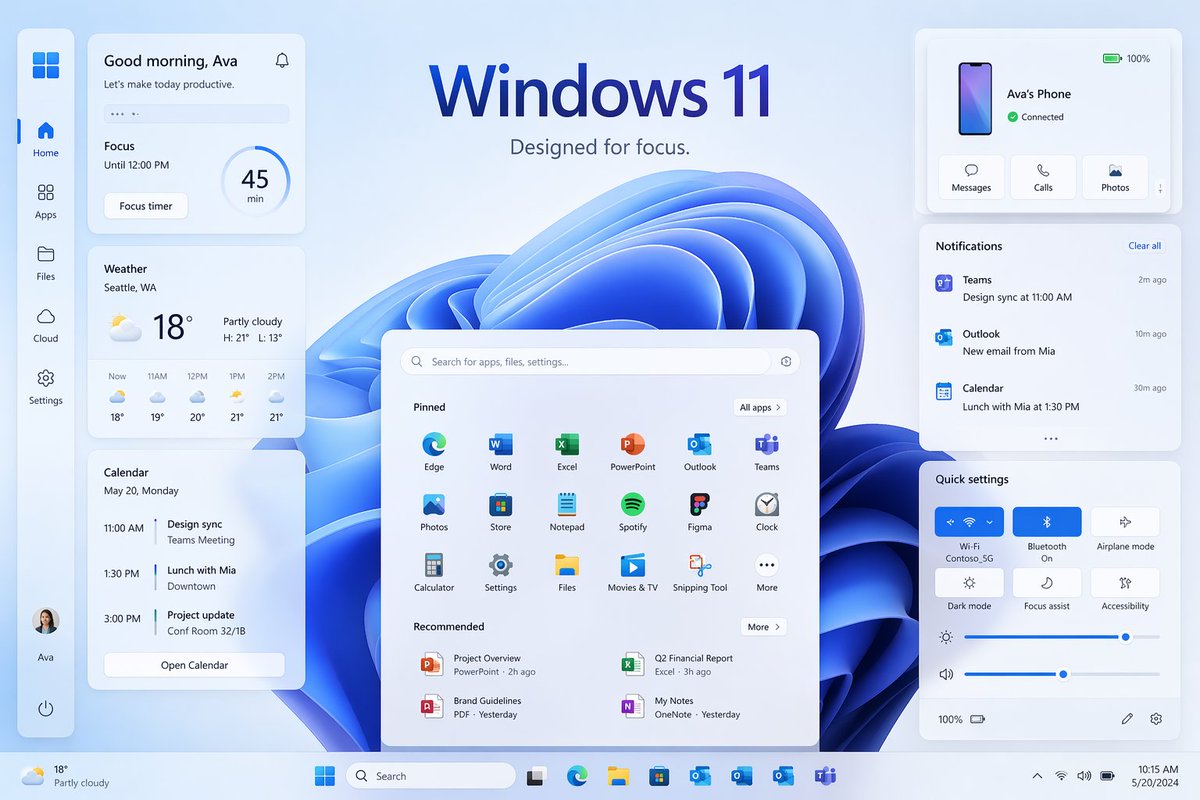
Windows 11 Focus UI-Showcase
Ein hochwertiger Desktop-Mockup im Windows 11-Stil mit zahlreichen Widgets und Panels, ideal zur Nachbildung einer modernen Marketinggrafik für ein Betriebssystem.
Dies ist ein GPT Image 2 -Prompt für Produkt & Vertrieb . Verwenden Sie den unten stehenden, kopierfertigen Prompt, um ähnliche Grafiken zu erstellen, und überprüfen Sie vor der Wiederverwendung Awesome GPT Image 2 Prompts -Quellenangaben sowie die kommerziellen Nutzungsrechte.
Free 1K preview
Generate one preview image instantly, no sign-up required.
Eingabeaufforderung
Kopierfertige Eingabeaufforderung
{
  "type": "Windows 11 promotional UI mockup",
  "style": "clean modern product marketing render, soft glassmorphism cards, subtle shadows, rounded corners, light blue and white palette, crisp vector-like interface, polished presentation slide aesthetic",
  "scene": {
    "background": "pale icy blue gradient background with a large abstract Windows 11 blue ribbon swirl wallpaper centered behind the interface",
    "headline": {
      "text": "{argument name=\"headline text\" default=\"Windows 11\"}",
      "subtext": "{argument name=\"tagline\" default=\"Designed for focus.\"}",
      "position": "top center"
    }
  },
  "layout": {
    "type": "desktop UI showcase",
    "sections": [
      {
        "title": "left sidebar",
        "position": "far left vertical dock",
        "count": 8,
        "labels": [
          "Windows logo",
          "Home",
          "Apps",
          "Files",
          "Cloud",
          "Settings",
          "Ava profile",
          "Power"
        ]
      },
      {
        "title": "productivity widgets",
        "position": "left column cards",
        "count": 3,
        "labels": [
          "Good morning, Ava",
          "Weather",
          "Calendar"
        ]
      },
      {
        "title": "center start menu",
        "position": "lower center",
        "count": 3,
        "labels": [
          "Search bar",
          "Pinned",
          "Recommended"
        ]
      },
      {
        "title": "right column cards",
        "position": "upper and middle and lower right",
        "count": 3,
        "labels": [
          "Ava's Phone",
          "Notifications",
          "Quick settings"
        ]
      },
      {
        "title": "taskbar",
        "position": "bottom full width",
        "count": 10,
        "labels": [
          "Weather summary",
          "Start",
          "Search",
          "Task View",
          "Microsoft Edge",
          "File Explorer",
          "Microsoft Store",
          "Outlook",
          "OneDrive",
          "Teams"
        ]
      }
    ],
    "centerpiece": "large Windows 11 Start menu floating in front of the blue abstract wallpaper"
  },
  "widgets": {
    "greeting_card": {
      "title": "Good morning, Ava",
      "subtitle": "Let's make today productive.",
      "focus_block": {
        "label": "Focus",
        "time": "Until 12:00 PM",
        "timer": "45 min",
        "button": "Focus timer"
      }
    },
    "weather_card": {
      "location": "{argument name=\"weather location\" default=\"Seattle, WA\"}",
      "temperature": "18°",
      "condition": "Partly cloudy",
      "range": "H: 21°  L: 13°",
      "forecast_count": 5,
      "forecast_labels": [
        "Now 18°",
        "11AM 19°",
        "12PM 20°",
        "1PM 21°",
        "2PM 21°"
      ]
    },
    "calendar_card": {
      "date": "May 20, Monday",
      "events_count": 3,
      "event_labels": [
        "11:00 AM Design sync, Teams Meeting",
        "1:30 PM Lunch with Mia, Downtown",
        "3:00 PM Project update, Conf Room 32/1B"
      ],
      "button": "Open Calendar"
    },
    "phone_card": {
      "device_name": "{argument name=\"device name\" default=\"Ava's Phone\"}",
      "status": "Connected",
      "actions_count": 3,
      "action_labels": [
        "Messages",
        "Calls",
        "Photos"
      ],
      "battery": "100%"
    },
    "notifications_card": {
      "title": "Notifications",
      "action": "Clear all",
      "items_count": 3,
      "item_labels": [
        "Teams — Design sync at 11:00 AM — 2m ago",
        "Outlook — New email from Mia — 10m ago",
        "Calendar — Lunch with Mia at 1:30 PM — 30m ago"
      ]
    },
    "quick_settings_card": {
      "title": "Quick settings",
      "toggles_count": 6,
      "toggle_labels": [
        "Wi‑Fi",
        "Bluetooth",
        "Airplane mode",
        "Dark mode",
        "Focus assist",
        "Accessibility"
      ],
      "active_toggles": [
        "Wi‑Fi",
        "Bluetooth"
      ],
      "sliders_count": 2,
      "slider_labels": [
        "Brightness",
        "Volume"
      ],
      "wifi_network": "Contoso_5G"
    },
    "start_menu": {
      "search_placeholder": "Search for apps, files, settings...",
      "pinned_count": 18,
      "pinned_labels": [
        "Edge",
        "Word",
        "Excel",
        "PowerPoint",
        "Outlook",
        "Teams",
        "Photos",
        "Store",
        "Notepad",
        "Spotify",
        "Figma",
        "Clock",
        "Calculator",
        "Settings",
        "Files",
        "Movies & TV",
        "Snipping Tool",
        "More"
      ],
      "recommended_count": 4,
      "recommended_labels": [
        "Project Overview",
        "Q2 Financial Report",
        "Brand Guidelines",
        "My Notes"
      ]
    }
  },
  "composition": "symmetrical product showcase with the Start menu centered, three stacked cards on the left, three cards on the right, generous spacing, all elements floating slightly above the background, bottom taskbar spanning edge to edge",
  "rendering": "high-resolution UI concept art for a desktop operating system launch page, immaculate typography, Microsoft-inspired iconography without extra branding clutter"
}
Eingabeaufforderungsvariablen
In der Eingabeaufforderung befinden sich bearbeitbare Argumentplatzhalter mit ihren Standardwerten.
Best for
- - Produkt & Vertrieb visual exploration
- - Image generation and reference-image edits
- - Reusable briefs that keep source attribution visible
Change these parts
- - Subject, product, character, or scene
- - Aspect ratio, camera, lighting, and background
- - Brand, text, color, and output constraints
Recommended model and settings
- - Model: gpt-image-2
- - Input mode: Text zu Bild
- - Aspect ratio: source
- - Commercial status: review original source
How to use this prompt
- 1. Copy the prompt and preserve its structure for the first test.
- 2. Replace the subject, context, and publishing channel.
- 3. Change one camera, lighting, or style variable per iteration.
- 4. Inspect the output, source, text, and rights before reuse.
Limitations, source, and reuse cautions
- - Generated output is an editable draft, not factual, legal, or rights evidence.
- - Review the linked source, people, brands, logos, text, and third-party media before commercial use.
Weitere Fälle in dieser Kategorie
Priorisiert nach Kategorie, Kompatibilität der Eingabemodi, Qualität und geringerem Risiko.






Hinweise zur Wiederverwendung und Quellenangabe
Verwenden Sie diese Eingabeaufforderung sicher, nachdem Sie den Fall in der Vorschau angezeigt haben.
- 1.Kopieren Sie die Eingabeaufforderung oder öffnen Sie sie direkt in Dovoo mit der Schaltfläche „Generieren“.
- 2.Passen Sie Variablen, Seitenverhältnis und Referenzbilder an Ihren Anwendungsfall an.
- 3.Vor der Veröffentlichung oder kostenpflichtigen Nutzung sollten Sie die Rechte an der Quelle, die Anforderungen an die Namensnennung sowie die Risiken für die Marke oder das Abbild prüfen.