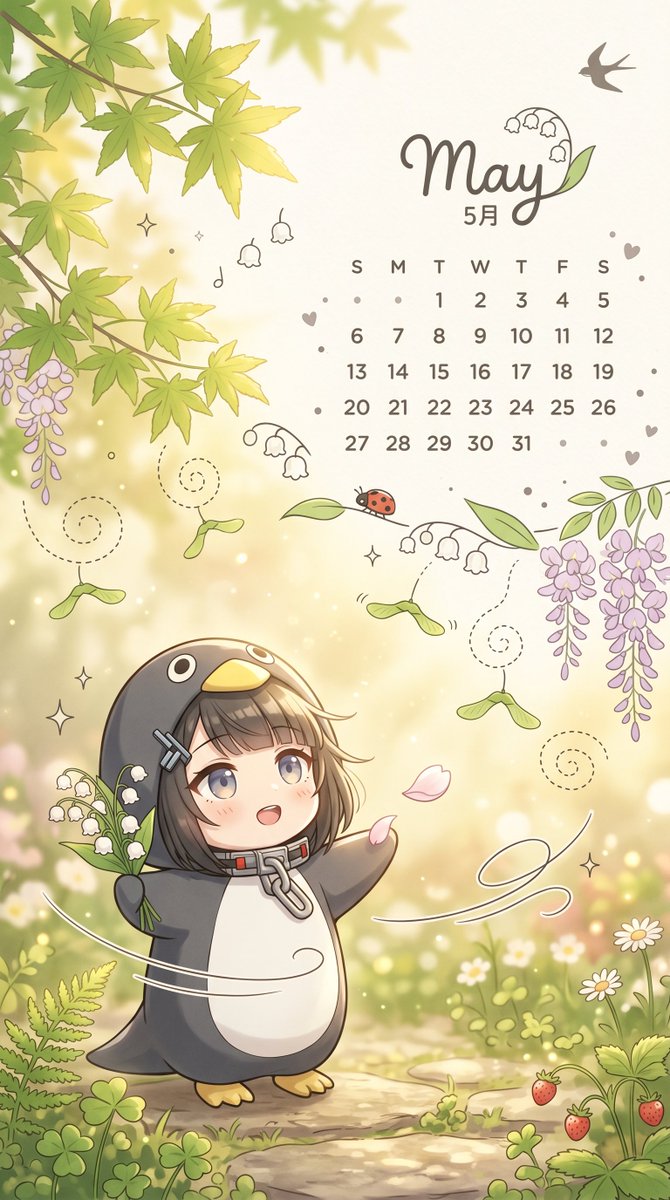
Verspieltes Mai-Gartenkalender-Hintergrundbild
Eine niedliche, frühlingshafte vertikale Hintergrundbildillustration mit einem Mai-Kalender, einem als Pinguin verkleideten Chibi-Kind und einem verträumten, blumenreichen Garten, ideal als saisonaler Handyhintergrund.
Dies ist ein GPT Image 2 -Prompt für Illustration & Kunst . Verwenden Sie den unten stehenden, kopierfertigen Prompt, um ähnliche Grafiken zu erstellen, und überprüfen Sie vor der Wiederverwendung Awesome GPT Image 2 Prompts -Quellenangaben sowie die kommerziellen Nutzungsrechte.
Free 1K preview
Generate one preview image instantly, no sign-up required.
Eingabeaufforderung
Kopierfertige Eingabeaufforderung
A portrait fantasy spring calendar illustration, adopting a soft pastel anime picture book style, a cute mobile wallpaper designed for {argument name="month" default="May"}. The scene is a warm garden with dappled sunlight, featuring creamy golden light spots, a narrow pebble path, clover patches, tiny white daisies, ferns, and a few ripe strawberries in the lower right corner. A large, vibrant green maple leaf hangs in the upper left, and the left and right edges are framed by cascading clusters of pale purple wisteria. Near the upper right corner, place elegant handwritten text {argument name="headline text" default="May"}, incorporating small lily of the valley doodles within the letters, with a silhouette of a small swallow above and smaller text below reading “May”. Add a simple mini May calendar at the bottom, including a day row of “S M T W T F S” and dates from 1 to 31 arranged in a simple grid, using soft taupe text. Scatter tiny decorative hearts, dots, sparkles, and simple floral doodles around the calendar area. In the lower half, depict a Q-version child character standing on the path, wearing a penguin onesie with a dark charcoal body, white belly, yellow beak-shaped hood, and yellow little feet. The character has a short {argument name="hair color" default="ash brown"} bob hairstyle peeking out from the hood, with two silver hair clips on one side and a large metal zipper ring around the neck. Replace the face with a smooth, centered rectangular blur block for privacy, while keeping the rest of the head and hair visible. The character holds a bunch of white lily of the valley flowers in one hand and extends the other arm as if enjoying the breeze. Add nearby falling pink petals, a red ladybug perched on a leaf above the character, several maple seeds with dashed spiral trails, delicate white swirling lines suggesting a breeze around the character, and a few extra sprigs of lily of the valley around the composition. Use soft cream, sage green, lavender purple, and warm beige tones, combined with delicate lines and subtle shading, to create a dreamy and adorable seasonal atmosphere.Eingabeaufforderungsvariablen
In der Eingabeaufforderung befinden sich bearbeitbare Argumentplatzhalter mit ihren Standardwerten.
Best for
- - Illustration & Kunst visual exploration
- - Image generation and reference-image edits
- - Reusable briefs that keep source attribution visible
Change these parts
- - Subject, product, character, or scene
- - Aspect ratio, camera, lighting, and background
- - Brand, text, color, and output constraints
Recommended model and settings
- - Model: gpt-image-2
- - Input mode: Text zu Bild
- - Aspect ratio: source
- - Commercial status: review original source
How to use this prompt
- 1. Copy the prompt and preserve its structure for the first test.
- 2. Replace the subject, context, and publishing channel.
- 3. Change one camera, lighting, or style variable per iteration.
- 4. Inspect the output, source, text, and rights before reuse.
Limitations, source, and reuse cautions
- - Generated output is an editable draft, not factual, legal, or rights evidence.
- - Review the linked source, people, brands, logos, text, and third-party media before commercial use.
Weitere Fälle in dieser Kategorie
Priorisiert nach Kategorie, Kompatibilität der Eingabemodi, Qualität und geringerem Risiko.






Hinweise zur Wiederverwendung und Quellenangabe
Verwenden Sie diese Eingabeaufforderung sicher, nachdem Sie den Fall in der Vorschau angezeigt haben.
- 1.Kopieren Sie die Eingabeaufforderung oder öffnen Sie sie direkt in Dovoo mit der Schaltfläche „Generieren“.
- 2.Passen Sie Variablen, Seitenverhältnis und Referenzbilder an Ihren Anwendungsfall an.
- 3.Vor der Veröffentlichung oder kostenpflichtigen Nutzung sollten Sie die Rechte an der Quelle, die Anforderungen an die Namensnennung sowie die Risiken für die Marke oder das Abbild prüfen.