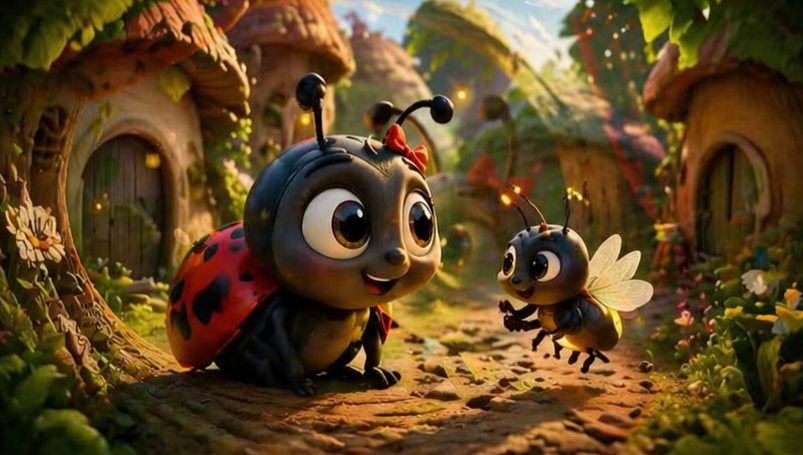
Verspielte Marienkäfer- und Bienendorfszene
Diese Eingabeaufforderung erzeugt ein filmisches 3D-Animationsbild von zwei niedlichen Insekten, die sich in einem verwunschenen Walddorf treffen – ideal für Bilderbuchillustrationen oder familienfreundliche Fantasy-Illustrationen.
Dies ist ein GPT Image 2 -Prompt für Porträt & Charakter . Verwenden Sie den unten stehenden, kopierfertigen Prompt, um ähnliche Grafiken zu erstellen, und überprüfen Sie vor der Wiederverwendung Awesome GPT Image 2 Prompts -Quellenangaben sowie die kommerziellen Nutzungsrechte.
Free 1K preview
Generate one preview image instantly, no sign-up required.
Eingabeaufforderung
Kopierfertige Eingabeaufforderung
A heartwarming stylized 3D animated forest village scene at golden hour, showing 2 adorable insect characters meeting on a cobblestone path between tiny mushroom-roof cottages. In the left foreground, a cute {argument name="main insect type" default="ladybug"} crouches low with an oversized glossy black head, huge expressive brown eyes, a small smiling mouth, short antennae with rounded tips, and a tiny {argument name="accessory color" default="red"} bow near one antenna. Its shell is bright {argument name="shell color" default="red"} with distinct black spots, and its body is dark charcoal black with soft rounded limbs. In the right midground, a cheerful small {argument name="second insect type" default="bee"} hovers slightly above the ground facing the larger insect, with a similarly oversized head, big sparkling eyes, delicate translucent wings, tiny antennae, and little forelegs lifted as if speaking excitedly. The setting is an enchanted bug-sized woodland hamlet with 3 visible cottages, rounded wooden doors, curved stone walls, moss, vines, flowers, and leafy plants framing the path. Warm cinematic sunlight filters through the trees from the upper right, creating glowing rim light, soft bokeh, and floating firefly-like particles. Use a shallow depth of field, low camera angle at insect eye level, rich autumn-green and golden tones, highly detailed textures, soft global illumination, whimsical family-film mood, Pixar-like stylized realism, and a subtle dreamy double-exposure feel with faint overlapping light or ghosted highlights in parts of the frame.Eingabeaufforderungsvariablen
In der Eingabeaufforderung befinden sich bearbeitbare Argumentplatzhalter mit ihren Standardwerten.
Best for
- - Porträt & Charakter visual exploration
- - Image generation and reference-image edits
- - Reusable briefs that keep source attribution visible
Change these parts
- - Subject, product, character, or scene
- - Aspect ratio, camera, lighting, and background
- - Brand, text, color, and output constraints
Recommended model and settings
- - Model: gpt-image-2
- - Input mode: Text zu Bild
- - Aspect ratio: source
- - Commercial status: review original source
How to use this prompt
- 1. Copy the prompt and preserve its structure for the first test.
- 2. Replace the subject, context, and publishing channel.
- 3. Change one camera, lighting, or style variable per iteration.
- 4. Inspect the output, source, text, and rights before reuse.
Limitations, source, and reuse cautions
- - Generated output is an editable draft, not factual, legal, or rights evidence.
- - Review the linked source, people, brands, logos, text, and third-party media before commercial use.
Weitere Fälle in dieser Kategorie
Priorisiert nach Kategorie, Kompatibilität der Eingabemodi, Qualität und geringerem Risiko.






Hinweise zur Wiederverwendung und Quellenangabe
Verwenden Sie diese Eingabeaufforderung sicher, nachdem Sie den Fall in der Vorschau angezeigt haben.
- 1.Kopieren Sie die Eingabeaufforderung oder öffnen Sie sie direkt in Dovoo mit der Schaltfläche „Generieren“.
- 2.Passen Sie Variablen, Seitenverhältnis und Referenzbilder an Ihren Anwendungsfall an.
- 3.Vor der Veröffentlichung oder kostenpflichtigen Nutzung sollten Sie die Rechte an der Quelle, die Anforderungen an die Namensnennung sowie die Risiken für die Marke oder das Abbild prüfen.