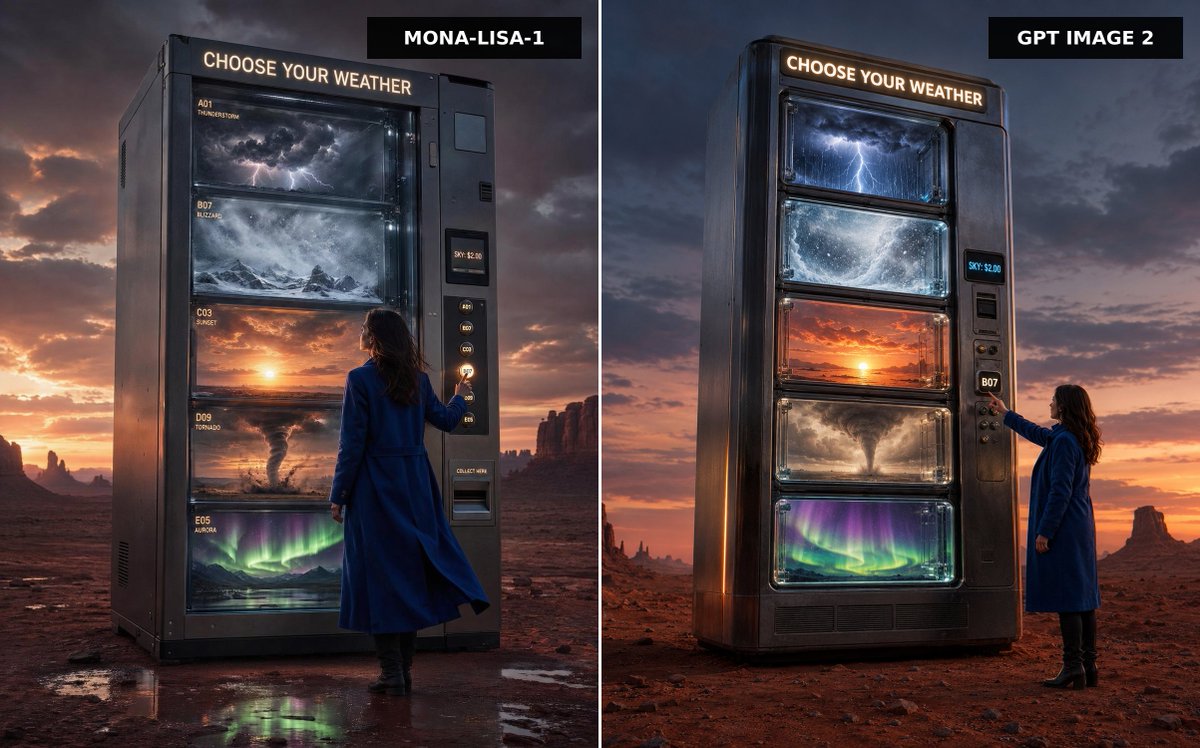
Weather Vending Machine Comparison
A cinematic split-screen desert advertisement comparing two versions of a colossal vending machine that dispenses different kinds of weather.
Dies ist ein GPT Image 2 -Prompt für Produkt & Vertrieb . Verwenden Sie den unten stehenden, kopierfertigen Prompt, um ähnliche Grafiken zu erstellen, und überprüfen Sie vor der Wiederverwendung Awesome GPT Image 2 Prompts -Quellenangaben sowie die kommerziellen Nutzungsrechte.
Benötigen Sie den vollständigen Prompt-Satz? Verwenden Sie den Produkt & Vertrieb Weitere verwandte Beispiele finden Sie im Themen-Hub oder öffnen Sie die GPT Image 2 Prompt-Katalog für das vollständige Beispielverzeichnis, wiederverwendbare Strukturen und Quellenangaben.
Free 1K preview
Generate one preview image instantly, no sign-up required.
1876/4000
Eingabeaufforderung
Kopierfertige Eingabeaufforderung
Create a split-screen comparison image showing two premium cinematic advertising photographs side by side, separated by a thin vertical white divider. The scene is a vast red desert at dusk with dramatic storm clouds, orange sunset glow on the horizon, distant mesas and rock spires, and wet reflective patches on the desert floor. In both panels, place a colossal dark metallic vending machine standing alone, labeled at the top with glowing warm-white text: “CHOOSE YOUR WEATHER”. The machine sells weather instead of snacks, with exactly five large glass display shelves containing: 1) a miniature thunderstorm with dark clouds and lightning, 2) a swirling blizzard over snowy mountains, 3) a glowing sunset sky, 4) a tornado over dusty plains, and 5) green-purple aurora lights over a night landscape. Include a woman in a long cobalt-blue coat and black boots standing beside the vending machine, seen from behind or side-back, reaching toward the selection buttons. The vending machine has a side payment/control panel with small glowing code buttons, a digital price display reading “SKY: $2.00”, and a collection slot. Add black rectangular title tags at the top of each panel: left tag reads {argument name="left model label" default="MONA-LISA-1"}, right tag reads {argument name="right model label" default="GPT IMAGE 2"}. Make the left panel slightly closer and more imposing, with readable small shelf labels such as A01 THUNDERSTORM, B07 BLIZZARD, C03 SUNSET, D09 TORNADO, and E05 AURORA; make the right panel a cleaner vertical machine design with the same five weather windows. Use ultra-realistic photography, cinematic lighting, high contrast, glossy glass reflections, moody atmosphere, premium sci-fi advertising style, sharp detail, 16:9 landscape composition, no extra text beyond the vending machine signage, shelf labels, price display, and model tags.Eingabeaufforderungsvariablen
In der Eingabeaufforderung befinden sich bearbeitbare Argumentplatzhalter mit ihren Standardwerten.
Variable
left model label
Standard
MONA-LISA-1
Variable
right model label
Standard
GPT IMAGE 2
Best for
- - Produkt & Vertrieb visual exploration
- - Image generation and reference-image edits
- - Reusable briefs that keep source attribution visible
Change these parts
- - Subject, product, character, or scene
- - Aspect ratio, camera, lighting, and background
- - Brand, text, color, and output constraints
Recommended model and settings
- - Model: gpt-image-2
- - Input mode: Text zu Bild
- - Aspect ratio: source
- - Commercial status: review original source
How to use this prompt
- 1. Copy the prompt and preserve its structure for the first test.
- 2. Replace the subject, context, and publishing channel.
- 3. Change one camera, lighting, or style variable per iteration.
- 4. Inspect the output, source, text, and rights before reuse.
Limitations, source, and reuse cautions
- - Generated output is an editable draft, not factual, legal, or rights evidence.
- - Review the linked source, people, brands, logos, text, and third-party media before commercial use.
Importiert von Awesome GPT Image 2 Prompts . Quellenangabe erforderlich. Status der kommerziellen Nutzung: allowed ; Rechte an der Quelle vor kostenpflichtiger Nutzung prüfen.
Weitere Fälle in dieser Kategorie
Priorisiert nach Kategorie, Kompatibilität der Eingabemodi, Qualität und geringerem Risiko.






Hinweise zur Wiederverwendung und Quellenangabe
Verwenden Sie diese Eingabeaufforderung sicher, nachdem Sie den Fall in der Vorschau angezeigt haben.
- 1.Kopieren Sie die Eingabeaufforderung oder öffnen Sie sie direkt in Dovoo mit der Schaltfläche „Generieren“.
- 2.Passen Sie Variablen, Seitenverhältnis und Referenzbilder an Ihren Anwendungsfall an.
- 3.Vor der Veröffentlichung oder kostenpflichtigen Nutzung sollten Sie die Rechte an der Quelle, die Anforderungen an die Namensnennung sowie die Risiken für die Marke oder das Abbild prüfen.