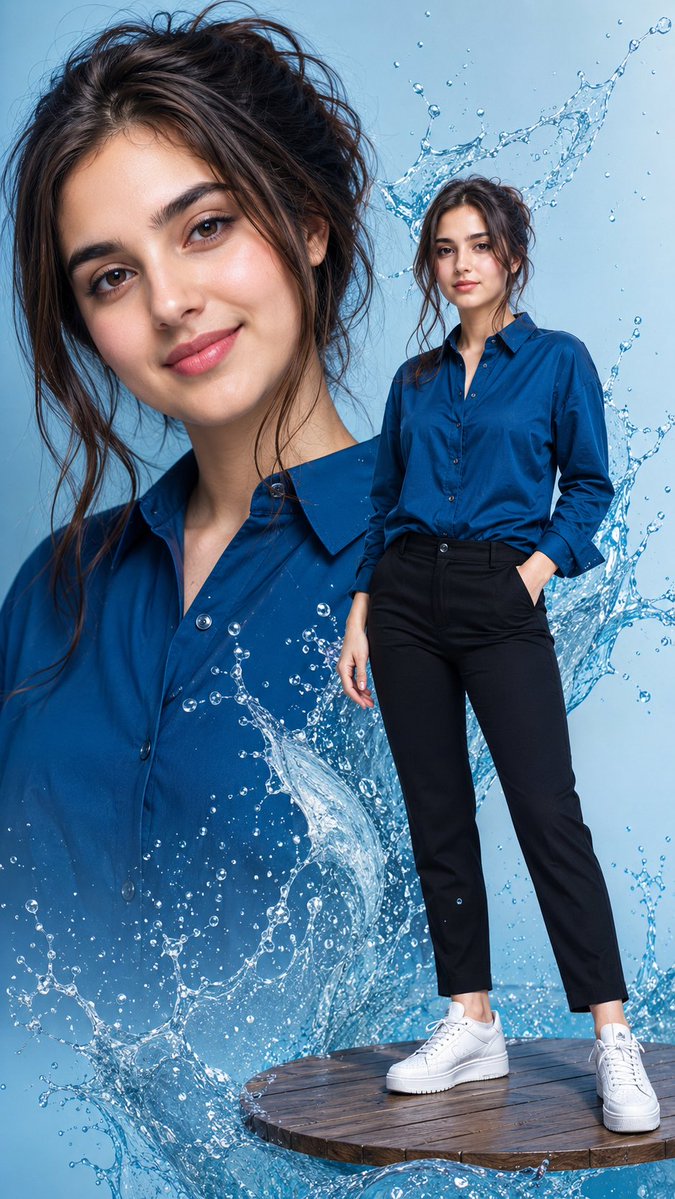
Water Splash Fashion Composite
Creates a vertical ultra-realistic editorial fashion image with a close-up portrait, full-body model, wooden platform, and dramatic blue water splashes.
Dies ist ein GPT Image 2 -Prompt für Mode & Schönheit . Verwenden Sie den unten stehenden, kopierfertigen Prompt, um ähnliche Grafiken zu erstellen, und überprüfen Sie vor der Wiederverwendung Awesome GPT Image 2 Prompts -Quellenangaben sowie die kommerziellen Nutzungsrechte.
Benötigen Sie den vollständigen Prompt-Satz? Verwenden Sie den Mode & Schönheit Weitere verwandte Beispiele finden Sie im Themen-Hub oder öffnen Sie die GPT Image 2 Prompt-Katalog für das vollständige Beispielverzeichnis, wiederverwendbare Strukturen und Quellenangaben.
Free 1K preview
Generate one preview image instantly, no sign-up required.
1553/4000
Eingabeaufforderung
Kopierfertige Eingabeaufforderung
Create an 8K ultra-realistic vertical fashion composite of {argument name="character name" default="a young woman"} with {argument name="hair color and style" default="dark-brown wavy hair in a messy loose bun with stray strands"}, fair glowing skin, natural makeup, pink matte lips, and glossy nails. The composition shows exactly 2 versions of the same woman: 1 large close-up portrait filling the left and center background from chest to top of head, and 1 full-body figure standing in the right foreground. Both faces are intentionally covered by smooth rectangular skin-tone privacy blocks with soft edges, matching the image’s censor-like look. She wears exactly 4 main outfit pieces: an {argument name="shirt color" default="emerald-blue satin button-up shirt"} with collar and open neckline, fitted black ankle-length pants, white platform sneakers, and subtle glossy nails; the full-body figure has one hand in a pants pocket and the other relaxed at her side. Place her on a circular floating wooden platform at the bottom right, with visible planks and dark wet texture. Surround the subject with dynamic transparent blue water splashes and droplets: a large cresting splash behind the full-body figure’s head and shoulders, a sweeping wave across the lower center over the large portrait, and smaller droplets scattered throughout. Use a clean light-blue studio background, crisp commercial lighting, high contrast, realistic fabric texture, sharp water refraction, polished editorial fashion photography, no text, no logos, no extra people.Eingabeaufforderungsvariablen
In der Eingabeaufforderung befinden sich bearbeitbare Argumentplatzhalter mit ihren Standardwerten.
Variable
character name
Standard
a young woman
Variable
hair color and style
Standard
dark-brown wavy hair in a messy loose bun with stray strands
Variable
shirt color
Standard
emerald-blue satin button-up shirt
Best for
- - Mode & Schönheit visual exploration
- - Image generation and reference-image edits
- - Reusable briefs that keep source attribution visible
Change these parts
- - Subject, product, character, or scene
- - Aspect ratio, camera, lighting, and background
- - Brand, text, color, and output constraints
Recommended model and settings
- - Model: gpt-image-2
- - Input mode: Text zu Bild
- - Aspect ratio: source
- - Commercial status: review original source
How to use this prompt
- 1. Copy the prompt and preserve its structure for the first test.
- 2. Replace the subject, context, and publishing channel.
- 3. Change one camera, lighting, or style variable per iteration.
- 4. Inspect the output, source, text, and rights before reuse.
Limitations, source, and reuse cautions
- - Generated output is an editable draft, not factual, legal, or rights evidence.
- - Review the linked source, people, brands, logos, text, and third-party media before commercial use.
Importiert von Awesome GPT Image 2 Prompts . Quellenangabe erforderlich. Status der kommerziellen Nutzung: allowed ; Rechte an der Quelle vor kostenpflichtiger Nutzung prüfen.
Weitere Fälle in dieser Kategorie
Priorisiert nach Kategorie, Kompatibilität der Eingabemodi, Qualität und geringerem Risiko.






Hinweise zur Wiederverwendung und Quellenangabe
Verwenden Sie diese Eingabeaufforderung sicher, nachdem Sie den Fall in der Vorschau angezeigt haben.
- 1.Kopieren Sie die Eingabeaufforderung oder öffnen Sie sie direkt in Dovoo mit der Schaltfläche „Generieren“.
- 2.Passen Sie Variablen, Seitenverhältnis und Referenzbilder an Ihren Anwendungsfall an.
- 3.Vor der Veröffentlichung oder kostenpflichtigen Nutzung sollten Sie die Rechte an der Quelle, die Anforderungen an die Namensnennung sowie die Risiken für die Marke oder das Abbild prüfen.