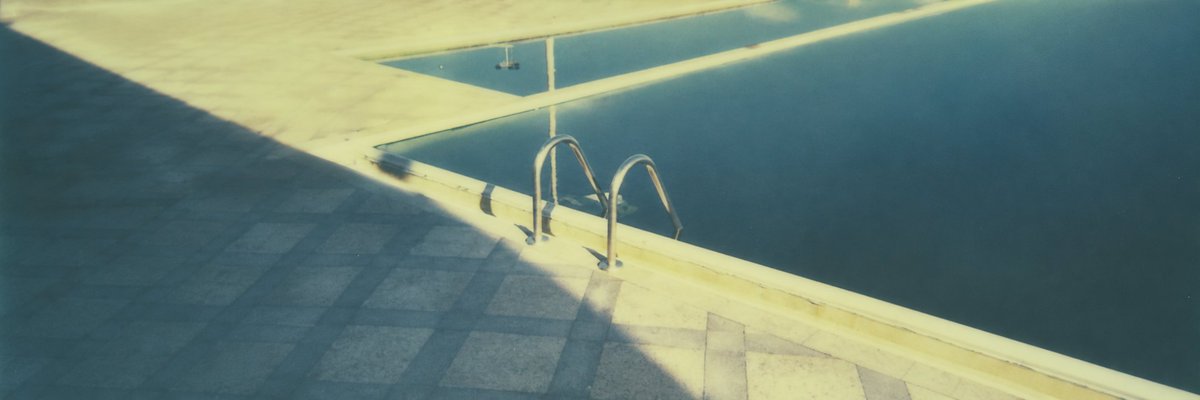
Vintage Panorama-Poolansicht
Erzeugt ein weitläufiges, filmisches Vintage-Foto eines ruhigen, sonnenbeschienenen Schwimmbeckenrandes mit einer Leiter und dramatischen Schatten.
Dies ist ein GPT Image 2 -Prompt für Innenarchitektur . Verwenden Sie den unten stehenden, kopierfertigen Prompt, um ähnliche Grafiken zu erstellen, und überprüfen Sie vor der Wiederverwendung Awesome GPT Image 2 Prompts -Quellenangaben sowie die kommerziellen Nutzungsrechte.
Benötigen Sie den vollständigen Prompt-Satz? Verwenden Sie den Innenarchitektur Weitere verwandte Beispiele finden Sie im Themen-Hub oder öffnen Sie die GPT Image 2 Prompt-Katalog für das vollständige Beispielverzeichnis, wiederverwendbare Strukturen und Quellenangaben.
Free 1K preview
Generate one preview image instantly, no sign-up required.
1317/4000
Eingabeaufforderung
Kopierfertige Eingabeaufforderung
Create a wide 3:1 cinematic photograph of a quiet outdoor swimming pool in harsh late-afternoon sunlight, shot from a slightly elevated angle looking diagonally across the pool edge. The composition is minimal and atmospheric: the right half is dark teal-blue still pool water, the lower left is a paved stone deck made of square gray tiles, and a pale cream pool coping runs diagonally from lower center toward the upper right. A stainless-steel U-shaped pool ladder with two arched rails sits near the center, bolted into the sunlit edge and descending into the water. Strong geometric shadows cut across the deck, with a large cool blue shadow occupying the left side and warm golden sunlight illuminating the pool rim and upper deck. Include a narrow reflected strip of sky or wall in the water near the top edge, soft film grain, slightly faded colors, subtle blur, and a nostalgic analog-photo look. Use {argument name="aspect ratio" default="3:1 panoramic"}, {argument name="pool water color" default="deep teal blue"}, {argument name="lighting mood" default="harsh golden late-afternoon sunlight"}, {argument name="deck material" default="square gray stone tiles"}, and {argument name="camera style" default="soft vintage film photograph"}. No people, no text, no clutter, serene architectural poolside scene.Eingabeaufforderungsvariablen
In der Eingabeaufforderung befinden sich bearbeitbare Argumentplatzhalter mit ihren Standardwerten.
Variable
aspect ratio
Standard
3:1 panoramic
Variable
pool water color
Standard
deep teal blue
Variable
lighting mood
Standard
harsh golden late-afternoon sunlight
Variable
deck material
Standard
square gray stone tiles
Variable
camera style
Standard
soft vintage film photograph
Best for
- - Innenarchitektur visual exploration
- - Image generation and reference-image edits
- - Reusable briefs that keep source attribution visible
Change these parts
- - Subject, product, character, or scene
- - Aspect ratio, camera, lighting, and background
- - Brand, text, color, and output constraints
Recommended model and settings
- - Model: gpt-image-2
- - Input mode: Text zu Bild
- - Aspect ratio: source
- - Commercial status: review original source
How to use this prompt
- 1. Copy the prompt and preserve its structure for the first test.
- 2. Replace the subject, context, and publishing channel.
- 3. Change one camera, lighting, or style variable per iteration.
- 4. Inspect the output, source, text, and rights before reuse.
Limitations, source, and reuse cautions
- - Generated output is an editable draft, not factual, legal, or rights evidence.
- - Review the linked source, people, brands, logos, text, and third-party media before commercial use.
Importiert von Awesome GPT Image 2 Prompts . Quellenangabe erforderlich. Status der kommerziellen Nutzung: allowed ; Rechte an der Quelle vor kostenpflichtiger Nutzung prüfen.
Weitere Fälle in dieser Kategorie
Priorisiert nach Kategorie, Kompatibilität der Eingabemodi, Qualität und geringerem Risiko.






Hinweise zur Wiederverwendung und Quellenangabe
Verwenden Sie diese Eingabeaufforderung sicher, nachdem Sie den Fall in der Vorschau angezeigt haben.
- 1.Kopieren Sie die Eingabeaufforderung oder öffnen Sie sie direkt in Dovoo mit der Schaltfläche „Generieren“.
- 2.Passen Sie Variablen, Seitenverhältnis und Referenzbilder an Ihren Anwendungsfall an.
- 3.Vor der Veröffentlichung oder kostenpflichtigen Nutzung sollten Sie die Rechte an der Quelle, die Anforderungen an die Namensnennung sowie die Risiken für die Marke oder das Abbild prüfen.