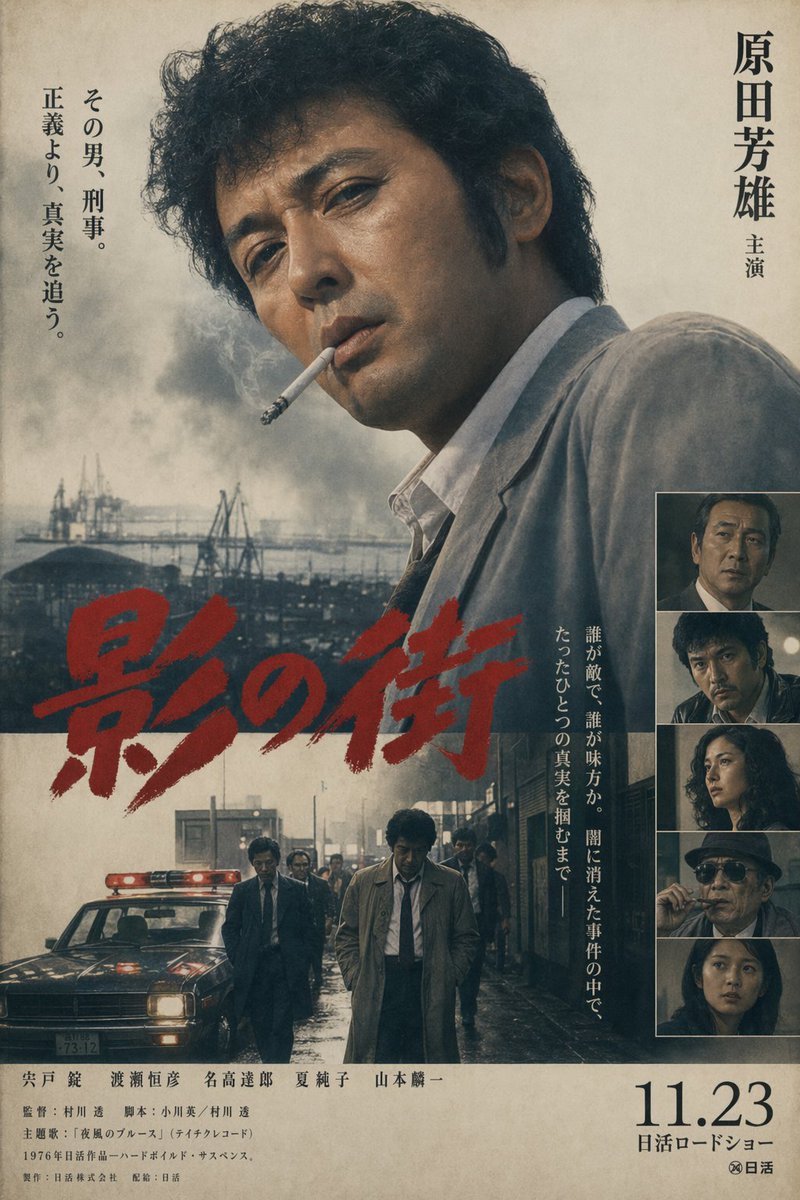
Vintage-Poster eines japanischen Kriminalfilms
Ein düsteres, japanisches Retro-Kinoplakat für einen knallharten Detektivfilm, das sich gut eignet, um gefälschte Key Art im Stil der 1970er Jahre mit authentischer Typografie und Layout zu erstellen.
Dies ist ein GPT Image 2 -Prompt für Grafik & Poster . Verwenden Sie den unten stehenden, kopierfertigen Prompt, um ähnliche Grafiken zu erstellen, und überprüfen Sie vor der Wiederverwendung Awesome GPT Image 2 Prompts -Quellenangaben sowie die kommerziellen Nutzungsrechte.
Free 1K preview
Generate one preview image instantly, no sign-up required.
Eingabeaufforderung
Kopierfertige Eingabeaufforderung
A vintage late-1970s Japanese crime film poster in the style of a Nikkatsu theatrical one-sheet, vertically composed on aged beige paper with visible grain, faint stains, and slightly faded ink. The main image is a large, moody half-body portrait of {argument name="lead actor name" default="Yoshio Harada"} occupying the upper right and center, turned partly away from camera, with thick curly dark hair, a serious expression, and a wrinkled light gray suit jacket over an open-collar white shirt; his face is mostly in shadow. Behind him is a bleak industrial waterfront with cranes, low factory structures, and heavy gray smoke rising into a washed-out sky. Across the lower middle, place a huge hand-brushed red Japanese title reading {argument name="title text" default="影の街"}, painted diagonally and aggressively, partially overlapping the portrait and the lower scene. In the lower half, add a second scene: a rainy urban street at dusk or night with wet reflective pavement, a dark police car at left with a glowing red roof light, and 6 men in suits and trench coats walking forward, with 1 central detective figure in a beige trench coat and loosened tie leading the group. On the far right, include a vertical strip of 5 stacked inset cast portraits framed in thin borders, each a dark cinematic still with different characters. Add vertical Japanese typography: on the upper right, the actor credit “原田芳雄 主演”; on the upper left, a 2-line tagline column reading “その男、刑事。 正義より、真実を追う。”; and near the lower right of the main image, another vertical blurb reading “誰が敵で、誰が味方か。闇に消えた事件の中で、ただひとつの真実を掴むまで—”. At the bottom, include dense small Japanese credits spanning the width, plus a large release date on the lower right reading {argument name="release date" default="11.23"} with “日活ロードショー” beneath it and a small studio mark. Use muted charcoal, sepia, smoky blue-gray, and off-white tones, with the red title as the only vivid color. The overall feeling is hard-boiled, melancholic, gritty, and cinematic, like a lost 1970s Japanese detective movie poster.Eingabeaufforderungsvariablen
In der Eingabeaufforderung befinden sich bearbeitbare Argumentplatzhalter mit ihren Standardwerten.
Best for
- - Grafik & Poster visual exploration
- - Image generation and reference-image edits
- - Reusable briefs that keep source attribution visible
Change these parts
- - Subject, product, character, or scene
- - Aspect ratio, camera, lighting, and background
- - Brand, text, color, and output constraints
Recommended model and settings
- - Model: gpt-image-2
- - Input mode: Text zu Bild
- - Aspect ratio: source
- - Commercial status: review original source
How to use this prompt
- 1. Copy the prompt and preserve its structure for the first test.
- 2. Replace the subject, context, and publishing channel.
- 3. Change one camera, lighting, or style variable per iteration.
- 4. Inspect the output, source, text, and rights before reuse.
Limitations, source, and reuse cautions
- - Generated output is an editable draft, not factual, legal, or rights evidence.
- - Review the linked source, people, brands, logos, text, and third-party media before commercial use.
Weitere Fälle in dieser Kategorie
Priorisiert nach Kategorie, Kompatibilität der Eingabemodi, Qualität und geringerem Risiko.






Hinweise zur Wiederverwendung und Quellenangabe
Verwenden Sie diese Eingabeaufforderung sicher, nachdem Sie den Fall in der Vorschau angezeigt haben.
- 1.Kopieren Sie die Eingabeaufforderung oder öffnen Sie sie direkt in Dovoo mit der Schaltfläche „Generieren“.
- 2.Passen Sie Variablen, Seitenverhältnis und Referenzbilder an Ihren Anwendungsfall an.
- 3.Vor der Veröffentlichung oder kostenpflichtigen Nutzung sollten Sie die Rechte an der Quelle, die Anforderungen an die Namensnennung sowie die Risiken für die Marke oder das Abbild prüfen.