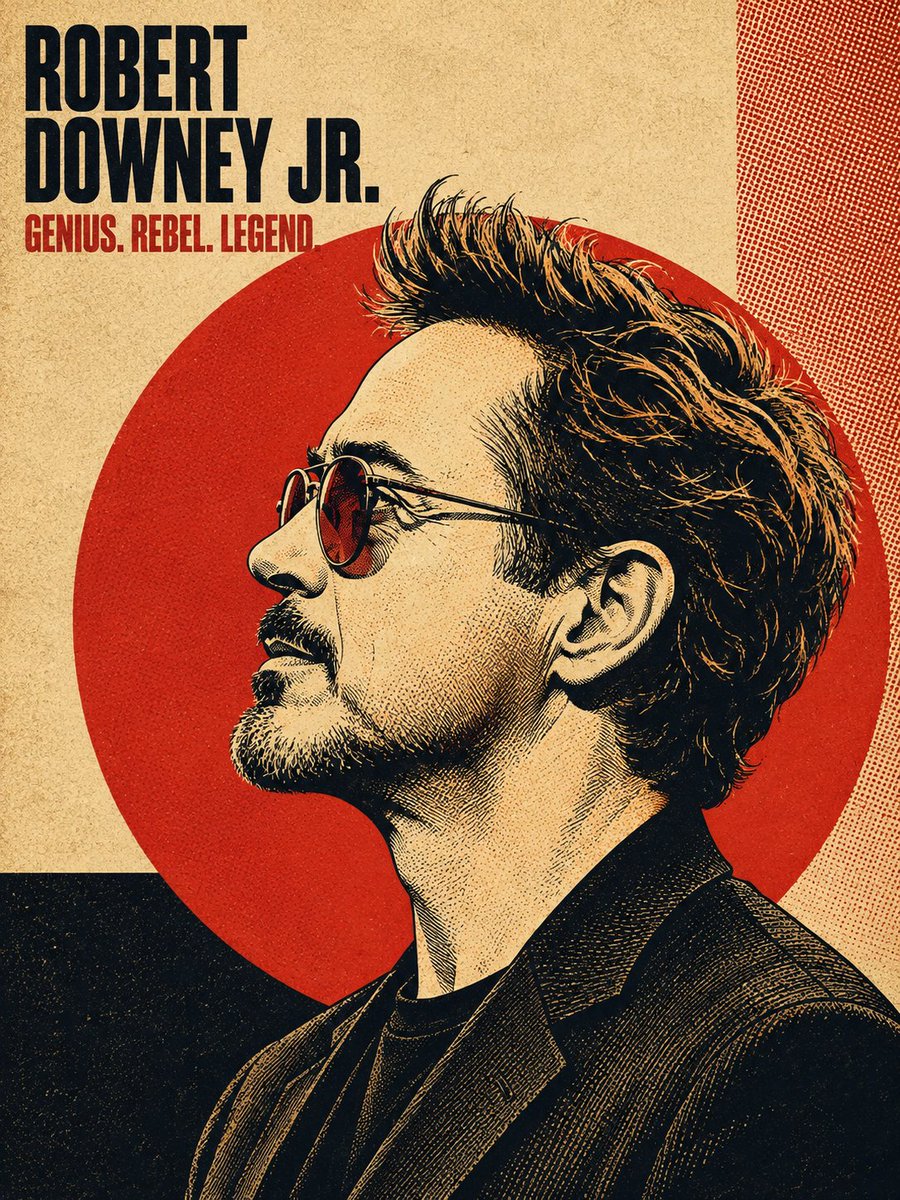
Vintage Halftone Portrait Poster
A complex 'smart prompt' structured in JSON for generating vintage 1960s-70s inspired halftone poster art with bold linework and offset print textures.
Dies ist ein GPT Image 2 -Prompt für Grafik & Poster . Verwenden Sie den unten stehenden, kopierfertigen Prompt, um ähnliche Grafiken zu erstellen, und überprüfen Sie vor der Wiederverwendung Awesome GPT Image 2 Prompts -Quellenangaben sowie die kommerziellen Nutzungsrechte.
Benötigen Sie den vollständigen Prompt-Satz? Verwenden Sie den Grafik & Poster Weitere verwandte Beispiele finden Sie im Themen-Hub oder öffnen Sie die GPT Image 2 Prompt-Katalog für das vollständige Beispielverzeichnis, wiederverwendbare Strukturen und Quellenangaben.
Free 1K preview
Generate one preview image instantly, no sign-up required.
Free text preview doesn’t preserve reference-image consistency.
4000/4000
Eingabeaufforderung
Kopierfertige Eingabeaufforderung
{
  "task": "Convert the uploaded reference photo (or a well-known likeness of the named person) into a vintage halftone bold poster-art style portrait illustration.",
  "input": {
    "subject_name": "{{PERSON_NAME}}",
    "reference_image": "{{UPLOADED_PHOTO_OR_NULL}}",
    "note": "Only the subject's name or an uploaded photo should be required from the user. All other parameters below are fixed art-direction rules."
  },
  "output_exclusions": [
    "Do NOT include a small circular/rounded-corner inset photo of the real reference image in the corner of the poster — the final output is the illustration ONLY, full-bleed, no reference thumbnail overlay."
  ],
  "art_style": {
    "medium": "digital illustration mimicking screen-printed / offset-lithograph poster art",
    "influences": [
      "1960s-70s bold political/protest poster art",
      "Shepard Fairey-style bold stencil illustration",
      "risograph print texture",
      "vintage magazine cover design",
      "retro concert/album poster art"
    ],
    "line_work": "high-contrast ink linework with fine cross-hatching and stippling for shading, visible pen/brush strokes in hair strands",
    "rendering": "flat color blocking combined with engraving-style fine line shading — NOT photorealistic, NOT airbrushed, NOT smooth gradient shading"
  },
  "composition": {
    "pose": "subject's head and upper shoulders/chest in a strict 90-degree side profile (facing left), eyes looking straight ahead in profile, chin slightly lifted, neutral/confident expression",
    "framing": "portrait orientation (4:5 or 3:4 aspect ratio), subject fills roughly 70-85% of vertical frame, cropped at mid-chest/shoulder",
    "focal_backdrop": "a large solid-color circle (sun/halo motif) centered behind the subject's head, circle diameter roughly 60-70% of canvas width, subject's hair and shoulders slightly overlap and break the circle's edge",
    "hair_treatment": "hair rendered as one of the most detailed elements — individual flowing strands, wind-swept or voluminous movement, strong directional lighting creating highlight streaks within the dark mass of hair"
  },
  "background": {
    "base_texture": "coarse woven linen/canvas paper texture overlaid across the entire composition at low opacity",
    "layout": "asymmetric geometric color-block panels behind/around the circle — e.g. a solid dark rectangle in one lower corner, a contrasting stripe or panel along one edge, sometimes a fine halftone dot-pattern or crosshatch pattern filling one quadrant",
    "halftone_overlay": "visible CMYK-style halftone dot pattern subtly overlaid on background panels and occasionally bleeding into the portrait's shadow areas",
    "grain": "fine analog print grain/noise across the whole image for an aged, screen-printed look"
  },
  "color_palette": {
    "instruction": "Select ONE cohesive limited palette (2-4 colors max) per poster, high contrast, no photographic gradients. Choose based on mood/subject or default to the classic scheme.",
    "classic_scheme": {
      "background_base": "warm cream / aged paper beige (#e8dcc4-ish)",
      "accent_circle": "bold poster red (#c1272d-ish)",
      "linework_shadow": "near-black ink (#1a1512-ish)",
      "highlight": "same cream as background used for lit skin/hair areas"
    },
    "alt_scheme_dark": {
      "background_base": "black or deep charcoal",
      "accent_circle": "poster red or burnt orange",
      "linework_shadow": "black ink",
      "highlight": "warm cream/tan"
    },
    "alt_scheme_cool": {
      "background_base": "deep navy blue",
      "accent_circle": "muted brick-red/orange",
      "linework_shadow": "navy/black ink",
      "highlight": "warm cream, with the subject's true eye color kept naturally visible as the one full-color accent"
    },
    "duotone_option": "for a graphic pop-art variant, render the entire subject in a single duotone (e.g. mustard-yellow and black, or gold and black) instead of cream/red/black"
  },
  "typography": {
    "headline": {
      "content": "subject's name (first name, or first+last stacked on two lines)",
      "placement": "top-left corner of the poster, inset from edges",
      "font_style": "extra-bold condensed slab-serif or grotesque sans-serif, all caps, tightly kerned, stacked on 1-2 lines, large scale (dominant typographic element)",
      "color": "matches the linework/shadow ink color, occasionally with a subtle drop shadow or outline for depth"
    },
    "subheadline": {
      "content": "a short 2-4 word tagline/epithet related to the subject (e.g. an evocative title, nickname, or descriptor)",
      "placement": "directly below the headline, smaller scale",
      "font_style": "bold condensed sans-serif or slab-serif, all caps, single line",
      "color": "the poster's accent color (matches the circle color)"
    }
  },
  "clothing_and_accessories": {
    "styling": "simple, era-appropriate or modern minimal clothing rendered in flat color with the same halftone/linework shading as the rest of the piece — collared shirts, blazers, off-shoulder tops, or textured jackets with visible fabric-fold linework",
    "accessories": "keep minimal — small jewelry (earrings, necklace) can be included if present in reference, rendered as simple line-art shapes"
  },
  "lighting": {
    "style": "single hard directional light source (as if raking across the side profile), creating strong graphic shadow shapes rather than realistic soft shading",
    "shadow_rendering": "shadows built from crosshatching, stippling, and halftone dot density rather than smooth gradients"
  },
  "quality_and_fidelity": {
    "likeness": "preserve accurate, recognizable facial proportions and features of the subject from the reference photo/name, translated into the illustrated line-art style — the illustration must be clearly identifiable as that specific person",
    "resolution": "crisp, poster-print-ready quality, sharp linework, no blur, no photographic artifacts",
    "consistency": "maintain identical composition, palette rules, and typography placement described above regardless of subject, so the whole set reads as one unified poster series"
  }
}
Best for
- - Grafik & Poster visual exploration
- - Image generation and reference-image edits
- - Reusable briefs that keep source attribution visible
Change these parts
- - Subject, product, character, or scene
- - Aspect ratio, camera, lighting, and background
- - Brand, text, color, and output constraints
Recommended model and settings
- - Model: gpt-image-2
- - Input mode: Bild zu Bild
- - Aspect ratio: source
- - Commercial status: review original source
How to use this prompt
- 1. Copy the prompt and preserve its structure for the first test.
- 2. Replace the subject, context, and publishing channel.
- 3. Change one camera, lighting, or style variable per iteration.
- 4. Inspect the output, source, text, and rights before reuse.
Limitations, source, and reuse cautions
- - Generated output is an editable draft, not factual, legal, or rights evidence.
- - Review the linked source, people, brands, logos, text, and third-party media before commercial use.
Importiert von Awesome GPT Image 2 Prompts . Quellenangabe erforderlich. Status der kommerziellen Nutzung: allowed ; Rechte an der Quelle vor kostenpflichtiger Nutzung prüfen.
Weitere Fälle in dieser Kategorie
Priorisiert nach Kategorie, Kompatibilität der Eingabemodi, Qualität und geringerem Risiko.




Hinweise zur Wiederverwendung und Quellenangabe
Verwenden Sie diese Eingabeaufforderung sicher, nachdem Sie den Fall in der Vorschau angezeigt haben.
- 1.Kopieren Sie die Eingabeaufforderung oder öffnen Sie sie direkt in Dovoo mit der Schaltfläche „Generieren“.
- 2.Passen Sie Variablen, Seitenverhältnis und Referenzbilder an Ihren Anwendungsfall an.
- 3.Vor der Veröffentlichung oder kostenpflichtigen Nutzung sollten Sie die Rechte an der Quelle, die Anforderungen an die Namensnennung sowie die Risiken für die Marke oder das Abbild prüfen.