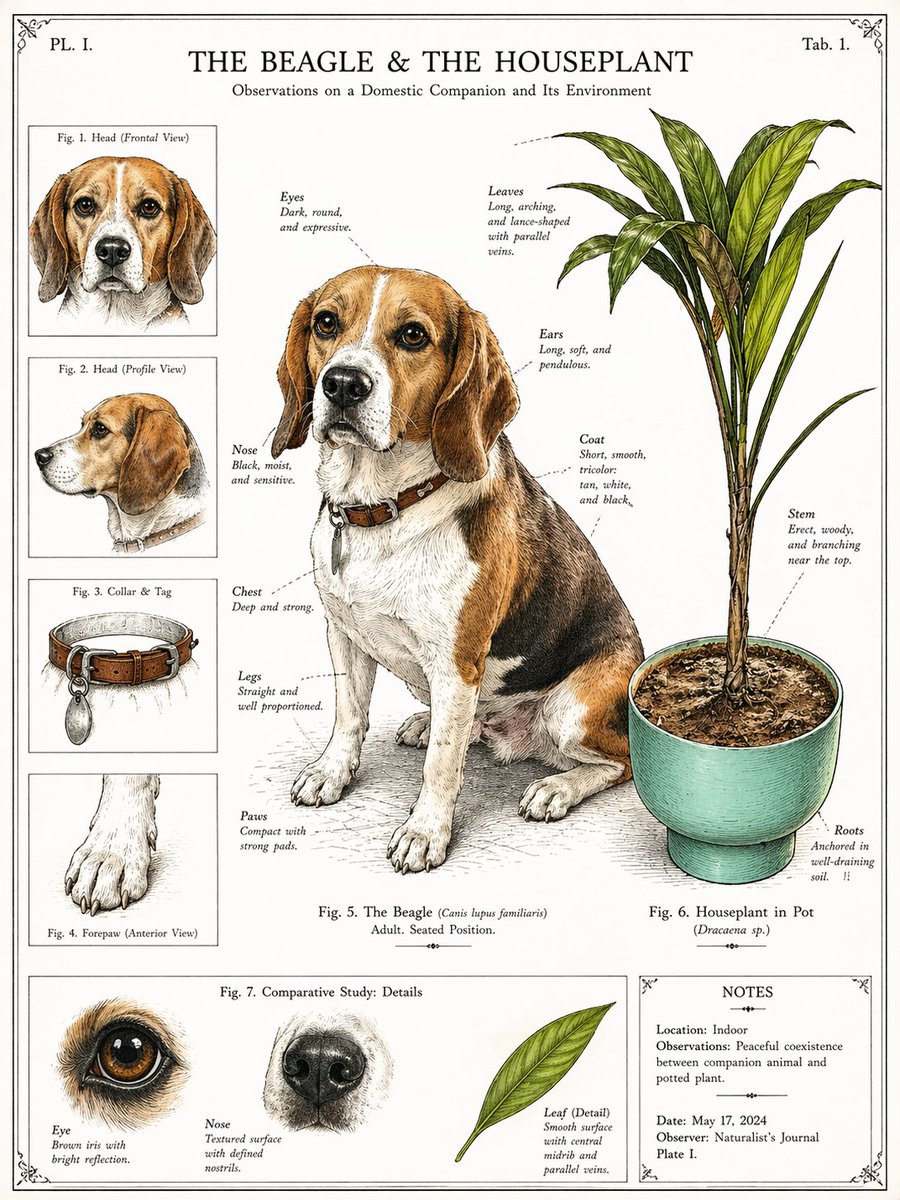
Vintage Beagle botanischer Teller
Diese Anregung verwandelt ein Haustierfoto mit einer Zimmerpflanze in eine antike naturkundliche Infografik-Tafel, die sich für dekorative Haustierporträts im wissenschaftlichen Stil eignet.
Dies ist ein GPT Image 2 -Prompt für Illustration & Kunst . Verwenden Sie den unten stehenden, kopierfertigen Prompt, um ähnliche Grafiken zu erstellen, und überprüfen Sie vor der Wiederverwendung Awesome GPT Image 2 Prompts -Quellenangaben sowie die kommerziellen Nutzungsrechte.
Free 1K preview
Generate one preview image instantly, no sign-up required.
Free text preview doesn’t preserve reference-image consistency.
Eingabeaufforderung
Kopierfertige Eingabeaufforderung
Using the provided reference image, transform the photo into a vintage naturalist encyclopedia plate in the style of a 19th-century scientific animal-and-botany illustration. Keep the same beagle and the same potted houseplant from the reference as the main subjects, but redraw them as finely inked and lightly hand-colored specimen illustrations on an aged off-white page. Preserve the dog's seated pose, collar and tag, and the plant's pot and overall structure. Add a formal infographic layout with 8 labeled figure areas total: 1 large central full-body beagle study, 1 large right-side plant study, 4 left-column inset studies labeled “Fig. 1. Head (Frontal View)”, “Fig. 2. Head (Profile View)”, “Fig. 3. Collar & Tag”, and “Fig. 4. Forepaw (Anterior View)”, 3 bottom comparative detail studies labeled “Eye”, “Nose”, and “Leaf (Detail)”, plus 1 bottom-right notes panel. Add delicate dotted annotation callouts around the main dog and plant identifying features such as eyes, ears, nose, chest, legs, paws, coat, leaves, stem, and roots. Include the page title “THE BEAGLE & THE HOUSEPLANT” at the top, the subtitle “Observations on a Domestic Companion and Its Environment”, corner plate markings “PL. I.” and “Tab. 1.”, a central caption “Fig. 5. The Beagle (Canis lupus familiaris) Adult. Seated Position.”, a plant caption “Fig. 6. Houseplant in Pot (Dracaena sp.)”, a bottom section title “Fig. 7. Comparative Study: Details”, and a notes box containing 5 lines: “Location: Indoor”, “Observations: Peaceful coexistence between companion animal and potted plant.”, “Date: May 17, 2024”, “Observer: Naturalist’s Journal”, and “Plate I.” Use clean engraved linework, restrained watercolor washes, subtle paper texture, decorative border corners, and a symmetrical museum-plate composition.
Best for
- - Illustration & Kunst visual exploration
- - Image generation and reference-image edits
- - Reusable briefs that keep source attribution visible
Change these parts
- - Subject, product, character, or scene
- - Aspect ratio, camera, lighting, and background
- - Brand, text, color, and output constraints
Recommended model and settings
- - Model: gpt-image-2
- - Input mode: Bild zu Bild
- - Aspect ratio: source
- - Commercial status: review original source
How to use this prompt
- 1. Copy the prompt and preserve its structure for the first test.
- 2. Replace the subject, context, and publishing channel.
- 3. Change one camera, lighting, or style variable per iteration.
- 4. Inspect the output, source, text, and rights before reuse.
Limitations, source, and reuse cautions
- - Generated output is an editable draft, not factual, legal, or rights evidence.
- - Review the linked source, people, brands, logos, text, and third-party media before commercial use.
Weitere Fälle in dieser Kategorie
Priorisiert nach Kategorie, Kompatibilität der Eingabemodi, Qualität und geringerem Risiko.






Hinweise zur Wiederverwendung und Quellenangabe
Verwenden Sie diese Eingabeaufforderung sicher, nachdem Sie den Fall in der Vorschau angezeigt haben.
- 1.Kopieren Sie die Eingabeaufforderung oder öffnen Sie sie direkt in Dovoo mit der Schaltfläche „Generieren“.
- 2.Passen Sie Variablen, Seitenverhältnis und Referenzbilder an Ihren Anwendungsfall an.
- 3.Vor der Veröffentlichung oder kostenpflichtigen Nutzung sollten Sie die Rechte an der Quelle, die Anforderungen an die Namensnennung sowie die Risiken für die Marke oder das Abbild prüfen.