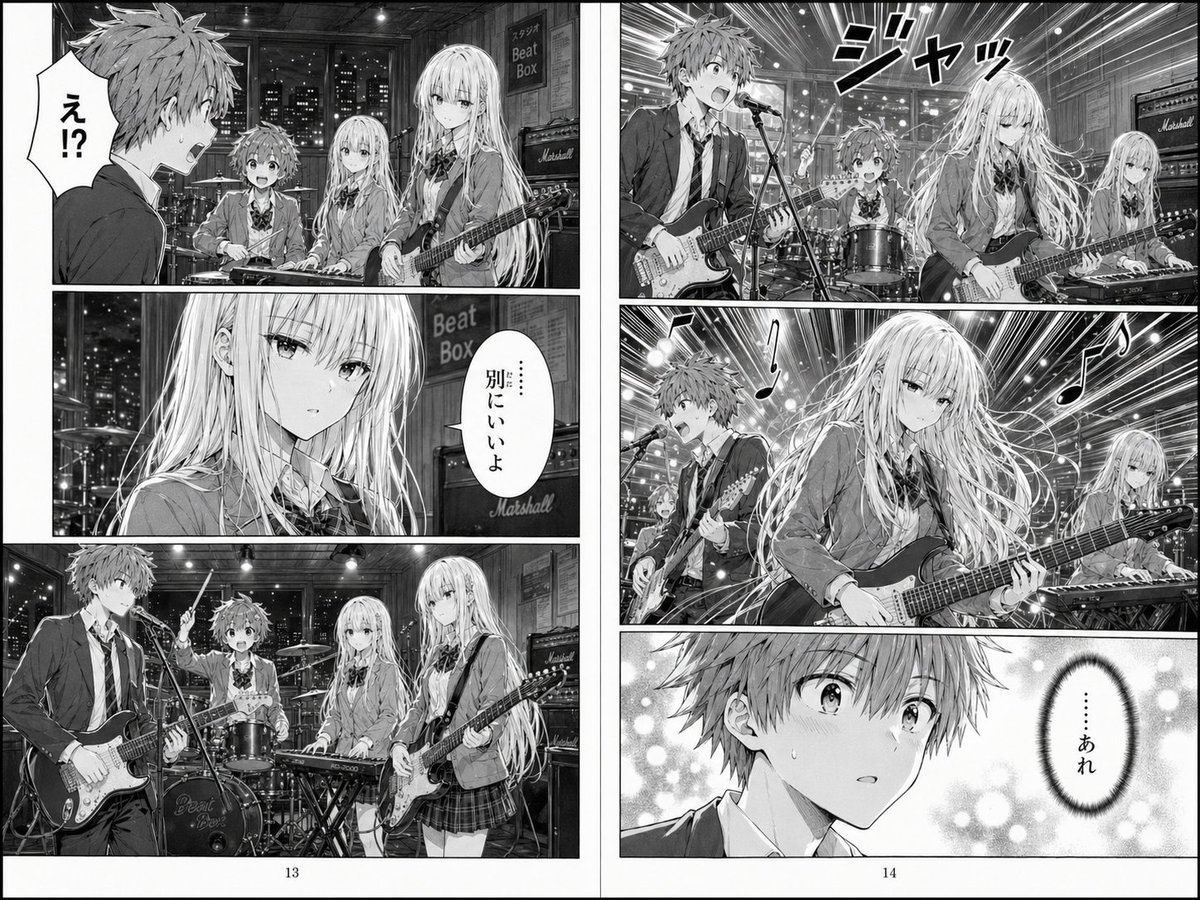
Doppelseitige Manga-Doppelseite einer Schulband
So entsteht eine dramatische Schwarz-Weiß-Manga-Doppelseite, die eine Probe einer Highschool-Band und einen Jungen zeigt, der von dem Gitarrenspiel eines Mädchens fasziniert ist – ideal für KI-Manga-Szenen oder Comic-Erzählungen.
Dies ist ein GPT Image 2 -Prompt für Anime & Spiel . Verwenden Sie den unten stehenden, kopierfertigen Prompt, um ähnliche Grafiken zu erstellen, und überprüfen Sie vor der Wiederverwendung Awesome GPT Image 2 Prompts -Quellenangaben sowie die kommerziellen Nutzungsrechte.
Benötigen Sie den vollständigen Prompt-Satz? Verwenden Sie den Anime & Spiel Weitere verwandte Beispiele finden Sie im Themen-Hub oder öffnen Sie die GPT Image 2 Prompt-Katalog für das vollständige Beispielverzeichnis, wiederverwendbare Strukturen und Quellenangaben.
Free 1K preview
Generate one preview image instantly, no sign-up required.
2058/4000
Eingabeaufforderung
Kopierfertige Eingabeaufforderung
A two-page black-and-white manga spread set in a nighttime high school band rehearsal studio, drawn in polished modern shonen/seinen manga style with detailed screentones, dramatic lighting, expressive speed lines, and glossy instrument rendering. The scene shows 4 visible band members in school uniforms: a surprised teenage boy with messy short hair at guitar and vocal mic, a calm beautiful teenage girl with very long flowing light hair playing electric guitar in the foreground, a petite long-haired teenage girl at a keyboard, Show every face clearly with natural, detailed facial features. The studio has large windows revealing a city skyline at night, hanging ceiling lights, amps including a visible Marshall stack, a drum kit with a band logo on the bass drum, cables, and a wall sign reading “Beat Box.” Compose it as a printed manga spread with 7 panels total across 2 pages, including gutters, page borders, and page numbers 13 and 14 at the bottom. Left page: 3 panels — top panel with the shocked boy turning toward the girls and a large Japanese speech bubble saying “え!?”; middle panel is a close-up of the long-haired guitarist girl with a calm expression and a Japanese speech bubble saying “……別にいいよ”; bottom panel is a wider full-band rehearsal shot with all 4 members in the studio. Right page: 4 panels — top panel is an explosive performance shot with the boy singing and playing while the long-haired girl plays guitar, with large sound-effect text “ジャッ”; middle panel is a dynamic close-up of the long-haired guitarist playing intensely, with flowing hair, musical note symbols, radiant speed lines, and the keyboard girl visible in the back; bottom panel is a close-up of the boy’s stunned face with soft bokeh and a vertical Japanese speech bubble saying “……あれ”. Emphasize the emotional contrast: awkward surprise turning into admiration as the girl’s guitar performance changes the mood. Use monochrome only, no color, authentic manga lettering, cinematic framing, layered depth, and highly detailed hair and instrument strings.
Best for
- - Anime & Spiel visual exploration
- - Image generation and reference-image edits
- - Reusable briefs that keep source attribution visible
Change these parts
- - Subject, product, character, or scene
- - Aspect ratio, camera, lighting, and background
- - Brand, text, color, and output constraints
Recommended model and settings
- - Model: gpt-image-2
- - Input mode: Text zu Bild
- - Aspect ratio: source
- - Commercial status: review original source
How to use this prompt
- 1. Copy the prompt and preserve its structure for the first test.
- 2. Replace the subject, context, and publishing channel.
- 3. Change one camera, lighting, or style variable per iteration.
- 4. Inspect the output, source, text, and rights before reuse.
Limitations, source, and reuse cautions
- - Generated output is an editable draft, not factual, legal, or rights evidence.
- - Review the linked source, people, brands, logos, text, and third-party media before commercial use.
Importiert von Awesome GPT Image 2 Prompts . Quellenangabe erforderlich. Status der kommerziellen Nutzung: allowed ; Rechte an der Quelle vor kostenpflichtiger Nutzung prüfen.
Weitere Fälle in dieser Kategorie
Priorisiert nach Kategorie, Kompatibilität der Eingabemodi, Qualität und geringerem Risiko.






Hinweise zur Wiederverwendung und Quellenangabe
Verwenden Sie diese Eingabeaufforderung sicher, nachdem Sie den Fall in der Vorschau angezeigt haben.
- 1.Kopieren Sie die Eingabeaufforderung oder öffnen Sie sie direkt in Dovoo mit der Schaltfläche „Generieren“.
- 2.Passen Sie Variablen, Seitenverhältnis und Referenzbilder an Ihren Anwendungsfall an.
- 3.Vor der Veröffentlichung oder kostenpflichtigen Nutzung sollten Sie die Rechte an der Quelle, die Anforderungen an die Namensnennung sowie die Risiken für die Marke oder das Abbild prüfen.