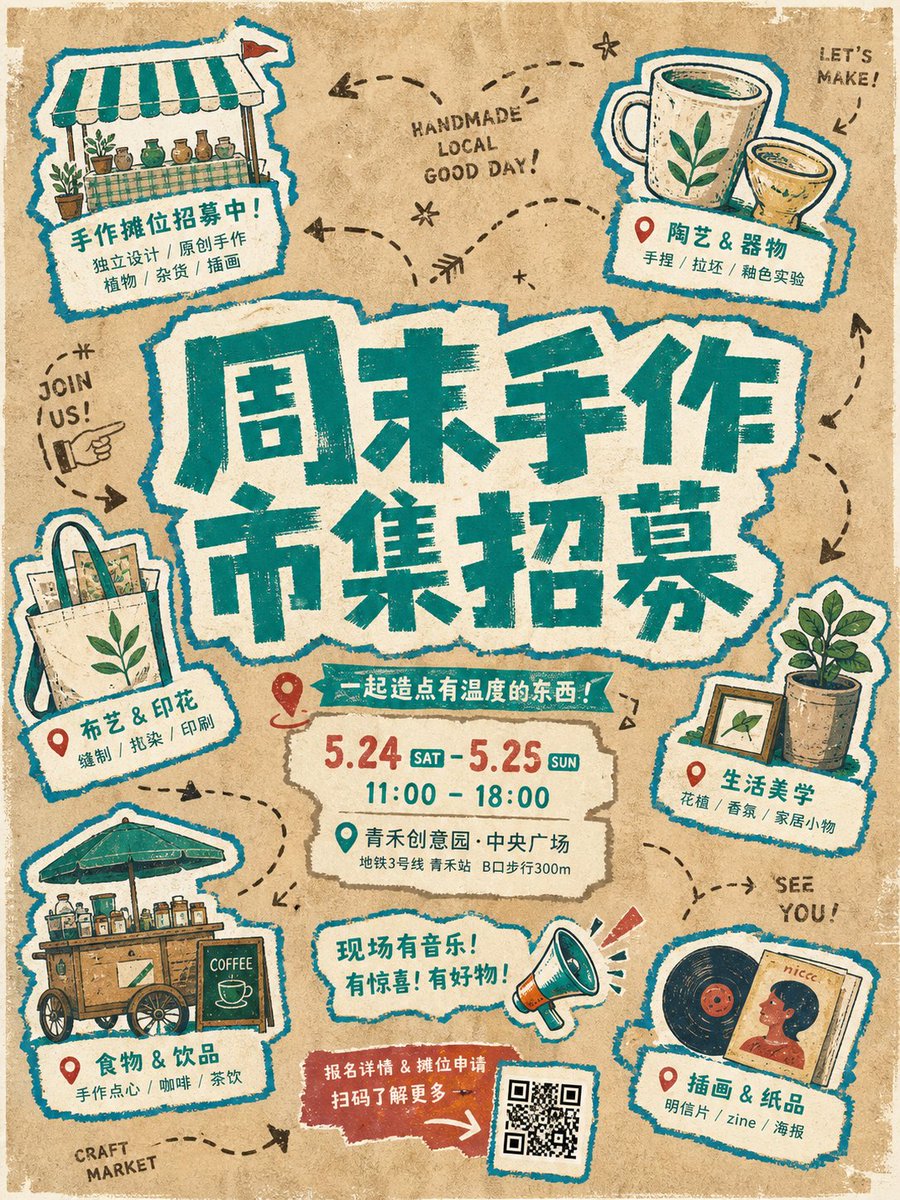
Torn Paper Poster Aesthetic
A creative prompt for generating handmade-style cultural posters featuring torn paper textures, fluorescent colors, and sticker-like badges for an urban event look.
Dies ist ein GPT Image 2 -Prompt für Grafik & Poster . Verwenden Sie den unten stehenden, kopierfertigen Prompt, um ähnliche Grafiken zu erstellen, und überprüfen Sie vor der Wiederverwendung Awesome GPT Image 2 Prompts -Quellenangaben sowie die kommerziellen Nutzungsrechte.
Free 1K preview
Generate one preview image instantly, no sign-up required.
Eingabeaufforderung
Kopierfertige Eingabeaufforderung
Create an immediate visual anchor from a group of irregularly layered fluorescent torn-paper title blocks: the {argument name="main title" default="main title"} is huge, centered, split into staggered lines, and built from a combination of rough brush lettering and paper-cut forms, with heavy strokes, ragged broken edges, exaggerated corners, uneven counters, and slight local misregistration so the words feel like hand-printed graphic shapes rather than orderly typesetting. Build a circular, loose yet clearly guided event-information system around the title, with several blue-and-white outlined hand-drawn sticker badges distributed around it; each badge connects a theme-related small illustration, location marker, or symbol to a white label, varies in size and direction, and feels casually pasted onto the paper. The subject and labels share a vivid blue outer contour and yellow fill, creating a unified cross-element stroke. Use warm fibrous paper and aged-poster texture in the background, with a large {argument name="background color" default="brown umber"} field retaining paper grain, impressions, slight color variation, and bleeding print edges; organize the open space with dark-brown hand-drawn dotted lines, arcs, arrows, and a few English geometric letterforms without letting them compete with the main message. Lock the main colors to ochre brown, bright yellow, vivid blue, and warm off-white, using flat fills and limited color overlap, with no modern gradients, glass effects, or excessively polished digital shadows. Give every graphic, word, sticker, and background the same slightly unstable handmade outlines, screen-print misregistration, varied stroke weights, and localized wear, preserving imperfect making traces; keep the information hierarchy clear, with the central title carrying the greatest weight and the surrounding modules creating rhythm and breathing room, so the whole piece feels like an urban cultural event poster assembled from collage, hand drawing, screen printing, and aged paper.Eingabeaufforderungsvariablen
In der Eingabeaufforderung befinden sich bearbeitbare Argumentplatzhalter mit ihren Standardwerten.
Best for
- - Grafik & Poster visual exploration
- - Image generation and reference-image edits
- - Reusable briefs that keep source attribution visible
Change these parts
- - Subject, product, character, or scene
- - Aspect ratio, camera, lighting, and background
- - Brand, text, color, and output constraints
Recommended model and settings
- - Model: gpt-image-2
- - Input mode: Text zu Bild
- - Aspect ratio: source
- - Commercial status: review original source
How to use this prompt
- 1. Copy the prompt and preserve its structure for the first test.
- 2. Replace the subject, context, and publishing channel.
- 3. Change one camera, lighting, or style variable per iteration.
- 4. Inspect the output, source, text, and rights before reuse.
Limitations, source, and reuse cautions
- - Generated output is an editable draft, not factual, legal, or rights evidence.
- - Review the linked source, people, brands, logos, text, and third-party media before commercial use.
Weitere Fälle in dieser Kategorie
Priorisiert nach Kategorie, Kompatibilität der Eingabemodi, Qualität und geringerem Risiko.



Hinweise zur Wiederverwendung und Quellenangabe
Verwenden Sie diese Eingabeaufforderung sicher, nachdem Sie den Fall in der Vorschau angezeigt haben.
- 1.Kopieren Sie die Eingabeaufforderung oder öffnen Sie sie direkt in Dovoo mit der Schaltfläche „Generieren“.
- 2.Passen Sie Variablen, Seitenverhältnis und Referenzbilder an Ihren Anwendungsfall an.
- 3.Vor der Veröffentlichung oder kostenpflichtigen Nutzung sollten Sie die Rechte an der Quelle, die Anforderungen an die Namensnennung sowie die Risiken für die Marke oder das Abbild prüfen.