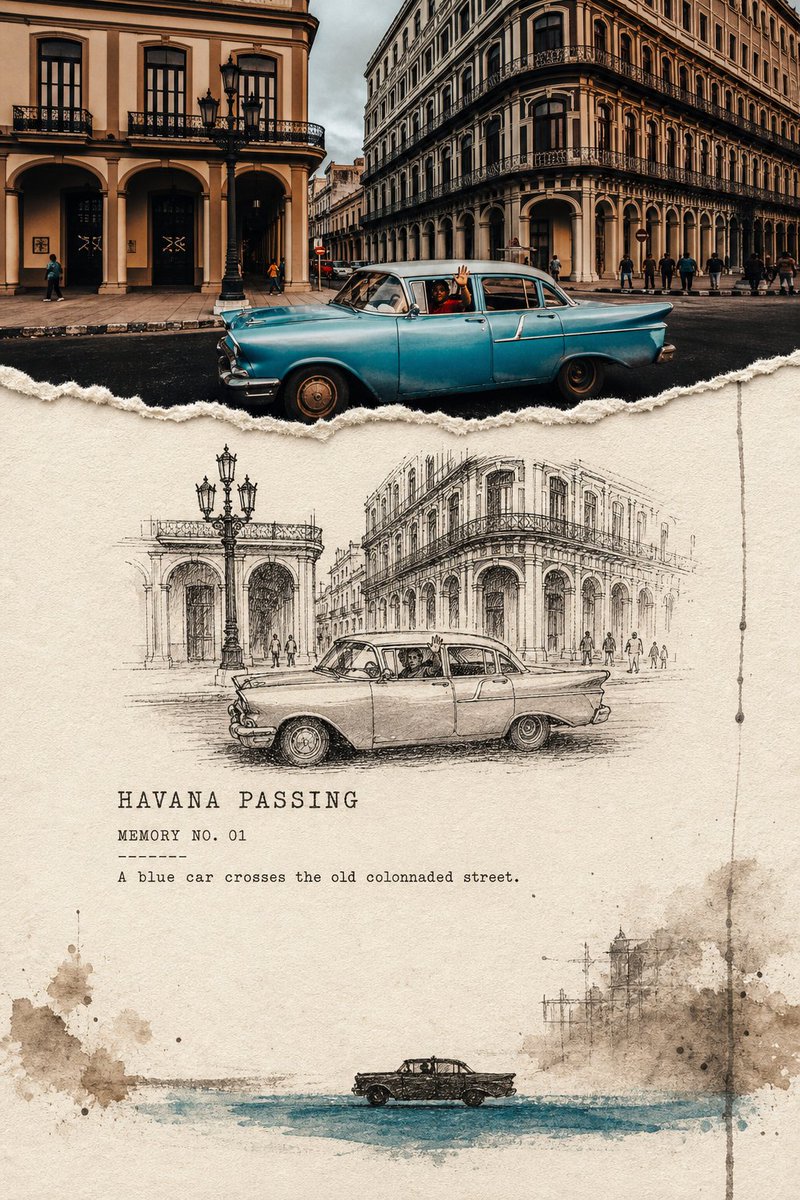
Torn Edge Ink Memory Poster
A poetic prompt that turns travel photos into 'torn edge' memory posters, featuring a three-stage visual reduction from real photography to pencil sketches and ink silhouettes.
Dies ist ein GPT Image 2 -Prompt für Grafik & Poster . Verwenden Sie den unten stehenden, kopierfertigen Prompt, um ähnliche Grafiken zu erstellen, und überprüfen Sie vor der Wiederverwendung Awesome GPT Image 2 Prompts -Quellenangaben sowie die kommerziellen Nutzungsrechte.
Benötigen Sie den vollständigen Prompt-Satz? Verwenden Sie den Grafik & Poster Weitere verwandte Beispiele finden Sie im Themen-Hub oder öffnen Sie die GPT Image 2 Prompt-Katalog für das vollständige Beispielverzeichnis, wiederverwendbare Strukturen und Quellenangaben.
Free 1K preview
Generate one preview image instantly, no sign-up required.
Free text preview doesn’t preserve reference-image consistency.
3729/4000
Eingabeaufforderung
Kopierfertige Eingabeaufforderung
Please create an independent torn-edge ink memory edit poster for each travel photo I upload, with each photo output separately and no multi-image stitching. Use a 3:4 vertical layout overall, employing a three-stage diminishing structure of "real photography -> observation line drawing -> ink silhouette" to express the same scene. The top part occupies about 28%-36% of the frame height, faithfully preserving the most important scene from the original photo. Accurately maintain the identity, number, posture, orientation, spacing, architectural structure, vehicles, boats, animals, human actions, real textures, spatial directions, natural light and shadow, and iconic colors of the subjects, with only slight artistic publication color grading. The photo must be clearly recognizable and cannot be stylized as an illustration or turned into a decorative thumbnail. The top photo and the paper below are connected using clearly visible hand-torn paper edges: the edges should have real paper fibers, irregular bumps, and slight thickness, and must not use digital atomization, feathering, or soft-light gradients. The middle section is warm ivory, unbleached cotton paper, or light beige coarse paper, serving as the observation page with the most white space. Redraw the same subject using unstable pen lines, short cross-hatching, dry ink, and a small amount of gray wash, accurately preserving the number, posture, and relative position while actively deleting irrelevant backgrounds and tiny details. Select tree trunks, lighthouses, bridge cables, architectural edges, ship masts, mountain cracks, or vehicle outlines from the photo as a vertical memory anchor. Line drawings should be concentrated in a narrower horizontal field, not filling the paper or acting as automatic photo outlines. The bottom section lets the scene dissipate further into ink blobs of light taupe, ash, blue-gray, or olive black, uneven water marks, dry brush grains, slender broken lines, and 1-2 restrained drips. The subject shrinks into a group of small dark silhouettes, still maintaining the correct number and orientation, landing on a horizontal brushstroke of an accent color extracted from the original photo. Use only one accent color, not fixed to orange. Information density must decrease from top to bottom: the photo is the densest, the line drawing is second, and the bottom silhouette is the simplest. Maintain continuous, obvious breathing space on the paper in the middle and around the subjects; ink blobs flow in incompletely from one side or the bottom edge, not closing all four sides. In the middle white space, add a 1-3 word English title, a MEMORY NO. 01 style field, and a 5-10 word English observation sentence. Use readable typewriter bold, monospaced archival fonts, or uppercase block letters with ink gaps for the text; auxiliary text is smaller but should not shrink into gray lines. Text content must derive from the subjects, actions, weather, or spatial relationships in the photo, not copying the author's text or fabricating research data. The overall look should be like a page of a travel archive that has been torn, observed, and is gradually fading—restrained, poetic, with real paper fiber, dry ink, and a sense of time. Mandatory Avoidance: Hard vertical/horizontal boundaries, common half-photo half-sketch templates, digital softening transitions, irrelevant illustrations below, full-page watercolors, traditional ink landscape imitations, cute cartoons, detailed animal or plant manuals, automatic outlines, dense technical infographics, large titles overwhelming the image, multiple accent colors, author names, signatures, accounts, logos, URLs, QR codes, watermarks, and garbled characters.
Best for
- - Grafik & Poster visual exploration
- - Image generation and reference-image edits
- - Reusable briefs that keep source attribution visible
Change these parts
- - Subject, product, character, or scene
- - Aspect ratio, camera, lighting, and background
- - Brand, text, color, and output constraints
Recommended model and settings
- - Model: gpt-image-2
- - Input mode: Bild zu Bild
- - Aspect ratio: source
- - Commercial status: review original source
How to use this prompt
- 1. Copy the prompt and preserve its structure for the first test.
- 2. Replace the subject, context, and publishing channel.
- 3. Change one camera, lighting, or style variable per iteration.
- 4. Inspect the output, source, text, and rights before reuse.
Limitations, source, and reuse cautions
- - Generated output is an editable draft, not factual, legal, or rights evidence.
- - Review the linked source, people, brands, logos, text, and third-party media before commercial use.
Importiert von Awesome GPT Image 2 Prompts . Quellenangabe erforderlich. Status der kommerziellen Nutzung: allowed ; Rechte an der Quelle vor kostenpflichtiger Nutzung prüfen.
Weitere Fälle in dieser Kategorie
Priorisiert nach Kategorie, Kompatibilität der Eingabemodi, Qualität und geringerem Risiko.






Hinweise zur Wiederverwendung und Quellenangabe
Verwenden Sie diese Eingabeaufforderung sicher, nachdem Sie den Fall in der Vorschau angezeigt haben.
- 1.Kopieren Sie die Eingabeaufforderung oder öffnen Sie sie direkt in Dovoo mit der Schaltfläche „Generieren“.
- 2.Passen Sie Variablen, Seitenverhältnis und Referenzbilder an Ihren Anwendungsfall an.
- 3.Vor der Veröffentlichung oder kostenpflichtigen Nutzung sollten Sie die Rechte an der Quelle, die Anforderungen an die Namensnennung sowie die Risiken für die Marke oder das Abbild prüfen.