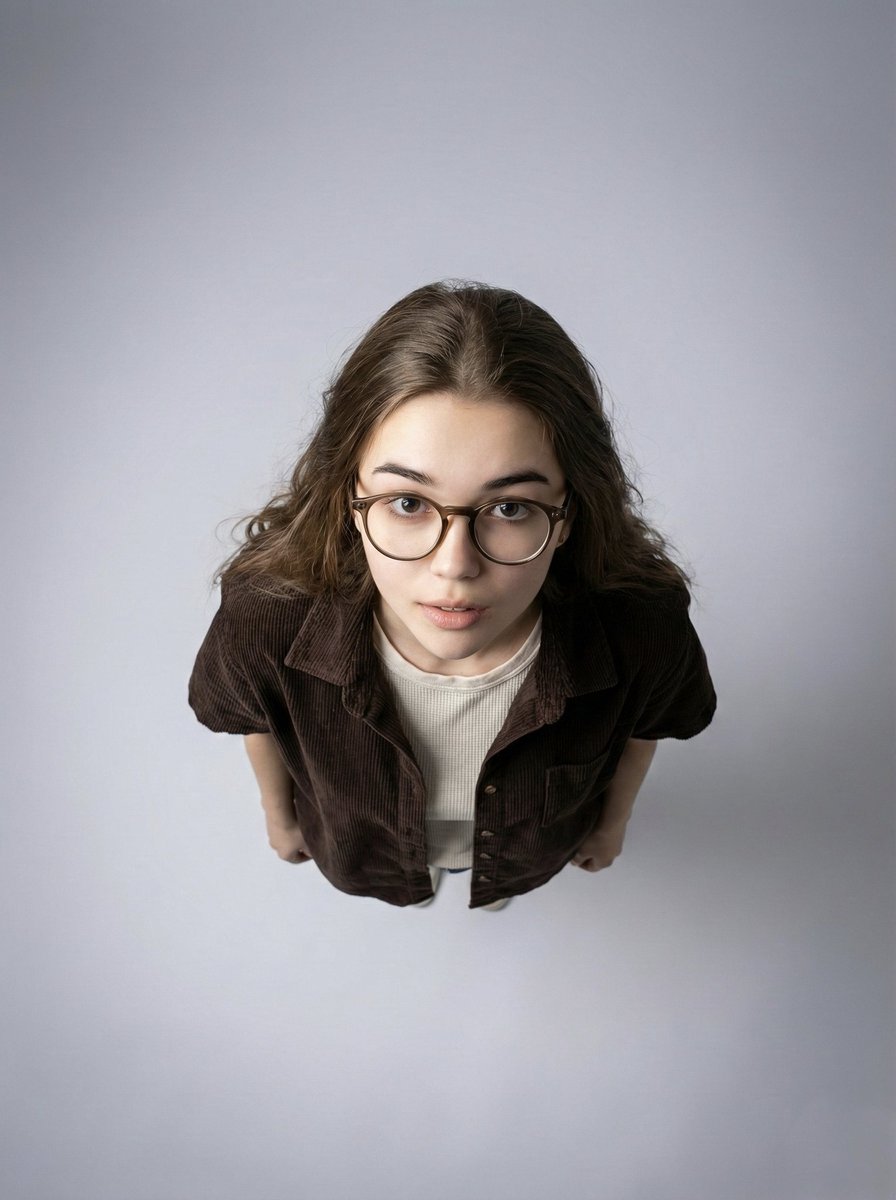
Top-Down Aerial Studio Portrait
A minimalist, top-down aerial portrait focusing on subject isolation and modern aesthetic.
Dies ist ein GPT Image 2 -Prompt für Porträt & Charakter . Verwenden Sie den unten stehenden, kopierfertigen Prompt, um ähnliche Grafiken zu erstellen, und überprüfen Sie vor der Wiederverwendung Awesome GPT Image 2 Prompts -Quellenangaben sowie die kommerziellen Nutzungsrechte.
Free 1K preview
Generate one preview image instantly, no sign-up required.
Free text preview doesn’t preserve reference-image consistency.
Eingabeaufforderung
Kopierfertige Eingabeaufforderung
Ultra-wide angle, 90-degree top-down aerial studio portrait of a {argument name="subject" default="woman"} looking straight up at the camera. Strict identity preservation from reference image, do not alter face, proportions, skin texture, or expression.

Composition: full-body framing, large negative space surrounding the subject, dramatic isolation and graphic impact.

Subject: woman with round thick-framed stylish glasses. Wearing a deep dark brown short-sleeve button-up shirt in corduroy or textured fabric, with a light beige off-white textured sweater underneath. Natural hairstyle with visible texture and volume, do not alter hair color or structure. Natural realistic skin tone, visible texture, not over-smoothed. Expression: engaging, slightly curious or inquisitive.

Background: {argument name="background" default="minimalist studio backdrop"}, soft gray gradient, darker at edges, lighter at center directly beneath the subject.

Lighting: soft uniform overhead lighting from above, subtle shadows defining facial features and clothing folds, even illumination, no harsh contrast.

Camera: ISO 150-200, aperture f/1.28, shutter speed 1/200s, high-resolution ultra-detailed.

Color grading: neutral modern tones, soft balanced contrast, clean contemporary look.

Mood: minimalist, modern, contemplative. Strong subject isolation and visual clarity.
Eingabeaufforderungsvariablen
In der Eingabeaufforderung befinden sich bearbeitbare Argumentplatzhalter mit ihren Standardwerten.
Best for
- - Porträt & Charakter visual exploration
- - Image generation and reference-image edits
- - Reusable briefs that keep source attribution visible
Change these parts
- - Subject, product, character, or scene
- - Aspect ratio, camera, lighting, and background
- - Brand, text, color, and output constraints
Recommended model and settings
- - Model: gpt-image-2
- - Input mode: Bild zu Bild
- - Aspect ratio: source
- - Commercial status: review original source
How to use this prompt
- 1. Copy the prompt and preserve its structure for the first test.
- 2. Replace the subject, context, and publishing channel.
- 3. Change one camera, lighting, or style variable per iteration.
- 4. Inspect the output, source, text, and rights before reuse.
Limitations, source, and reuse cautions
- - Generated output is an editable draft, not factual, legal, or rights evidence.
- - Review the linked source, people, brands, logos, text, and third-party media before commercial use.
Weitere Fälle in dieser Kategorie
Priorisiert nach Kategorie, Kompatibilität der Eingabemodi, Qualität und geringerem Risiko.






Hinweise zur Wiederverwendung und Quellenangabe
Verwenden Sie diese Eingabeaufforderung sicher, nachdem Sie den Fall in der Vorschau angezeigt haben.
- 1.Kopieren Sie die Eingabeaufforderung oder öffnen Sie sie direkt in Dovoo mit der Schaltfläche „Generieren“.
- 2.Passen Sie Variablen, Seitenverhältnis und Referenzbilder an Ihren Anwendungsfall an.
- 3.Vor der Veröffentlichung oder kostenpflichtigen Nutzung sollten Sie die Rechte an der Quelle, die Anforderungen an die Namensnennung sowie die Risiken für die Marke oder das Abbild prüfen.