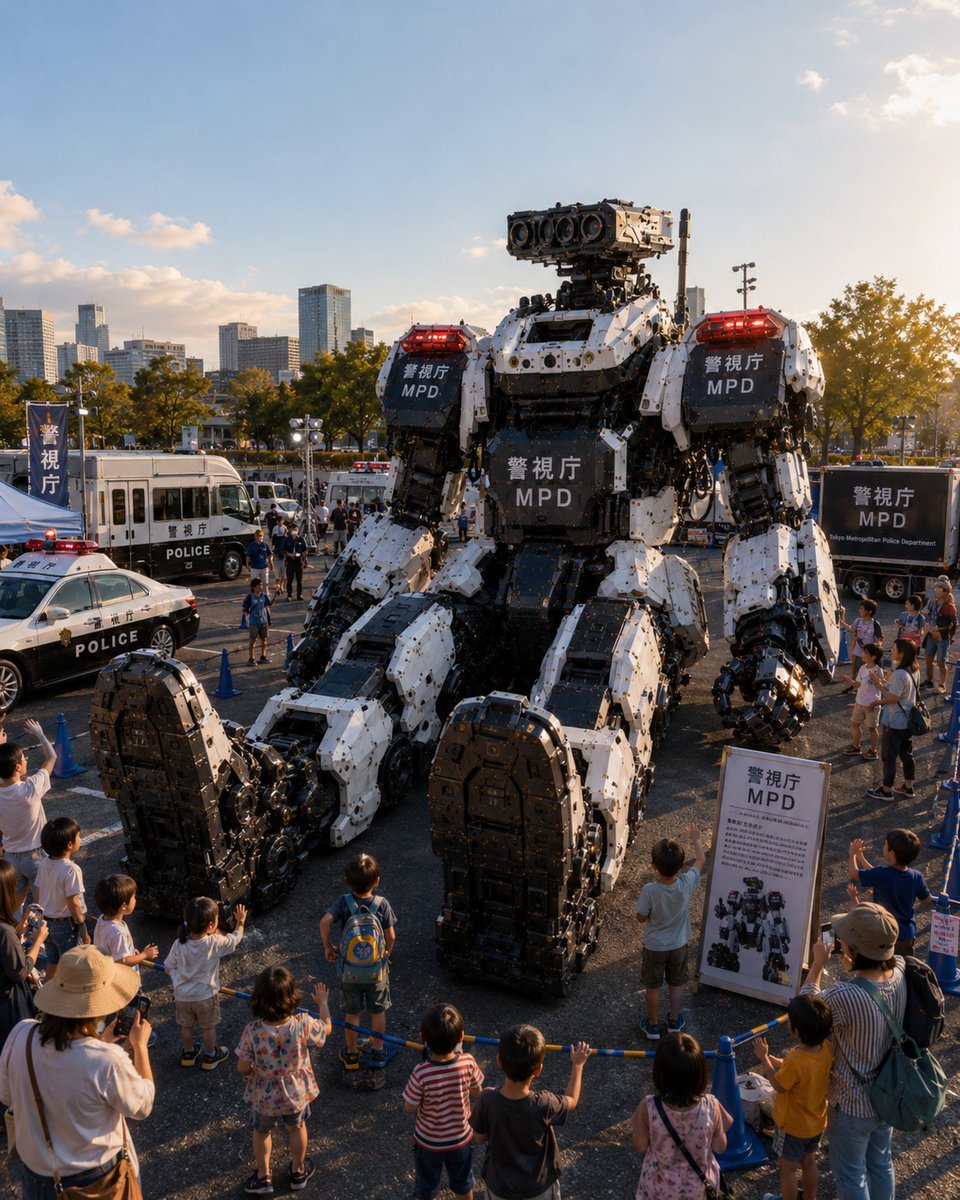
Tokyo Police Robot Exhibition
A photorealistic scene of a massive MPD humanoid police robot displayed at a Tokyo public police vehicle exhibition.
Dies ist ein GPT Image 2 -Prompt für Andere Inspiration . Verwenden Sie den unten stehenden, kopierfertigen Prompt, um ähnliche Grafiken zu erstellen, und überprüfen Sie vor der Wiederverwendung Awesome GPT Image 2 Prompts -Quellenangaben sowie die kommerziellen Nutzungsrechte.
Benötigen Sie den vollständigen Prompt-Satz? Verwenden Sie den Andere Inspiration Weitere verwandte Beispiele finden Sie im Themen-Hub oder öffnen Sie die GPT Image 2 Prompt-Katalog für das vollständige Beispielverzeichnis, wiederverwendbare Strukturen und Quellenangaben.
Free 1K preview
Generate one preview image instantly, no sign-up required.
2473/4000
Eingabeaufforderung
Kopierfertige Eingabeaufforderung
Create a photorealistic vertical event photograph of a futuristic Tokyo Metropolitan Police public vehicle exhibition at golden hour. The main subject is exactly 1 enormous seated humanoid police robot, about three stories tall, built from white and matte-black armored mechanical plates with exposed pistons, bolts, joints, cables, hydraulic arms, oversized feet, and a rectangular sensor head with 4 large circular camera lenses. Put red emergency light bars on both shoulders, and display the visible markings {argument name="agency text" default="MPD"} on exactly 3 dark armor panels: left shoulder, right shoulder, and chest. The robot is seated in the center of an outdoor parking-lot exhibition area behind blue rope barriers, towering over spectators. Include exactly 4 police display vehicles around it: 1 black-and-white patrol sedan in the left foreground with a red roof light, 1 white police bus or command van on the left midground, 1 small white emergency police vehicle behind the robot, and 1 black police trailer or truck on the right midground with Tokyo Metropolitan Police Department-style lettering. Add exactly 3 readable public-safety display items: 1 tall blue vertical flag on the far left with Japanese police text, 1 freestanding white information board on the right foreground showing the robot diagram and MPD heading, and 1 dark rectangular sign on the right trailer. Surround the display with a family crowd, including at least 10 children lined along the blue barrier in the foreground, some waving or pointing upward, plus parents and photographers, all at realistic scale to emphasize the robot’s size. Background: modern Tokyo city skyline, mid-rise office towers, trees with late-afternoon sunlight, open blue sky with a few small clouds. Use cinematic documentary realism, high detail, natural lens perspective from slightly elevated front view, warm sunset highlights, deep mechanical texture, realistic shadows, subtle crowd motion, no anime style, no illustration, no watermark. Overall mood: awe, public demonstration, advanced police robotics. Optional customization: set the event location to {argument name="event location" default="Tokyo outdoor police vehicle exhibition"}, the robot color scheme to {argument name="robot color scheme" default="white and matte black"}, the time of day to {argument name="time of day" default="golden hour"}, and the crowd type to {argument name="crowd type" default="families with children"}.Eingabeaufforderungsvariablen
In der Eingabeaufforderung befinden sich bearbeitbare Argumentplatzhalter mit ihren Standardwerten.
Variable
agency text
Standard
MPD
Variable
event location
Standard
Tokyo outdoor police vehicle exhibition
Variable
robot color scheme
Standard
white and matte black
Variable
time of day
Standard
golden hour
Variable
crowd type
Standard
families with children
Best for
- - Andere Inspiration visual exploration
- - Image generation and reference-image edits
- - Reusable briefs that keep source attribution visible
Change these parts
- - Subject, product, character, or scene
- - Aspect ratio, camera, lighting, and background
- - Brand, text, color, and output constraints
Recommended model and settings
- - Model: gpt-image-2
- - Input mode: Text zu Bild
- - Aspect ratio: source
- - Commercial status: review original source
How to use this prompt
- 1. Copy the prompt and preserve its structure for the first test.
- 2. Replace the subject, context, and publishing channel.
- 3. Change one camera, lighting, or style variable per iteration.
- 4. Inspect the output, source, text, and rights before reuse.
Limitations, source, and reuse cautions
- - Generated output is an editable draft, not factual, legal, or rights evidence.
- - Review the linked source, people, brands, logos, text, and third-party media before commercial use.
Importiert von Awesome GPT Image 2 Prompts . Quellenangabe erforderlich. Status der kommerziellen Nutzung: allowed ; Rechte an der Quelle vor kostenpflichtiger Nutzung prüfen.
Weitere Fälle in dieser Kategorie
Priorisiert nach Kategorie, Kompatibilität der Eingabemodi, Qualität und geringerem Risiko.






Hinweise zur Wiederverwendung und Quellenangabe
Verwenden Sie diese Eingabeaufforderung sicher, nachdem Sie den Fall in der Vorschau angezeigt haben.
- 1.Kopieren Sie die Eingabeaufforderung oder öffnen Sie sie direkt in Dovoo mit der Schaltfläche „Generieren“.
- 2.Passen Sie Variablen, Seitenverhältnis und Referenzbilder an Ihren Anwendungsfall an.
- 3.Vor der Veröffentlichung oder kostenpflichtigen Nutzung sollten Sie die Rechte an der Quelle, die Anforderungen an die Namensnennung sowie die Risiken für die Marke oder das Abbild prüfen.