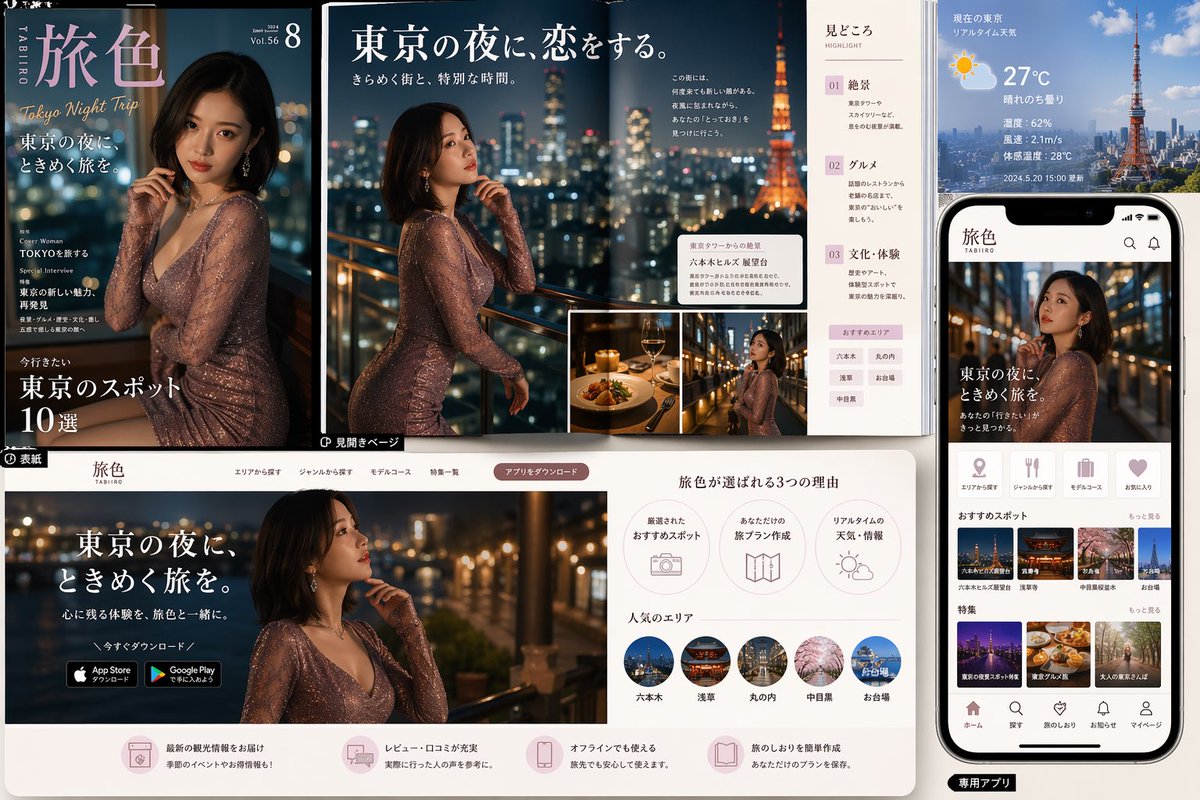
Tokyo Night Travel Marken-Mockup
Ein professionelles Editorial- und App-Konzeptboard für eine Luxusmarke für Nachtreisen in Tokio, geeignet für Reisemarketingpräsentationen, UI-Showcases und Kampagnenvisualisierungen im Magazinstil.
Dies ist ein GPT Image 2 -Prompt für Produkt & Vertrieb . Verwenden Sie den unten stehenden, kopierfertigen Prompt, um ähnliche Grafiken zu erstellen, und überprüfen Sie vor der Wiederverwendung Awesome GPT Image 2 Prompts -Quellenangaben sowie die kommerziellen Nutzungsrechte.
Free 1K preview
Generate one preview image instantly, no sign-up required.
Eingabeaufforderung
Kopierfertige Eingabeaufforderung
{
  "type": "travel magazine and mobile app promotional mockup",
  "theme": "romantic Tokyo night travel branding",
  "brand": {
    "name": "{argument name=\"brand name\" default=\"Tabi-iro\"}",
    "romanized": "TABIIRO",
    "tagline": "Tokyo Night Trip"
  },
  "style": {
    "overall": "luxury editorial design blended with modern travel app UI presentation",
    "color_palette": "deep navy, black, warm gold, soft blush pink, white, city-light bokeh",
    "lighting": "cinematic nighttime glow with sparkling urban lights and warm highlights",
    "mood": "elegant, romantic, aspirational, premium"
  },
  "subject": {
    "primary_model": "glamorous adult East Asian woman in a fitted shimmering rose-gold long-sleeve evening dress, shoulder-length dark bob haircut, posed thoughtfully near a balcony railing overlooking Tokyo at night",
    "setting": "high-rise terrace or rooftop with blurred skyline and Tokyo Tower visible"
  },
  "layout": {
    "composition": "multi-panel marketing board showing print cover, double-page spread, website landing page, and smartphone app screen",
    "sections": [
      {
        "title": "magazine cover",
        "position": "top left",
        "count": 1,
        "labels": [
          "Tabi-iro",
          "Tokyo Night Trip",
          "東京の夜に、ときめく旅を。",
          "Cover Woman TOKYOを旅する",
          "Special Interview 東京の新しい魅力、再発見",
          "今行きたい 東京のスポット10選"
        ]
      },
      {
        "title": "magazine spread",
        "position": "top center",
        "count": 1,
        "labels": [
          "Vol.56",
          "8",
          "東京の夜に、恋をする。",
          "きらめく街と、特別な時間。",
          "見どころ",
          "01 Scenic Spot (01 Scenic Spot)",
          "02 グルメ",
          "03 文化・体験"
        ]
      },
      {
        "title": "weather and city info panel",
        "position": "top right",
        "count": 1,
        "labels": [
          "現在の東京 リアルタイム天気",
          "27°C",
          "晴れのち曇り",
          "Humidity: 62%",
          "Wind speed: 2.1m/s",
          "Feels like temperature: 28°C",
          "Updated 2024.5.20 15:00"
        ]
      },
      {
        "title": "smartphone app screen",
        "position": "right side",
        "count": 1,
        "labels": [
          "Tabi-iro",
          "東京の夜に、ときめく旅を。",
          "おすすめスポット",
          "Special Feature",
          "ホーム",
          "探す",
          "旅のしおり",
          "お知らせ",
          "マイページ"
        ]
      },
      {
        "title": "website landing page",
        "position": "bottom left and center",
        "count": 1,
        "labels": [
          "Tabi-iro",
          "東京の夜に、ときめく旅を。",
          "心に残る体験を、旅色と一緒に。",
          "今すぐダウンロード",
          "App Store からダウンロード",
          "Google Play で手に入れよう",
          "旅色が選ばれる3つの理由",
          "厳選されたおすすめスポット",
          "あなただけの旅プラン作成",
          "リアルタイムの天気・情報",
          "人気のエリア"
        ]
      },
      {
        "title": "popular areas row",
        "position": "bottom center",
        "count": 5,
        "labels": [
          "Roppongi",
          "Asakusa",
          "丸の内",
          "Nakameguro",
          "お台場"
        ]
      },
      {
        "title": "feature thumbnails on app",
        "position": "mid to lower right inside phone",
        "count": 6,
        "labels": [
          "六本木ヒルズ展望台",
          "Senso-ji Temple",
          "中目黒の夜桜",
          "ネオン街",
          "東京グルメ旅",
          "大人の東京さんぽ"
        ]
      },
      {
        "title": "reason icons row",
        "position": "bottom center upper",
        "count": 3,
        "labels": [
          "厳選されたおすすめスポット",
          "あなただけの旅プラン作成",
          "リアルタイムの天気・情報"
        ]
      },
      {
        "title": "bottom service features row",
        "position": "very bottom across website panel",
        "count": 4,
        "labels": [
          "最新の観光情報をお届け",
          "レビュー・口コミが充実",
          "オフラインでも使える",
          "旅のしおりを簡単作成"
        ]
      }
    ],
    "inset_images": {
      "count": 2,
      "descriptions": [
        "fine dining plate with wine in warm candlelit restaurant",
        "smaller portrait of the same woman on a balcony with city lights"
      ]
    }
  },
  "background": {
    "surface": "clean light tabletop or presentation board",
    "arrangement": "overlapping printed pages and digital screens laid out like a branding case study"
  },
  "rendering": {
    "quality": "high-resolution commercial mockup",
    "camera": "slightly elevated front view capturing all panels clearly",
    "detail_level": "crisp typography, glossy print feel, realistic phone hardware, polished UI cards"
  },
  "customization": {
    "city": "{argument name=\"city\" default=\"Tokyo\"}",
    "main headline": "{argument name=\"main headline\" default=\"東京の夜に、ときめく旅を。\"}",
    "temperature": "{argument name=\"temperature\" default=\"27°C\"}",
    "dress color": "{argument name=\"dress color\" default=\"rose-gold shimmer\"}"
  }
}
Eingabeaufforderungsvariablen
In der Eingabeaufforderung befinden sich bearbeitbare Argumentplatzhalter mit ihren Standardwerten.
Best for
- - Produkt & Vertrieb visual exploration
- - Image generation and reference-image edits
- - Reusable briefs that keep source attribution visible
Change these parts
- - Subject, product, character, or scene
- - Aspect ratio, camera, lighting, and background
- - Brand, text, color, and output constraints
Recommended model and settings
- - Model: gpt-image-2
- - Input mode: Text zu Bild
- - Aspect ratio: source
- - Commercial status: review original source
How to use this prompt
- 1. Copy the prompt and preserve its structure for the first test.
- 2. Replace the subject, context, and publishing channel.
- 3. Change one camera, lighting, or style variable per iteration.
- 4. Inspect the output, source, text, and rights before reuse.
Limitations, source, and reuse cautions
- - Generated output is an editable draft, not factual, legal, or rights evidence.
- - Review the linked source, people, brands, logos, text, and third-party media before commercial use.
Weitere Fälle in dieser Kategorie
Priorisiert nach Kategorie, Kompatibilität der Eingabemodi, Qualität und geringerem Risiko.






Hinweise zur Wiederverwendung und Quellenangabe
Verwenden Sie diese Eingabeaufforderung sicher, nachdem Sie den Fall in der Vorschau angezeigt haben.
- 1.Kopieren Sie die Eingabeaufforderung oder öffnen Sie sie direkt in Dovoo mit der Schaltfläche „Generieren“.
- 2.Passen Sie Variablen, Seitenverhältnis und Referenzbilder an Ihren Anwendungsfall an.
- 3.Vor der Veröffentlichung oder kostenpflichtigen Nutzung sollten Sie die Rechte an der Quelle, die Anforderungen an die Namensnennung sowie die Risiken für die Marke oder das Abbild prüfen.