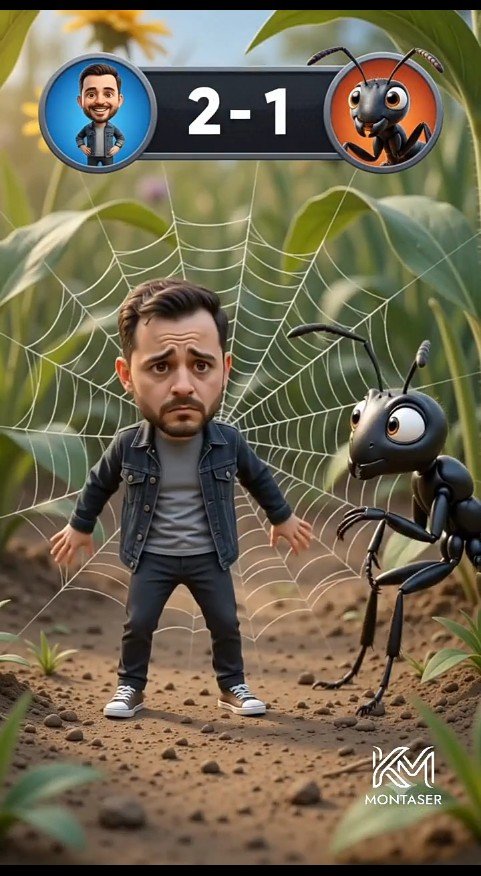
Tiny Man vs Giant Ant Scoreboard Scene
A vertical cinematic 3D cartoon forest-floor scene featuring a worried miniature man trapped in a spider web beside a giant ant with a game scoreboard overlay.
Dies ist ein GPT Image 2 -Prompt für Anime & Spiel . Verwenden Sie den unten stehenden, kopierfertigen Prompt, um ähnliche Grafiken zu erstellen, und überprüfen Sie vor der Wiederverwendung Awesome GPT Image 2 Prompts -Quellenangaben sowie die kommerziellen Nutzungsrechte.
Free 1K preview
Generate one preview image instantly, no sign-up required.
Eingabeaufforderung
Kopierfertige Eingabeaufforderung
Create a cinematic vertical 3D cartoon scene on a realistic forest floor, framed like a mobile video still. In the center foreground, show one cute miniature bearded man, {argument name="character name" default="Montaser"}, with an oversized caricature head and worried expression, standing stiffly with arms slightly out while trapped in a large white spider web behind him. He has short dark brown hair, a trimmed beard, raised sad eyebrows, and big anxious eyes. Dress him in exactly four main outfit pieces: a dark denim jacket, a gray T-shirt, black pants, and white sneakers. To his right, show one giant glossy black cartoon ant with large expressive eyes, two antennae, six thin legs, and bent forearms, leaning toward him with a curious intimidating look. Behind them, the spider web radiates clearly across green leaves and stems. At the top center, add a game-style scoreboard overlay: a dark rounded rectangle with exactly two circular avatar icons, the left icon showing the man on a blue background, the right icon showing the ant on an orange background, and large white score text {argument name="score text" default="2 - 1"} between them. The environment is a macro-scale forest floor with dirt, small pebbles, tiny plants, blurred green foliage, warm daylight, shallow depth of field, and cinematic bokeh. Use polished Pixar-like 3D rendering, soft realistic lighting, detailed textures, playful comedy tension, and a vertical 9:16 composition. Add a small white stylized logo watermark at the bottom right reading {argument name="watermark text" default="MONTASER"}.Eingabeaufforderungsvariablen
In der Eingabeaufforderung befinden sich bearbeitbare Argumentplatzhalter mit ihren Standardwerten.
Best for
- - Anime & Spiel visual exploration
- - Image generation and reference-image edits
- - Reusable briefs that keep source attribution visible
Change these parts
- - Subject, product, character, or scene
- - Aspect ratio, camera, lighting, and background
- - Brand, text, color, and output constraints
Recommended model and settings
- - Model: gpt-image-2
- - Input mode: Text zu Bild
- - Aspect ratio: source
- - Commercial status: review original source
How to use this prompt
- 1. Copy the prompt and preserve its structure for the first test.
- 2. Replace the subject, context, and publishing channel.
- 3. Change one camera, lighting, or style variable per iteration.
- 4. Inspect the output, source, text, and rights before reuse.
Limitations, source, and reuse cautions
- - Generated output is an editable draft, not factual, legal, or rights evidence.
- - Review the linked source, people, brands, logos, text, and third-party media before commercial use.
Weitere Fälle in dieser Kategorie
Priorisiert nach Kategorie, Kompatibilität der Eingabemodi, Qualität und geringerem Risiko.






Hinweise zur Wiederverwendung und Quellenangabe
Verwenden Sie diese Eingabeaufforderung sicher, nachdem Sie den Fall in der Vorschau angezeigt haben.
- 1.Kopieren Sie die Eingabeaufforderung oder öffnen Sie sie direkt in Dovoo mit der Schaltfläche „Generieren“.
- 2.Passen Sie Variablen, Seitenverhältnis und Referenzbilder an Ihren Anwendungsfall an.
- 3.Vor der Veröffentlichung oder kostenpflichtigen Nutzung sollten Sie die Rechte an der Quelle, die Anforderungen an die Namensnennung sowie die Risiken für die Marke oder das Abbild prüfen.