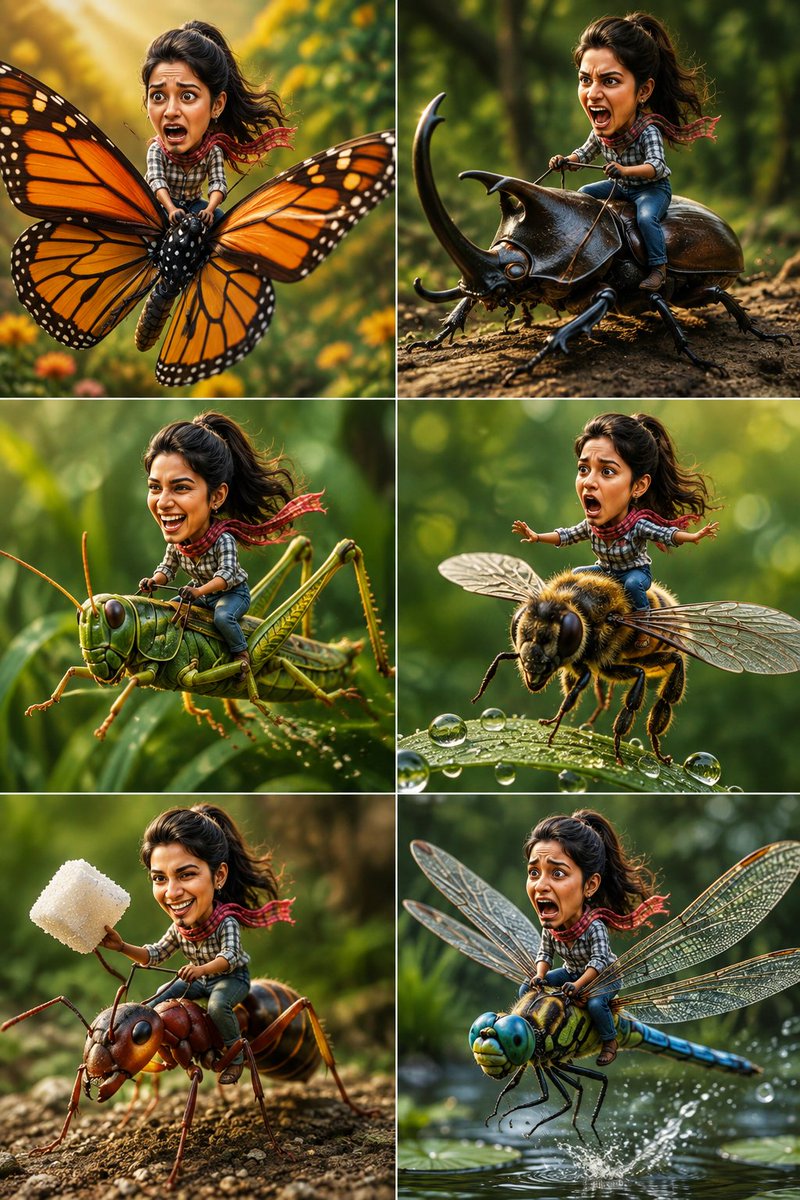
Tiny Adventurer Giant Insect Collage
A whimsical 6-panel collage prompt that creates stylized 3D versions of a person riding giant insects with expressive faces and Pixar-like charm.
Dies ist ein GPT Image 2 -Prompt für Porträt & Charakter . Verwenden Sie den unten stehenden, kopierfertigen Prompt, um ähnliche Grafiken zu erstellen, und überprüfen Sie vor der Wiederverwendung Awesome GPT Image 2 Prompts -Quellenangaben sowie die kommerziellen Nutzungsrechte.
Free 1K preview
Generate one preview image instantly, no sign-up required.
Free text preview doesn’t preserve reference-image consistency.
Eingabeaufforderung
Kopierfertige Eingabeaufforderung
Create a 6-panel ultra-realistic cinematic collage using the uploaded reference image as the facial reference. Keep the woman's recognizable face, hairstyle, facial features, skin tone, and expression consistent across all six scenes while giving her a cute oversized-head, tiny-body stylized 3D character appearance. Theme: "{argument name="theme" default="Tiny Adventurer Riding Giant Insects"}" Each panel features a different giant insect with a unique funny expression and pose. Scene 1: {argument name="scene one" default="The tiny woman rides a giant Monarch butterfly soaring through a lush garden. She has a terrified, wide-eyed expression while tightly gripping the butterfly's body as its colorful wings flap through golden sunlight."} Scene 2: She confidently rides a massive rhinoceros beetle like a motorcycle, leaning forward and shouting excitedly as the beetle charges across a tree log. Scene 3: She laughs uncontrollably while riding a giant green grasshopper performing a huge leap between tall blades of grass. Scene 4: She balances nervously while surfing on the back of a giant honeybee flying above dew-covered leaves, arms stretched for balance with an exaggerated shocked face. Scene 5: She happily rides a giant red ant carrying an oversized sugar cube through a forest floor, proudly raising the sugar cube like a trophy. Scene 6: She screams dramatically while riding a giant dragonfly racing just above a peaceful pond at incredible speed, water splashing beneath the wings. Style: {argument name="style" default="Ultra-realistic macro photography, stylized 3D character with an oversized expressive head and tiny body, cinematic lighting, Pixar-inspired proportions"}, highly detailed insect anatomy, realistic wings, fur, and textures, shallow depth of field, beautiful garden bokeh, vibrant natural colors, whimsical adventure, funny expressions, premium 3D rendering, 8K, hyper-detailed, vertical 2×3 collage layout. Negative Prompt: blurry, low quality, duplicate character, duplicate insects, deformed face, extra limbs, incorrect anatomy, cropped character, watermark, logo, text, flat lighting, horror, gore, realistic human-sized insects, CGI artifacts, low resolution.Eingabeaufforderungsvariablen
In der Eingabeaufforderung befinden sich bearbeitbare Argumentplatzhalter mit ihren Standardwerten.
Best for
- - Porträt & Charakter visual exploration
- - Image generation and reference-image edits
- - Reusable briefs that keep source attribution visible
Change these parts
- - Subject, product, character, or scene
- - Aspect ratio, camera, lighting, and background
- - Brand, text, color, and output constraints
Recommended model and settings
- - Model: gpt-image-2
- - Input mode: Bild zu Bild
- - Aspect ratio: source
- - Commercial status: review original source
How to use this prompt
- 1. Copy the prompt and preserve its structure for the first test.
- 2. Replace the subject, context, and publishing channel.
- 3. Change one camera, lighting, or style variable per iteration.
- 4. Inspect the output, source, text, and rights before reuse.
Limitations, source, and reuse cautions
- - Generated output is an editable draft, not factual, legal, or rights evidence.
- - Review the linked source, people, brands, logos, text, and third-party media before commercial use.
Weitere Fälle in dieser Kategorie
Priorisiert nach Kategorie, Kompatibilität der Eingabemodi, Qualität und geringerem Risiko.






Hinweise zur Wiederverwendung und Quellenangabe
Verwenden Sie diese Eingabeaufforderung sicher, nachdem Sie den Fall in der Vorschau angezeigt haben.
- 1.Kopieren Sie die Eingabeaufforderung oder öffnen Sie sie direkt in Dovoo mit der Schaltfläche „Generieren“.
- 2.Passen Sie Variablen, Seitenverhältnis und Referenzbilder an Ihren Anwendungsfall an.
- 3.Vor der Veröffentlichung oder kostenpflichtigen Nutzung sollten Sie die Rechte an der Quelle, die Anforderungen an die Namensnennung sowie die Risiken für die Marke oder das Abbild prüfen.