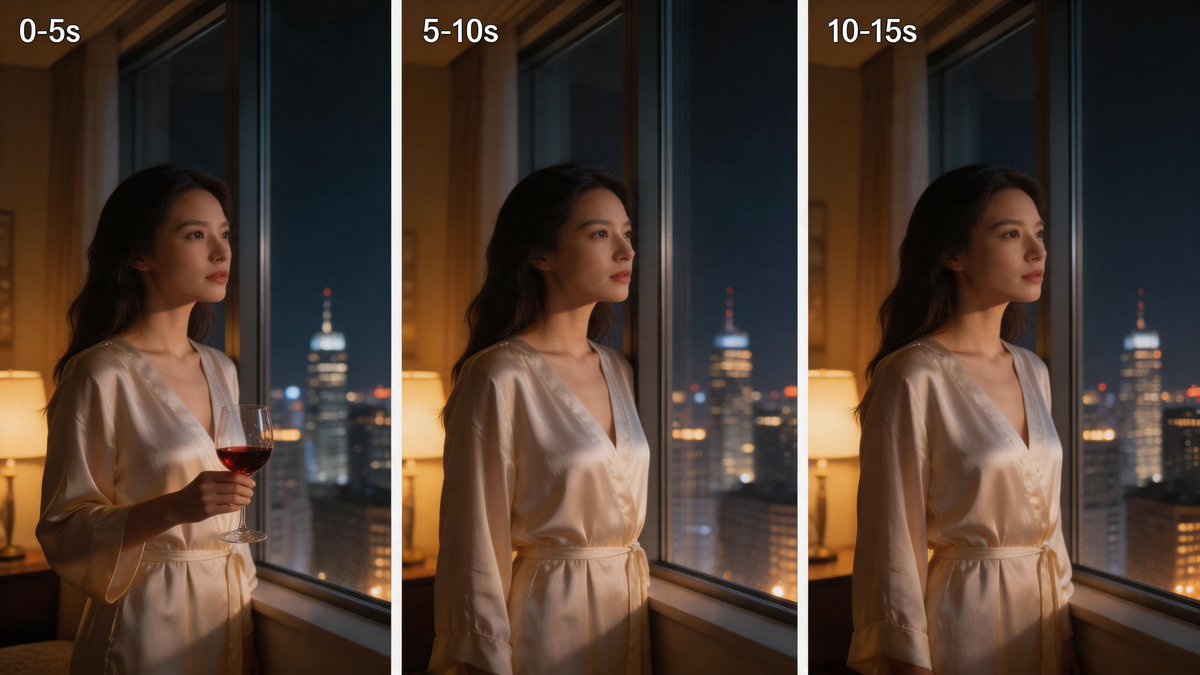
Vergleich von dreiteiligen Nachtfenstern
Diese Eingabeaufforderung erzeugt ein filmisches Triptychon einer Frau in einem Satinmorgenmantel an einem nächtlichen Fenster, das sich für visuelle Zeitvergleiche oder stimmungsbasierte Lifestyle-Werbung eignet.
Dies ist ein GPT Image 2 -Prompt für Porträt & Charakter . Verwenden Sie den unten stehenden, kopierfertigen Prompt, um ähnliche Grafiken zu erstellen, und überprüfen Sie vor der Wiederverwendung Awesome GPT Image 2 Prompts -Quellenangaben sowie die kommerziellen Nutzungsrechte.
Benötigen Sie den vollständigen Prompt-Satz? Verwenden Sie den Porträt & Charakter Weitere verwandte Beispiele finden Sie im Themen-Hub oder öffnen Sie die GPT Image 2 Prompt-Katalog für das vollständige Beispielverzeichnis, wiederverwendbare Strukturen und Quellenangaben.
Free 1K preview
Generate one preview image instantly, no sign-up required.
2336/4000
Eingabeaufforderung
Kopierfertige Eingabeaufforderung
{
  "type": "three-panel cinematic comparison image",
  "subject": {
    "count": 1,
    "description": "a woman standing indoors beside a tall hotel or apartment window at night, shown from mid-thigh up, face turned toward the city, long dark wavy hair, wearing a glossy ivory satin robe with a tied waist and deep V neckline",
    "prop": {
      "count": 1,
      "description": "a stemmed wine glass with red wine, held in her right hand only in the first panel"
    }
  },
  "scene": {
    "location": "warmly lit luxury interior with a table lamp glowing on the left and a nighttime city skyline outside the window",
    "background_elements": {
      "count": 3,
      "items": [
        "large floor-to-ceiling window with dark vertical frame",
        "soft warm bedside or table lamp on the left",
        "blurred high-rise buildings with bokeh lights and one prominent tower with a lit spire"
      ]
    },
    "lighting": "moody cinematic contrast, warm amber interior light on skin and robe, cool blue city light from outside, shallow depth of field"
  },
  "layout": {
    "orientation": "horizontal triptych with three equal vertical panels separated by white gutters",
    "sections": [
      {
        "title": "0-5s",
        "position": "left",
        "count": 1,
        "details": "woman by the window holding a glass of red wine"
      },
      {
        "title": "5-10s",
        "position": "center",
        "count": 1,
        "details": "same composition without the wine glass, woman gazing out the window"
      },
      {
        "title": "10-15s",
        "position": "right",
        "count": 1,
        "details": "same composition again without the wine glass, subtle pose continuity"
      }
    ],
    "text_style": "bold white sans-serif text in the top-left corner of each panel"
  },
  "style": "photorealistic, cinematic, intimate luxury lifestyle photography, soft focus background, polished skin tones, realistic satin fabric reflections",
  "camera": {
    "framing": "medium shot",
    "angle": "slightly side-on profile",
    "lens": "portrait lens around 50mm to 85mm",
    "composition": "subject placed left of center in each panel, city view visible through the glass"
  },
  "quality": "high detail, smooth natural skin, realistic glass and fabric, elegant editorial color grading"
}
Best for
- - Porträt & Charakter visual exploration
- - Image generation and reference-image edits
- - Reusable briefs that keep source attribution visible
Change these parts
- - Subject, product, character, or scene
- - Aspect ratio, camera, lighting, and background
- - Brand, text, color, and output constraints
Recommended model and settings
- - Model: gpt-image-2
- - Input mode: Text zu Bild
- - Aspect ratio: source
- - Commercial status: review original source
How to use this prompt
- 1. Copy the prompt and preserve its structure for the first test.
- 2. Replace the subject, context, and publishing channel.
- 3. Change one camera, lighting, or style variable per iteration.
- 4. Inspect the output, source, text, and rights before reuse.
Limitations, source, and reuse cautions
- - Generated output is an editable draft, not factual, legal, or rights evidence.
- - Review the linked source, people, brands, logos, text, and third-party media before commercial use.
Importiert von Awesome GPT Image 2 Prompts . Quellenangabe erforderlich. Status der kommerziellen Nutzung: allowed ; Rechte an der Quelle vor kostenpflichtiger Nutzung prüfen.
Weitere Fälle in dieser Kategorie
Priorisiert nach Kategorie, Kompatibilität der Eingabemodi, Qualität und geringerem Risiko.






Hinweise zur Wiederverwendung und Quellenangabe
Verwenden Sie diese Eingabeaufforderung sicher, nachdem Sie den Fall in der Vorschau angezeigt haben.
- 1.Kopieren Sie die Eingabeaufforderung oder öffnen Sie sie direkt in Dovoo mit der Schaltfläche „Generieren“.
- 2.Passen Sie Variablen, Seitenverhältnis und Referenzbilder an Ihren Anwendungsfall an.
- 3.Vor der Veröffentlichung oder kostenpflichtigen Nutzung sollten Sie die Rechte an der Quelle, die Anforderungen an die Namensnennung sowie die Risiken für die Marke oder das Abbild prüfen.