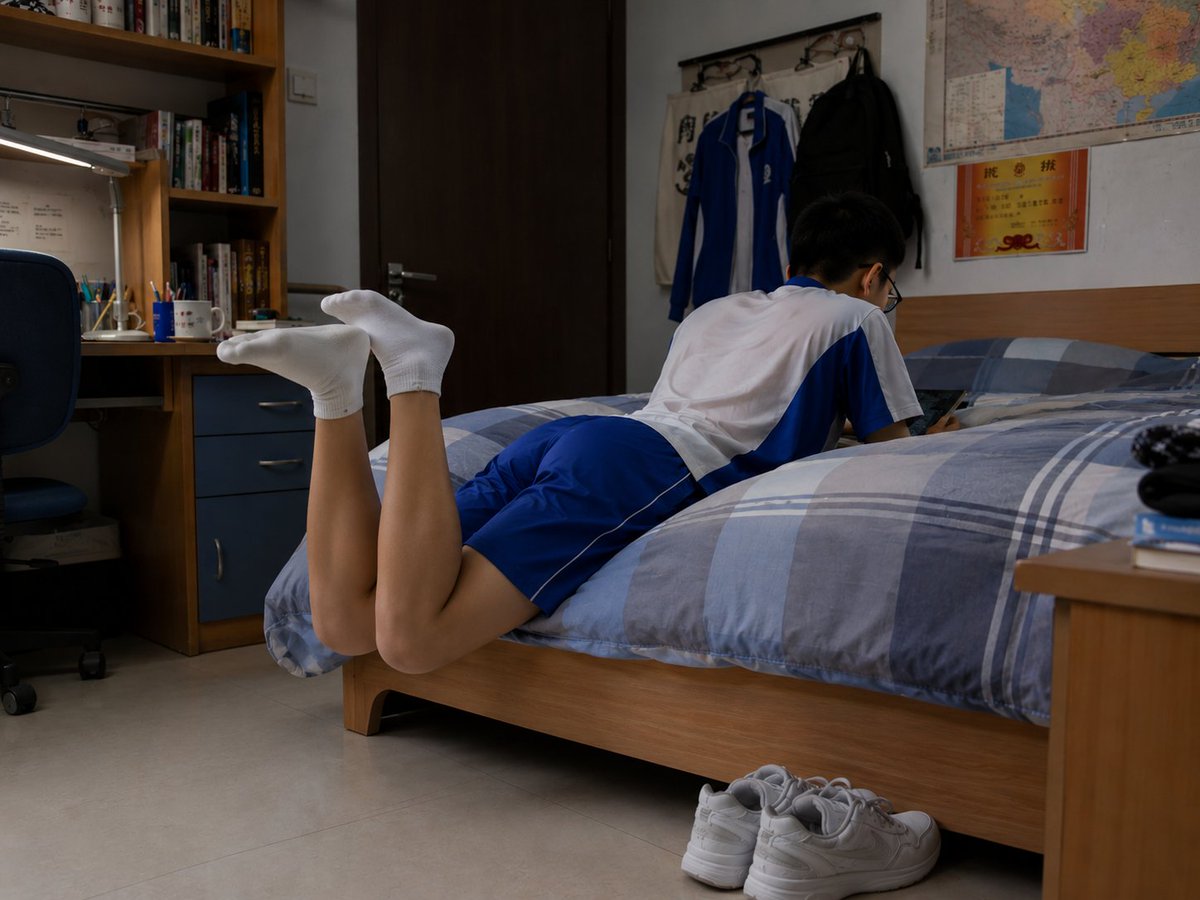
Photorealistic Student Dorm Room Scene
Generates a realistic documentary-style dormitory bedroom scene with a fully clothed student resting on a bed, useful for cinematic slice-of-life imagery.
Dies ist ein GPT Image 2 -Prompt für Innenarchitektur . Verwenden Sie den unten stehenden, kopierfertigen Prompt, um ähnliche Grafiken zu erstellen, und überprüfen Sie vor der Wiederverwendung Awesome GPT Image 2 Prompts -Quellenangaben sowie die kommerziellen Nutzungsrechte.
Benötigen Sie den vollständigen Prompt-Satz? Verwenden Sie den Innenarchitektur Weitere verwandte Beispiele finden Sie im Themen-Hub oder öffnen Sie die GPT Image 2 Prompt-Katalog für das vollständige Beispielverzeichnis, wiederverwendbare Strukturen und Quellenangaben.
Free 1K preview
Generate one preview image instantly, no sign-up required.
1436/4000
Eingabeaufforderung
Kopierfertige Eingabeaufforderung
Create a photorealistic documentary-style image of a quiet student dormitory bedroom in the evening, shot from a low side angle at bed height with natural indoor lighting. A {argument name="student age" default="teenage"} male student is lying face-down across a single wooden bed, fully clothed in a {argument name="school uniform colors" default="white and royal blue"} short-sleeve athletic school uniform with matching blue shorts. His head and upper body face toward the wall side of the bed, Show every face clearly with natural, detailed facial features, and his lower legs are bent upward behind him with both feet wearing plain white ankle socks. The room feels realistic and lived-in: a blue-gray plaid duvet covers the bed, a pair of white sneakers sits neatly on the tile floor beside the bed, a wooden desk and bookshelf with books, stationery cups, a desk lamp, and a blue office chair appear on the left, while the back wall has a dark wooden door, wall hooks holding two hanging jackets, a large colorful map, and a small orange certificate or notice. Include exactly 1 student, 1 bed, 1 pair of white sneakers, 1 desk, 1 chair, 1 bookshelf, 1 desk lamp, 2 hanging jackets, 1 wall map, and 1 orange wall certificate. Use a realistic camera look with soft shadows, muted dorm-room colors, slight wide-angle perspective, and no stylization, no glamour lighting, no extra people, no visible text emphasis, and no watermark.Eingabeaufforderungsvariablen
In der Eingabeaufforderung befinden sich bearbeitbare Argumentplatzhalter mit ihren Standardwerten.
Variable
student age
Standard
teenage
Variable
school uniform colors
Standard
white and royal blue
Best for
- - Innenarchitektur visual exploration
- - Image generation and reference-image edits
- - Reusable briefs that keep source attribution visible
Change these parts
- - Subject, product, character, or scene
- - Aspect ratio, camera, lighting, and background
- - Brand, text, color, and output constraints
Recommended model and settings
- - Model: gpt-image-2
- - Input mode: Text zu Bild
- - Aspect ratio: source
- - Commercial status: review original source
How to use this prompt
- 1. Copy the prompt and preserve its structure for the first test.
- 2. Replace the subject, context, and publishing channel.
- 3. Change one camera, lighting, or style variable per iteration.
- 4. Inspect the output, source, text, and rights before reuse.
Limitations, source, and reuse cautions
- - Generated output is an editable draft, not factual, legal, or rights evidence.
- - Review the linked source, people, brands, logos, text, and third-party media before commercial use.
Importiert von Awesome GPT Image 2 Prompts . Quellenangabe erforderlich. Status der kommerziellen Nutzung: allowed ; Rechte an der Quelle vor kostenpflichtiger Nutzung prüfen.
Weitere Fälle in dieser Kategorie
Priorisiert nach Kategorie, Kompatibilität der Eingabemodi, Qualität und geringerem Risiko.






Hinweise zur Wiederverwendung und Quellenangabe
Verwenden Sie diese Eingabeaufforderung sicher, nachdem Sie den Fall in der Vorschau angezeigt haben.
- 1.Kopieren Sie die Eingabeaufforderung oder öffnen Sie sie direkt in Dovoo mit der Schaltfläche „Generieren“.
- 2.Passen Sie Variablen, Seitenverhältnis und Referenzbilder an Ihren Anwendungsfall an.
- 3.Vor der Veröffentlichung oder kostenpflichtigen Nutzung sollten Sie die Rechte an der Quelle, die Anforderungen an die Namensnennung sowie die Risiken für die Marke oder das Abbild prüfen.