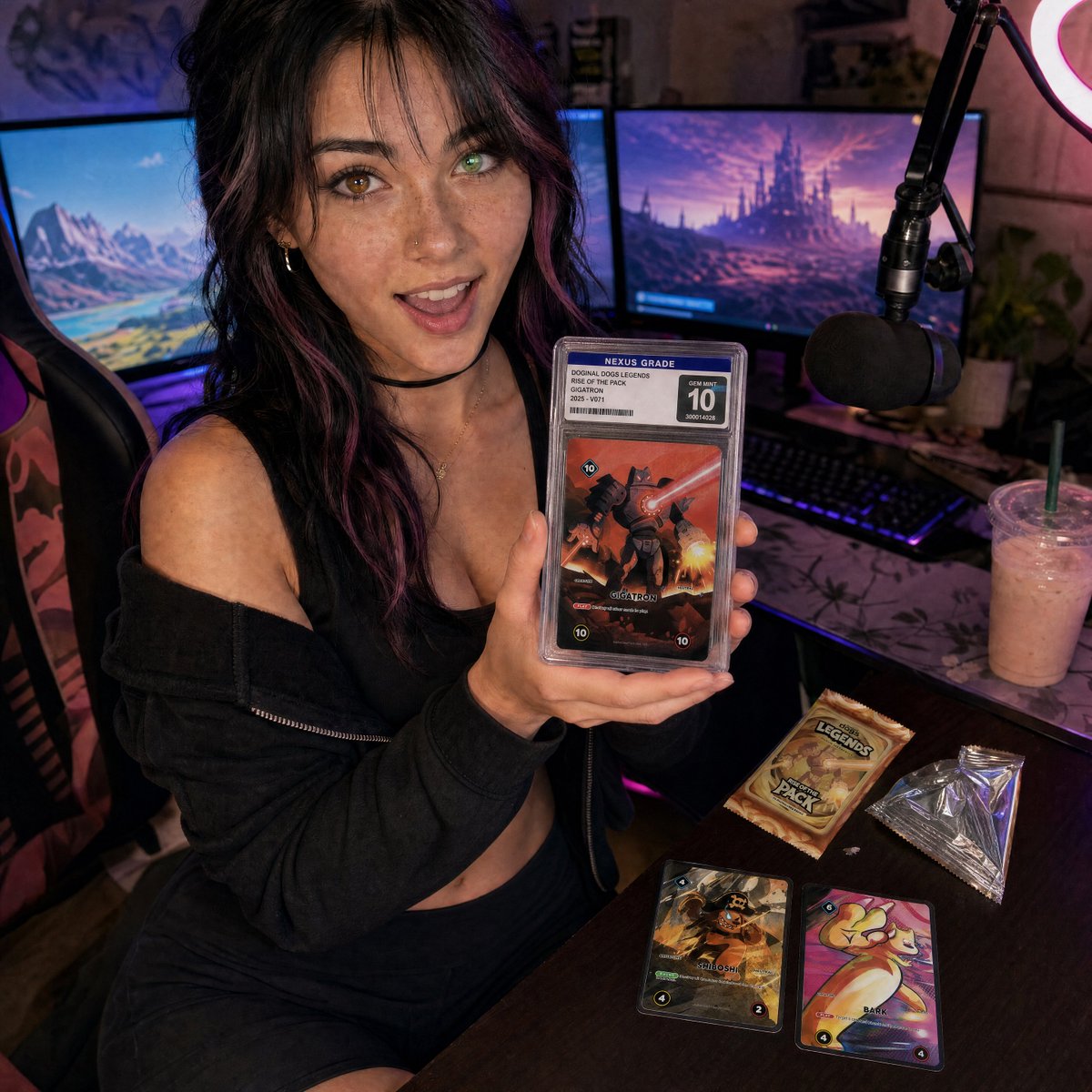
Streamer Trading Card Product Shot
A photorealistic influencer-style gaming desk scene featuring a streamer showcasing a graded collectible card for marketing or social content.
Dies ist ein GPT Image 2 -Prompt für Produkt & Vertrieb . Verwenden Sie den unten stehenden, kopierfertigen Prompt, um ähnliche Grafiken zu erstellen, und überprüfen Sie vor der Wiederverwendung Awesome GPT Image 2 Prompts -Quellenangaben sowie die kommerziellen Nutzungsrechte.
Benötigen Sie den vollständigen Prompt-Satz? Verwenden Sie den Produkt & Vertrieb Weitere verwandte Beispiele finden Sie im Themen-Hub oder öffnen Sie die GPT Image 2 Prompt-Katalog für das vollständige Beispielverzeichnis, wiederverwendbare Strukturen und Quellenangaben.
Free 1K preview
Generate one preview image instantly, no sign-up required.
2219/4000
Eingabeaufforderung
Kopierfertige Eingabeaufforderung
Create a photorealistic square social-media product shot of a young female streamer in a cozy gaming setup, shot with a slightly wide-angle close perspective from above desk height. She is seated in a gaming chair, leaning toward the camera with an excited open-mouth smile, holding one graded trading card slab prominently in both hands close to the lens. Her look: {argument name="character appearance" default="young woman with wavy black hair with purple streaks, freckles, nose stud, hoop earrings, choker, black cropped top and loose black off-shoulder hoodie"}. The graded slab should have a clear plastic case, a top label reading “NEXUS GRADE,” a large “10” grade box, a small barcode and serial number, and the card art should show a dramatic red-orange robot/monster battle card titled {argument name="featured card name" default="GIGATRON"}. Place exactly 5 visible trading-card/product elements: 1 graded slab in her hands, 1 unopened booster pack on the desk, 1 opened silver foil wrapper on the desk, and 2 loose cards on the desk, one dark pirate-themed card and one colorful cute creature card. The booster pack should read {argument name="booster pack text" default="DOGINAL DOGS LEGENDS RISE OF THE PACK"}. The background is a streamer room with exactly 2 large monitors showing fantasy landscapes, 1 black boom-arm microphone with foam windscreen on the right, 1 glowing ring light partially visible in the upper right, 1 RGB keyboard, 1 gaming chair, and 1 iced pink drink with straw on the desk. Use moody purple and blue RGB lighting mixed with warm screen glow, shallow depth of field but keep the woman’s face and the graded slab sharp, realistic skin texture, authentic cluttered desk, cinematic marketing-still composition. The overall mood should feel like influencer livestream content for a collectible card game product launch. Use {argument name="lighting style" default="neon purple-blue streamer lighting with warm monitor glow"} and a {argument name="camera style" default="high-detail photorealistic wide-angle smartphone-style shot"}. Avoid extra fingers, unreadable main labels, warped slab edges, duplicate microphones, or additional cards beyond the specified 5 product elements.Eingabeaufforderungsvariablen
In der Eingabeaufforderung befinden sich bearbeitbare Argumentplatzhalter mit ihren Standardwerten.
Variable
character appearance
Standard
young woman with wavy black hair with purple streaks, freckles, nose stud, hoop earrings, choker, black cropped top and loose black off-shoulder hoodie
Variable
featured card name
Standard
GIGATRON
Variable
booster pack text
Standard
DOGINAL DOGS LEGENDS RISE OF THE PACK
Variable
lighting style
Standard
neon purple-blue streamer lighting with warm monitor glow
Variable
camera style
Standard
high-detail photorealistic wide-angle smartphone-style shot
Best for
- - Produkt & Vertrieb visual exploration
- - Image generation and reference-image edits
- - Reusable briefs that keep source attribution visible
Change these parts
- - Subject, product, character, or scene
- - Aspect ratio, camera, lighting, and background
- - Brand, text, color, and output constraints
Recommended model and settings
- - Model: gpt-image-2
- - Input mode: Text zu Bild
- - Aspect ratio: source
- - Commercial status: review original source
How to use this prompt
- 1. Copy the prompt and preserve its structure for the first test.
- 2. Replace the subject, context, and publishing channel.
- 3. Change one camera, lighting, or style variable per iteration.
- 4. Inspect the output, source, text, and rights before reuse.
Limitations, source, and reuse cautions
- - Generated output is an editable draft, not factual, legal, or rights evidence.
- - Review the linked source, people, brands, logos, text, and third-party media before commercial use.
Importiert von Awesome GPT Image 2 Prompts . Quellenangabe erforderlich. Status der kommerziellen Nutzung: allowed ; Rechte an der Quelle vor kostenpflichtiger Nutzung prüfen.
Weitere Fälle in dieser Kategorie
Priorisiert nach Kategorie, Kompatibilität der Eingabemodi, Qualität und geringerem Risiko.






Hinweise zur Wiederverwendung und Quellenangabe
Verwenden Sie diese Eingabeaufforderung sicher, nachdem Sie den Fall in der Vorschau angezeigt haben.
- 1.Kopieren Sie die Eingabeaufforderung oder öffnen Sie sie direkt in Dovoo mit der Schaltfläche „Generieren“.
- 2.Passen Sie Variablen, Seitenverhältnis und Referenzbilder an Ihren Anwendungsfall an.
- 3.Vor der Veröffentlichung oder kostenpflichtigen Nutzung sollten Sie die Rechte an der Quelle, die Anforderungen an die Namensnennung sowie die Risiken für die Marke oder das Abbild prüfen.