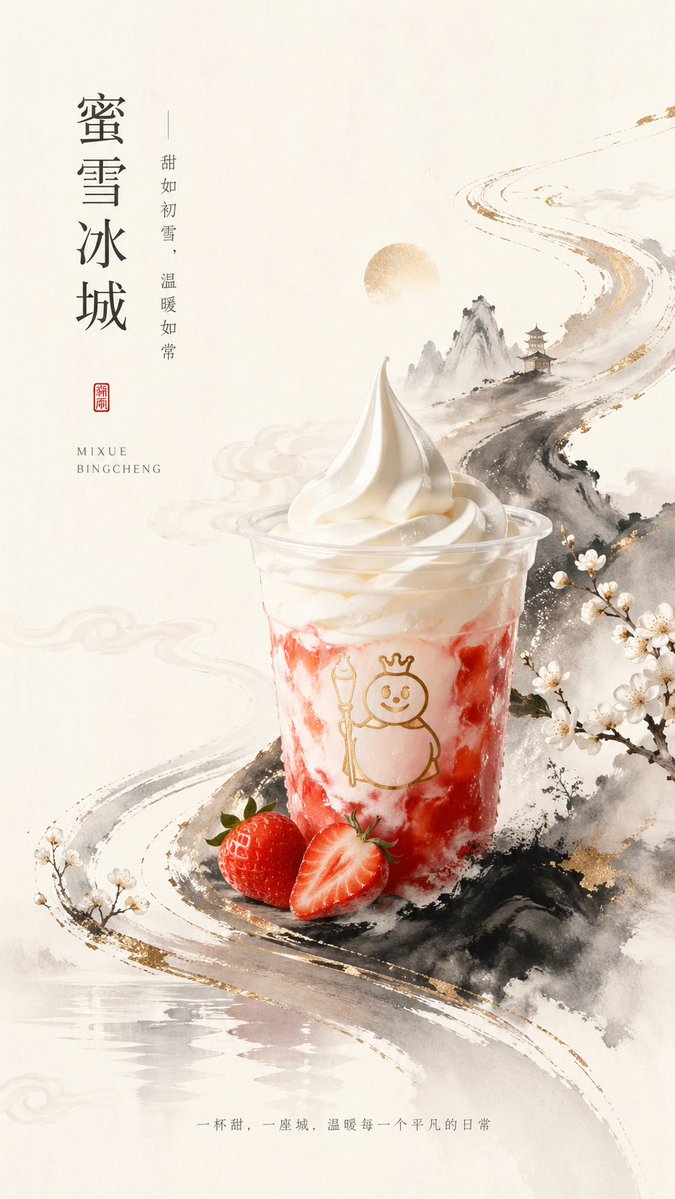
Neues Poster für Eiscremegetränke im chinesischen Stil
Diese Vorgabe generiert eine raffinierte vertikale Getränkewerbung, die ein realistisches Erdbeer-Softeisgetränk mit einer chinesischen Landschaftsgrafik im Tuschewaschstil für Premium-Markenplakate verbindet.
Dies ist ein GPT Image 2 -Prompt für Produkt & Vertrieb . Verwenden Sie den unten stehenden, kopierfertigen Prompt, um ähnliche Grafiken zu erstellen, und überprüfen Sie vor der Wiederverwendung Awesome GPT Image 2 Prompts -Quellenangaben sowie die kommerziellen Nutzungsrechte.
Free 1K preview
Generate one preview image instantly, no sign-up required.
Eingabeaufforderung
Kopierfertige Eingabeaufforderung
A premium vertical poster advertisement in elegant new Chinese aesthetics, featuring a single plastic cup of strawberry sundae-style ice cream drink as the central product. The cup is placed slightly below center, shot straight-on with soft studio lighting, with glossy white swirled soft serve on top, creamy white layers marbled with vivid strawberry-red streaks inside the cup, and a simple gold line-art mascot printed on the front. In front of the cup are exactly 2 strawberries: 1 whole strawberry and 1 halved strawberry with the cut face visible. The background is a warm ivory rice-paper texture with large areas of negative space. Surround the product with an ink-wash Chinese landscape composition: misty gray-black mountains, a winding brushstroke-like river or road flowing diagonally from lower left to upper right, subtle gold foil accents along the brush edges, a pale circular sun or moon near the upper middle, a small traditional pagoda on a mountain ridge, soft drifting cloud motifs, and blooming white plum blossoms on branches at the right edge and lower left corner. The overall palette is off-white, black ink gray, soft beige, gold, and strawberry red, balancing minimalism and luxury. Add vertical Chinese typography on the upper left with the large main title {argument name="headline text" default="Mixue Bingcheng"}, and a thinner vertical tagline beside it reading {argument name="tagline text" default="Sweet as the first snow, warm as always"}. Beneath that, place a small red seal stamp with Chinese characters, and below it a small uppercase serif-style Latin brand line reading {argument name="brand text" default="MIXUE BINGCHENG"}. At the bottom center, add one line of small Chinese slogan text reading {argument name="footer text" default="A cup of sweetness, a city, warming every ordinary day."}. Refined commercial poster design, high detail product realism, painterly ink illustration fusion, clean luxury layout, no extra products, no people, no busy background.Eingabeaufforderungsvariablen
In der Eingabeaufforderung befinden sich bearbeitbare Argumentplatzhalter mit ihren Standardwerten.
Best for
- - Produkt & Vertrieb visual exploration
- - Image generation and reference-image edits
- - Reusable briefs that keep source attribution visible
Change these parts
- - Subject, product, character, or scene
- - Aspect ratio, camera, lighting, and background
- - Brand, text, color, and output constraints
Recommended model and settings
- - Model: gpt-image-2
- - Input mode: Text zu Bild
- - Aspect ratio: source
- - Commercial status: review original source
How to use this prompt
- 1. Copy the prompt and preserve its structure for the first test.
- 2. Replace the subject, context, and publishing channel.
- 3. Change one camera, lighting, or style variable per iteration.
- 4. Inspect the output, source, text, and rights before reuse.
Limitations, source, and reuse cautions
- - Generated output is an editable draft, not factual, legal, or rights evidence.
- - Review the linked source, people, brands, logos, text, and third-party media before commercial use.
Weitere Fälle in dieser Kategorie
Priorisiert nach Kategorie, Kompatibilität der Eingabemodi, Qualität und geringerem Risiko.






Hinweise zur Wiederverwendung und Quellenangabe
Verwenden Sie diese Eingabeaufforderung sicher, nachdem Sie den Fall in der Vorschau angezeigt haben.
- 1.Kopieren Sie die Eingabeaufforderung oder öffnen Sie sie direkt in Dovoo mit der Schaltfläche „Generieren“.
- 2.Passen Sie Variablen, Seitenverhältnis und Referenzbilder an Ihren Anwendungsfall an.
- 3.Vor der Veröffentlichung oder kostenpflichtigen Nutzung sollten Sie die Rechte an der Quelle, die Anforderungen an die Namensnennung sowie die Risiken für die Marke oder das Abbild prüfen.