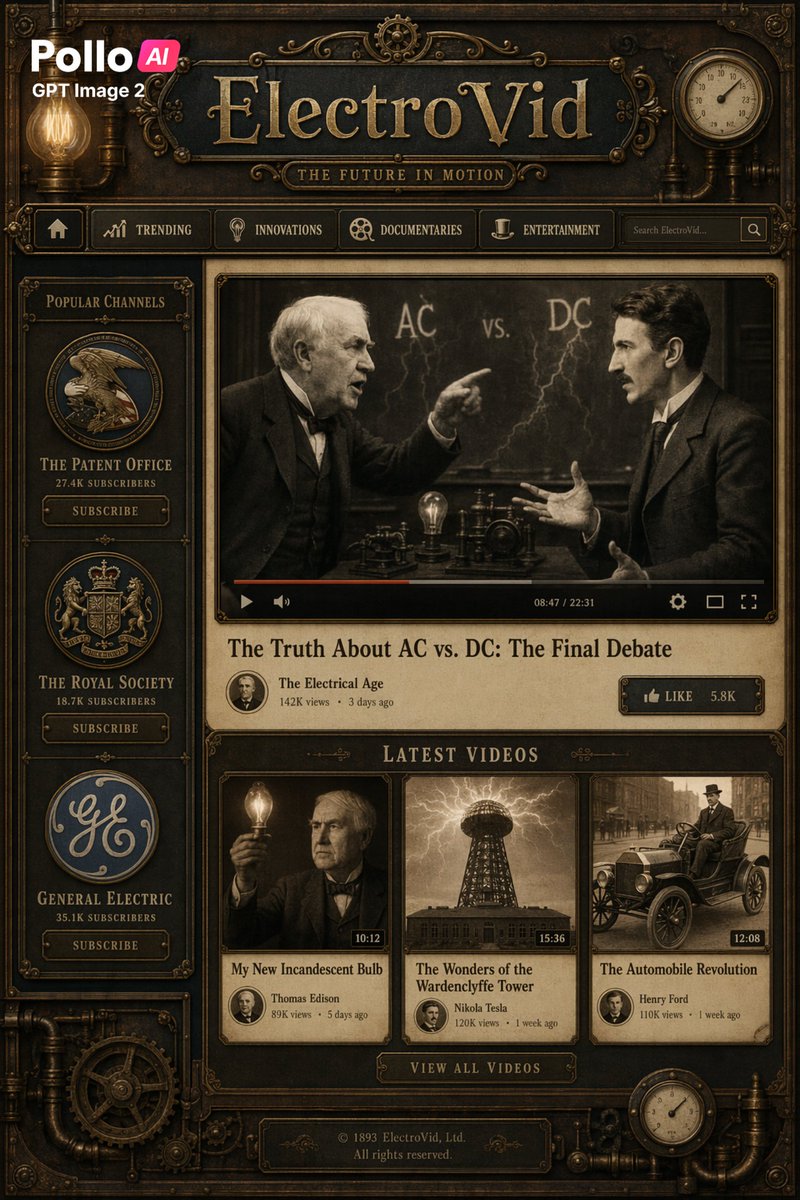
Steampunk ElectroVid Videoplattform-Benutzeroberfläche
Ein detailliertes Mockup einer Streaming-Website im Stil der Antike und Industrie, mit dem sich Retro-Steampunk-Oberflächen, Parodie-Plattformen oder stilisierte Landingpages im historischen Technik-Look erstellen lassen.
Dies ist ein GPT Image 2 -Prompt für Grafik & Poster . Verwenden Sie den unten stehenden, kopierfertigen Prompt, um ähnliche Grafiken zu erstellen, und überprüfen Sie vor der Wiederverwendung Awesome GPT Image 2 Prompts -Quellenangaben sowie die kommerziellen Nutzungsrechte.
Free 1K preview
Generate one preview image instantly, no sign-up required.
Free text preview doesn’t preserve reference-image consistency.
Eingabeaufforderung
Kopierfertige Eingabeaufforderung
Create a full-screen, fictional video streaming website homepage in a detailed steampunk Victorian retro-futuristic style, designed as an interface resembling antique brass and wooden machinery. The page includes 1 main header bar, 1 top navigation bar, 1 left sidebar, 1 featured video panel, 1 latest videos area with 3 thumbnails, 1 central call-to-action button, and 1 footer plaque. The overall color scheme is dark bronze, tarnished brass, browns, blackened steel, and parchment beige, with warm amber lighting, engraved borders, piping, gears, rivets, decorative filigree, and simulated gauge details. In the upper left corner, place a modern brand badge displaying “Pika {argument name="brand tag" default="AI"}”, with “GPT Image 2” above or next to it, contrasting with the antique interface. Centered on a dark plaque, place a large website title in embossed serif gold metal style, “{argument name="site name" default="ElectroVid"}”, with the subtitle “THE FUTURE IN MOTION” below it. Add a glowing Edison bulb to the upper left and a circular pressure gauge or clock face to the upper right. Below the title, include a horizontal navigation bar with 6 elements: a home icon, “TRENDING”, “INNOVATIONS”, “DOCUMENTARIES”, “ENTERTAINMENT”, a search box with placeholder text “Search ElectroVid…” and a search button. In the left sidebar, add a framed area titled “POPULAR CHANNELS”, vertically stacking 3 channel cards, each containing a circular logo, channel name, subscriber count, and a subscribe button: “THE PATENT OFFICE” & “27.4K SUBSCRIBERS”, “THE ROYAL SOCIETY” & “18.7K SUBSCRIBERS”, “GENERAL ELECTRIC” & “35.1K SUBSCRIBERS”. In the main content area, showcase a large featured video player playing a sepia-toned video clip of two early electrical pioneers debating in front of a blackboard with “AC vs. DC” and lightning bolt patterns; Show every face clearly with natural, detailed facial features. Include a realistic video player control bar with play icon, progress bar, volume, settings, full screen, and timestamp “08:47 / 22:31”. Below the player, display the title “{argument name="featured title" default="The Truth About AC vs. DC: The Final Debate"}” in a large serif font. Below that, display the channel line “The Electrical Age” with a small circular avatar, “142K views”, and “3 days ago”, and a brass button on the right that reads “LIKE 5.8K”. Create an area below labeled “LATEST VIDEOS” containing 3 video cards: 1) “Thomas Edison”’s “My New Incandescent Bulb”, “89K views”, “5 days ago”, duration “10:12”, Show every face clearly with natural, detailed facial features; 2) “Nikola Tesla”’s “The Wonders of the Wardenclyffe Tower”, “120K views”, “1 week ago”, duration “15:36”, thumbnail showing the Tesla Tower under storm clouds; 3) “Henry Ford”’s “The Automobile Revolution”, “110K views”, “1 week ago”, duration “12:08”, thumbnail showing early vintage cars on a city street. Center a metal button below the cards that reads “VIEW ALL VIDEOS”. At the bottom, add a dark engraved footer plaque with the text “© 1893 ElectroVid, Ltd. All rights reserved.” Frame the entire composition with decorative brass corners, piping, gears, screws, and small gauges to make it look like a functional Victorian industrial dashboard. The image should have a refined, cinematic-grade website design draft feel, symmetrical and highly detailed, with realistic textures, layered depth, subtle grime, and high-poster-quality rendering.Eingabeaufforderungsvariablen
In der Eingabeaufforderung befinden sich bearbeitbare Argumentplatzhalter mit ihren Standardwerten.
Best for
- - Grafik & Poster visual exploration
- - Image generation and reference-image edits
- - Reusable briefs that keep source attribution visible
Change these parts
- - Subject, product, character, or scene
- - Aspect ratio, camera, lighting, and background
- - Brand, text, color, and output constraints
Recommended model and settings
- - Model: gpt-image-2
- - Input mode: Bild zu Bild
- - Aspect ratio: source
- - Commercial status: review original source
How to use this prompt
- 1. Copy the prompt and preserve its structure for the first test.
- 2. Replace the subject, context, and publishing channel.
- 3. Change one camera, lighting, or style variable per iteration.
- 4. Inspect the output, source, text, and rights before reuse.
Limitations, source, and reuse cautions
- - Generated output is an editable draft, not factual, legal, or rights evidence.
- - Review the linked source, people, brands, logos, text, and third-party media before commercial use.
Weitere Fälle in dieser Kategorie
Priorisiert nach Kategorie, Kompatibilität der Eingabemodi, Qualität und geringerem Risiko.






Hinweise zur Wiederverwendung und Quellenangabe
Verwenden Sie diese Eingabeaufforderung sicher, nachdem Sie den Fall in der Vorschau angezeigt haben.
- 1.Kopieren Sie die Eingabeaufforderung oder öffnen Sie sie direkt in Dovoo mit der Schaltfläche „Generieren“.
- 2.Passen Sie Variablen, Seitenverhältnis und Referenzbilder an Ihren Anwendungsfall an.
- 3.Vor der Veröffentlichung oder kostenpflichtigen Nutzung sollten Sie die Rechte an der Quelle, die Anforderungen an die Namensnennung sowie die Risiken für die Marke oder das Abbild prüfen.