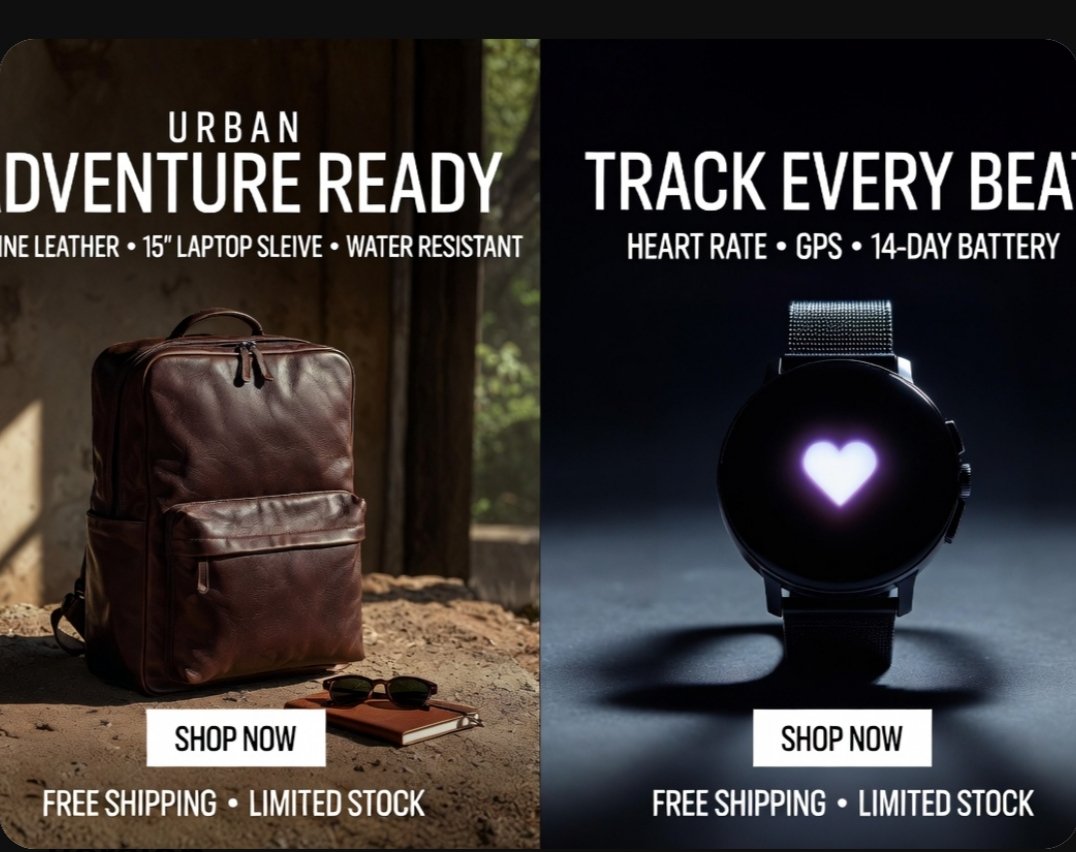
Produktanzeigenplakat im Split-Screen-Modus
Eine fotorealistische, zweiteilige E-Commerce-Anzeige, die einen Lederrucksack und eine Smartwatch zeigt, ideal für Social-Media-Aktionen, Marktplatzbanner und Online-Shop-Marketing.
Dies ist ein GPT Image 2 -Prompt für Produkt & Vertrieb . Verwenden Sie den unten stehenden, kopierfertigen Prompt, um ähnliche Grafiken zu erstellen, und überprüfen Sie vor der Wiederverwendung Awesome GPT Image 2 Prompts -Quellenangaben sowie die kommerziellen Nutzungsrechte.
Free 1K preview
Generate one preview image instantly, no sign-up required.
Eingabeaufforderung
Kopierfertige Eingabeaufforderung
{
  "type": "split-screen e-commerce advertisement poster",
  "style": "premium photorealistic retail marketing graphic, high contrast, polished commercial lighting, clean bold typography, modern direct-response ad design",
  "canvas": {
    "aspect_ratio": "4:3",
    "background": "black outer border with rounded-corner poster"
  },
  "layout": {
    "orientation": "vertical split",
    "sections": [
      {
        "title": "left product ad",
        "position": "left half",
        "count": 1,
        "product": "backpack",
        "headline_lines_count": 2,
        "cta_count": 1,
        "footer_count": 1
      },
      {
        "title": "right product ad",
        "position": "right half",
        "count": 1,
        "product": "smartwatch",
        "headline_lines_count": 2,
        "cta_count": 1,
        "footer_count": 1
      }
    ],
    "divider": "hard vertical split down the center"
  },
  "text": {
    "left": {
      "eyebrow": "{argument name=\"left eyebrow text\" default=\"URBAN\"}",
      "headline": "{argument name=\"left headline text\" default=\"ADVENTURE READY\"}",
      "features": "GENUINE LEATHER • 15\" LAPTOP SLEEVE • WATER RESISTANT",
      "button": "SHOP NOW",
      "footer": "FREE SHIPPING • LIMITED STOCK"
    },
    "right": {
      "headline": "{argument name=\"right headline text\" default=\"TRACK EVERY BEAT\"}",
      "features": "HEART RATE • GPS • 14-DAY BATTERY",
      "button": "SHOP NOW",
      "footer": "FREE SHIPPING • LIMITED STOCK"
    }
  },
  "left_panel": {
    "scene": "rustic indoor setting with warm natural sunlight entering from the side",
    "background_details_count": 3,
    "background_details": [
      "aged wall or wooden interior surface",
      "window opening with soft greenery visible outside",
      "dusty textured ground floor"
    ],
    "product": {
      "type": "{argument name=\"left product\" default=\"brown leather backpack\"}",
      "position": "lower left-center standing upright on the ground",
      "material": "rich polished leather",
      "color": "dark brown",
      "details_count": 5,
      "details": [
        "top carry handle",
        "double zipper top opening",
        "large front zip pocket",
        "side pocket visible on the left",
        "structured rectangular silhouette"
      ]
    },
    "supporting_props_count": 2,
    "supporting_props": [
      "a pair of dark sunglasses",
      "a small brown notebook placed near the backpack"
    ],
    "lighting": "warm cinematic sunlight from upper left creating soft highlights and earthy shadows",
    "button_style": "white rectangular button centered near lower middle of the left panel with black uppercase text"
  },
  "right_panel": {
    "scene": "dark studio product shot with cool moody spotlight",
    "background": "deep navy-to-black gradient",
    "product": {
      "type": "round black smartwatch",
      "position": "centered vertically and horizontally in right half",
      "details_count": 5,
      "details": [
        "circular black face",
        "glowing white-purple heart icon in the center of the screen",
        "dark metal case",
        "two side buttons visible on the right edge",
        "fine mesh metal strap"
      ]
    },
    "surface": "smooth studio floor with a soft circular shadow beneath the watch",
    "lighting": "cool spotlight from above and slightly behind, creating rim light and dramatic shadow",
    "button_style": "white rectangular button centered near lower middle of the right panel with black uppercase text"
  },
  "typography": {
    "font": "bold condensed sans-serif uppercase",
    "color": "white",
    "alignment": "centered within each panel",
    "feature_line_style": "smaller uppercase subheadline with bullet separators"
  }
}
Eingabeaufforderungsvariablen
In der Eingabeaufforderung befinden sich bearbeitbare Argumentplatzhalter mit ihren Standardwerten.
Best for
- - Produkt & Vertrieb visual exploration
- - Image generation and reference-image edits
- - Reusable briefs that keep source attribution visible
Change these parts
- - Subject, product, character, or scene
- - Aspect ratio, camera, lighting, and background
- - Brand, text, color, and output constraints
Recommended model and settings
- - Model: gpt-image-2
- - Input mode: Text zu Bild
- - Aspect ratio: source
- - Commercial status: review original source
How to use this prompt
- 1. Copy the prompt and preserve its structure for the first test.
- 2. Replace the subject, context, and publishing channel.
- 3. Change one camera, lighting, or style variable per iteration.
- 4. Inspect the output, source, text, and rights before reuse.
Limitations, source, and reuse cautions
- - Generated output is an editable draft, not factual, legal, or rights evidence.
- - Review the linked source, people, brands, logos, text, and third-party media before commercial use.
Weitere Fälle in dieser Kategorie
Priorisiert nach Kategorie, Kompatibilität der Eingabemodi, Qualität und geringerem Risiko.






Hinweise zur Wiederverwendung und Quellenangabe
Verwenden Sie diese Eingabeaufforderung sicher, nachdem Sie den Fall in der Vorschau angezeigt haben.
- 1.Kopieren Sie die Eingabeaufforderung oder öffnen Sie sie direkt in Dovoo mit der Schaltfläche „Generieren“.
- 2.Passen Sie Variablen, Seitenverhältnis und Referenzbilder an Ihren Anwendungsfall an.
- 3.Vor der Veröffentlichung oder kostenpflichtigen Nutzung sollten Sie die Rechte an der Quelle, die Anforderungen an die Namensnennung sowie die Risiken für die Marke oder das Abbild prüfen.