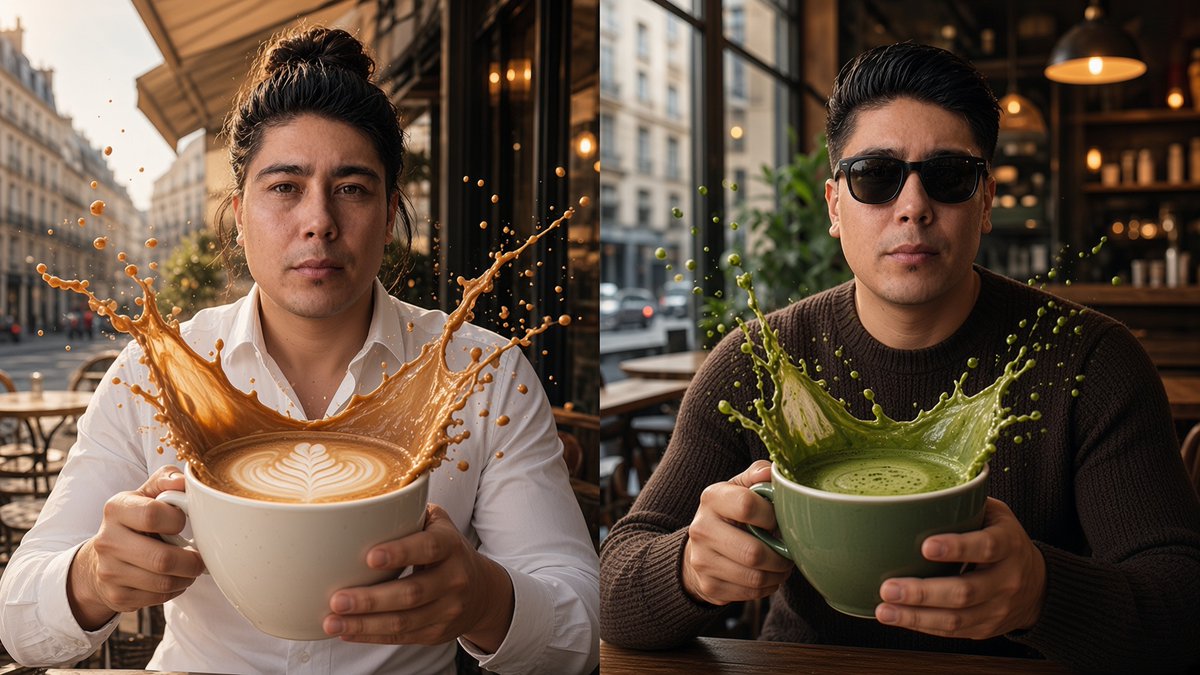
Split-Screen Surreal Café Portrait
A cinematic photorealistic split-screen scene of one man holding oversized latte and matcha cups with dramatic frozen liquid splashes.
Dies ist ein GPT Image 2 -Prompt für Porträt & Charakter . Verwenden Sie den unten stehenden, kopierfertigen Prompt, um ähnliche Grafiken zu erstellen, und überprüfen Sie vor der Wiederverwendung Awesome GPT Image 2 Prompts -Quellenangaben sowie die kommerziellen Nutzungsrechte.
Benötigen Sie den vollständigen Prompt-Satz? Verwenden Sie den Porträt & Charakter Weitere verwandte Beispiele finden Sie im Themen-Hub oder öffnen Sie die GPT Image 2 Prompt-Katalog für das vollständige Beispielverzeichnis, wiederverwendbare Strukturen und Quellenangaben.
Free 1K preview
Generate one preview image instantly, no sign-up required.
1778/4000
Eingabeaufforderung
Kopierfertige Eingabeaufforderung
Create a cinematic, photorealistic split-screen café scene showing the same stylish young man in two surreal coffee moments, divided by a clean vertical split down the center. Left side: the man sits at an outdoor European sidewalk café on a sunny city street, wearing a crisp {argument name="left outfit" default="white button-up shirt"}, with {argument name="left hairstyle" default="dark hair tied in a loose high bun"}, facing the camera with a calm serious expression. He holds an oversized white ceramic cup with both hands; inside is creamy latte with a detailed white leaf latte-art pattern, and a dramatic frozen splash of caramel-brown coffee erupts upward from the cup in a crown shape with many droplets suspended in midair. Show café tables, chairs, awnings, tall Paris-like buildings, warm afternoon sunlight, and shallow depth of field. Right side: the same man appears seated inside or at the edge of a cozy modern café, wearing {argument name="right outfit" default="a dark brown knit sweater and black sunglasses"}, hair short and slicked back, also facing the camera with a composed expression. He holds an oversized muted green ceramic cup with both hands; inside is frothy {argument name="right drink" default="green matcha latte"}, and a vibrant green liquid splash bursts upward in a crown shape with droplets frozen around it. The background includes a wooden café table, large window, blurred city street, indoor shelves, plants, pendant lamps, and warm bokeh lighting. Use hyper-realistic skin texture, natural hands, realistic liquid physics, rich cinematic contrast, warm golden tones on the left and darker cozy café tones on the right, 16:9 landscape composition, sharp focus on the man and cups, blurred background, no text, no logo, no watermark.Eingabeaufforderungsvariablen
In der Eingabeaufforderung befinden sich bearbeitbare Argumentplatzhalter mit ihren Standardwerten.
Variable
left outfit
Standard
white button-up shirt
Variable
left hairstyle
Standard
dark hair tied in a loose high bun
Variable
right outfit
Standard
a dark brown knit sweater and black sunglasses
Variable
right drink
Standard
green matcha latte
Best for
- - Porträt & Charakter visual exploration
- - Image generation and reference-image edits
- - Reusable briefs that keep source attribution visible
Change these parts
- - Subject, product, character, or scene
- - Aspect ratio, camera, lighting, and background
- - Brand, text, color, and output constraints
Recommended model and settings
- - Model: gpt-image-2
- - Input mode: Text zu Bild
- - Aspect ratio: source
- - Commercial status: review original source
How to use this prompt
- 1. Copy the prompt and preserve its structure for the first test.
- 2. Replace the subject, context, and publishing channel.
- 3. Change one camera, lighting, or style variable per iteration.
- 4. Inspect the output, source, text, and rights before reuse.
Limitations, source, and reuse cautions
- - Generated output is an editable draft, not factual, legal, or rights evidence.
- - Review the linked source, people, brands, logos, text, and third-party media before commercial use.
Importiert von Awesome GPT Image 2 Prompts . Quellenangabe erforderlich. Status der kommerziellen Nutzung: allowed ; Rechte an der Quelle vor kostenpflichtiger Nutzung prüfen.
Weitere Fälle in dieser Kategorie
Priorisiert nach Kategorie, Kompatibilität der Eingabemodi, Qualität und geringerem Risiko.






Hinweise zur Wiederverwendung und Quellenangabe
Verwenden Sie diese Eingabeaufforderung sicher, nachdem Sie den Fall in der Vorschau angezeigt haben.
- 1.Kopieren Sie die Eingabeaufforderung oder öffnen Sie sie direkt in Dovoo mit der Schaltfläche „Generieren“.
- 2.Passen Sie Variablen, Seitenverhältnis und Referenzbilder an Ihren Anwendungsfall an.
- 3.Vor der Veröffentlichung oder kostenpflichtigen Nutzung sollten Sie die Rechte an der Quelle, die Anforderungen an die Namensnennung sowie die Risiken für die Marke oder das Abbild prüfen.