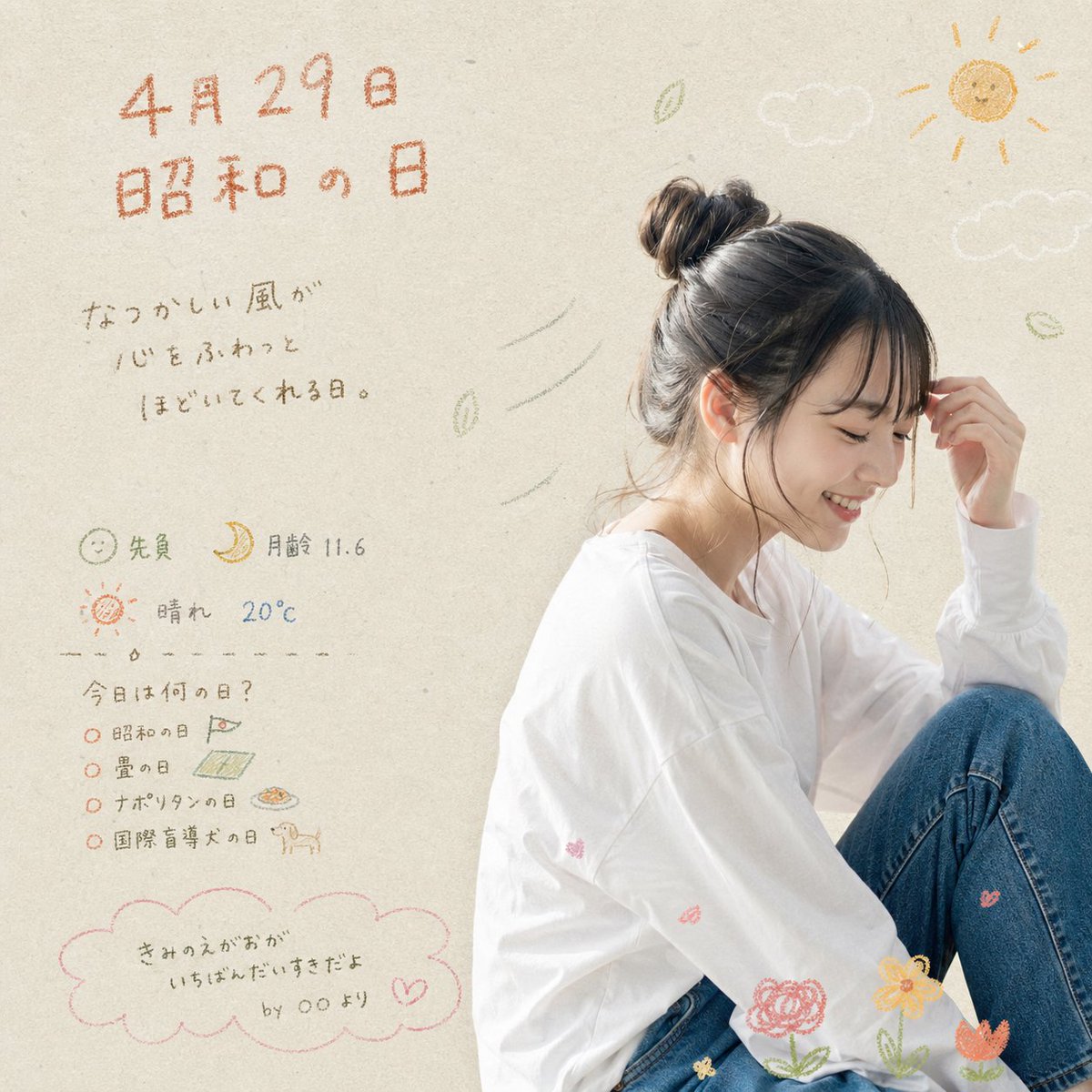
Showa-Tag-Scrapbook-Porträt
Ein nostalgisches Bild im Stil eines japanischen Weihnachtsplakats, das ein sanftes Porträt einer sitzenden jungen Frau mit handgeschriebenen Kalendernotizen, Kritzeleien und saisonalen Scrapbook-Dekorationen kombiniert.
Dies ist ein GPT Image 2 -Prompt für Grafik & Poster . Verwenden Sie den unten stehenden, kopierfertigen Prompt, um ähnliche Grafiken zu erstellen, und überprüfen Sie vor der Wiederverwendung Awesome GPT Image 2 Prompts -Quellenangaben sowie die kommerziellen Nutzungsrechte.
Free 1K preview
Generate one preview image instantly, no sign-up required.
Eingabeaufforderung
Kopierfertige Eingabeaufforderung
A soft, airy Japanese lifestyle poster with a warm nostalgic mood on a light beige textured paper background. On the right side, show a young woman sitting in a relaxed side pose with one knee raised, wearing an oversized white long-sleeve shirt and blue jeans. Her dark brown hair is tied in a messy bun with loose wisps around the face, and one hand lightly touches her forehead. The face should be de-emphasized or obscured so the overall feeling and styling matter more than identity. Use gentle natural daylight, high-key exposure, and a delicate editorial-photography look mixed with hand-drawn doodles. On the left half, place handwritten Japanese text in a crayon or colored-pencil style. At the top, large orange text reads {argument name="date text" default="April 29"} and below it {argument name="headline text" default="昭和の日"}. Under that, add a short handwritten message in gray Japanese: "なつかしい風が 心をふわっと ほどいてくれる日。" Below, add 3 small info lines with icons: 1 smiling face icon with "先負", 1 crescent moon icon with "月齢 11.6", and 1 sun icon with "晴れ 20℃". Then add a dashed divider and a handwritten list headed "今日は何の日?" with exactly 4 bullet items: "昭和の日", "畳の日", "ナポリタンの日", and "国際盲導犬の日", each accompanied by tiny doodles such as a flag, tatami mat, pasta plate, and dog. At the bottom left, draw 1 pink cloud-shaped speech bubble containing the handwritten quote {argument name="quote" default="きみのえがおが いちばんだいすきだよ by ○○より"}. Decorate the composition with exactly 2 white cloud doodles near the upper right, 1 yellow sun doodle in the top-right corner, several small green leaf doodles drifting in the air, a few faint wind-swoosh lines near the woman’s head, and exactly 4 flower doodles near the bottom edge around her legs in pink, yellow, and orange. Keep the palette muted and pastel, with orange, pink, olive, gray, cream, and denim blue. The overall result should feel like a sentimental handwritten scrapbook calendar page for a Japanese national holiday, combining minimalist portrait photography with cute childlike illustrations.Eingabeaufforderungsvariablen
In der Eingabeaufforderung befinden sich bearbeitbare Argumentplatzhalter mit ihren Standardwerten.
Best for
- - Grafik & Poster visual exploration
- - Image generation and reference-image edits
- - Reusable briefs that keep source attribution visible
Change these parts
- - Subject, product, character, or scene
- - Aspect ratio, camera, lighting, and background
- - Brand, text, color, and output constraints
Recommended model and settings
- - Model: gpt-image-2
- - Input mode: Text zu Bild
- - Aspect ratio: source
- - Commercial status: review original source
How to use this prompt
- 1. Copy the prompt and preserve its structure for the first test.
- 2. Replace the subject, context, and publishing channel.
- 3. Change one camera, lighting, or style variable per iteration.
- 4. Inspect the output, source, text, and rights before reuse.
Limitations, source, and reuse cautions
- - Generated output is an editable draft, not factual, legal, or rights evidence.
- - Review the linked source, people, brands, logos, text, and third-party media before commercial use.
Weitere Fälle in dieser Kategorie
Priorisiert nach Kategorie, Kompatibilität der Eingabemodi, Qualität und geringerem Risiko.






Hinweise zur Wiederverwendung und Quellenangabe
Verwenden Sie diese Eingabeaufforderung sicher, nachdem Sie den Fall in der Vorschau angezeigt haben.
- 1.Kopieren Sie die Eingabeaufforderung oder öffnen Sie sie direkt in Dovoo mit der Schaltfläche „Generieren“.
- 2.Passen Sie Variablen, Seitenverhältnis und Referenzbilder an Ihren Anwendungsfall an.
- 3.Vor der Veröffentlichung oder kostenpflichtigen Nutzung sollten Sie die Rechte an der Quelle, die Anforderungen an die Namensnennung sowie die Risiken für die Marke oder das Abbild prüfen.