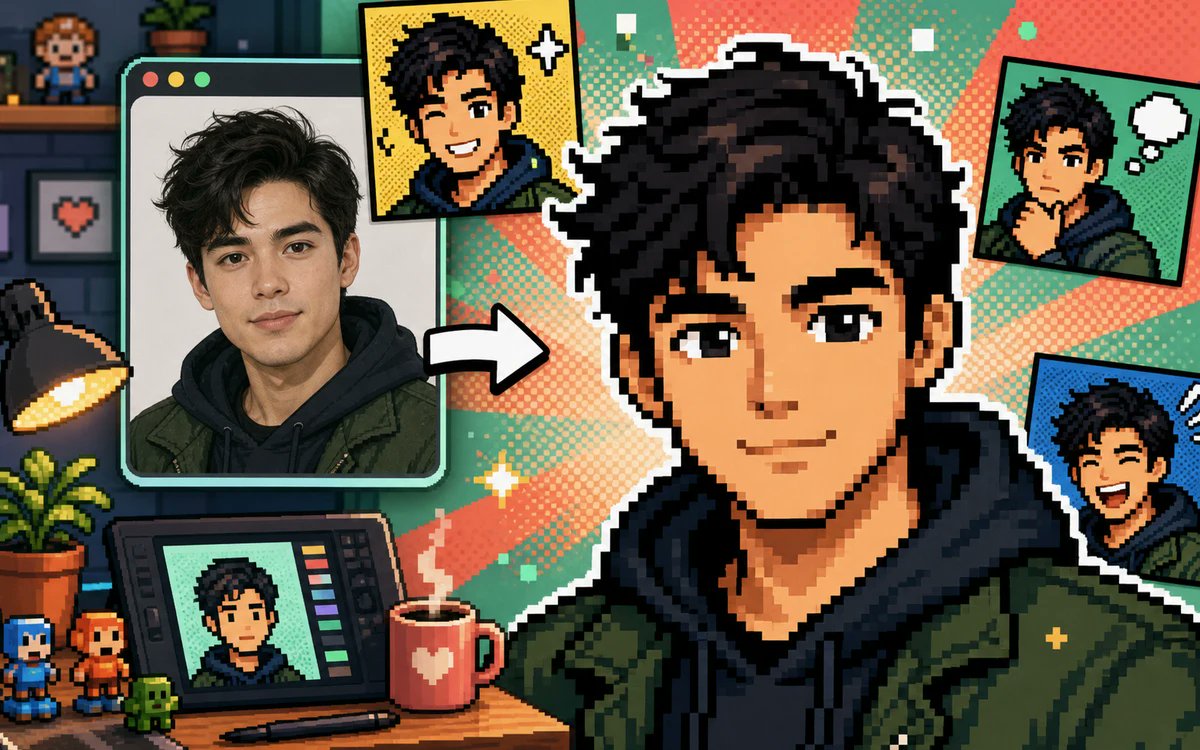
Selfie zu Pixel Comic Studio
Eine lebendige Szene aus einem Retro-Pixel-Art-Studio zeigt, wie ein Selfie in mehrere Avatar-Versionen im Comic-Stil umgewandelt wird.
Dies ist ein GPT Image 2 -Prompt für Illustration & Kunst . Verwenden Sie den unten stehenden, kopierfertigen Prompt, um ähnliche Grafiken zu erstellen, und überprüfen Sie vor der Wiederverwendung Awesome GPT Image 2 Prompts -Quellenangaben sowie die kommerziellen Nutzungsrechte.
Free 1K preview
Generate one preview image instantly, no sign-up required.
Free text preview doesn’t preserve reference-image consistency.
Eingabeaufforderung
Kopierfertige Eingabeaufforderung
Goal: Create a colorful pixel-art promotional illustration showing a selfie transformed into comic avatars. Canvas: 1200×675 widescreen 16:9 composition, bright retro game aesthetic, crisp blocky pixels, thick black outlines, halftone comic dots, high contrast, playful creator-studio mood. Main subject: A young man with {argument name="hair style" default="messy dark curly hair"}, wearing {argument name="outfit" default="a dark hoodie under an olive green jacket"}; keep him recognizable as the same person across all depictions, but render the face as a simple soft blurred placeholder with warm skin tone and no detailed features. Layout: On the left, show exactly 1 large desktop photo window with rounded corners and three small traffic-light buttons at the top, containing a realistic selfie of the person. In the center-right foreground, show exactly 1 large transformed pixel-comic portrait of the same person, cropped from chest up, with a bold white sticker-like outline. Between the photo window and the pixel portrait, place exactly 1 thick white arrow pointing right to indicate conversion. Around the central portrait, include exactly 4 smaller comic avatar outputs: 1 yellow-background portrait near the top center, 1 green-background speech-bubble comic portrait in the upper right, 1 blue-background dramatic comic portrait in the lower right, and 1 mint-green portrait displayed on a drawing tablet at the bottom left. Environment: A cozy digital artist desk and studio with dark teal walls, shelves, pixel collectibles, and warm lighting. Desk objects: include exactly 1 angled drawing tablet with color swatches on the right edge, exactly 1 stylus lying in front of it, exactly 1 red mug with a white heart and steam, exactly 1 black desk lamp glowing from the left, exactly 1 potted plant on the desk, exactly 3 small pixel figurines along the bottom left edge, exactly 1 framed pixel heart on the back wall, exactly 1 tiny pixel person figurine on the top shelf, and exactly 1 small potted plant on the shelf. Background: Use a teal, coral, peach, and yellow radial comic burst behind the main character with halftone texture, small plus signs, sparkle icons, and square pixels. Text: No readable headline or labels. Visual style: blend pixel art, manga/webtoon/comic transformation, retro arcade UI, social-media promo thumbnail, clean composition, sharp edges, vibrant colors. Constraints: Use exactly the counted major panels and desk objects listed; do not add extra characters, captions, watermarks, logos, or UI text.Eingabeaufforderungsvariablen
In der Eingabeaufforderung befinden sich bearbeitbare Argumentplatzhalter mit ihren Standardwerten.
Best for
- - Illustration & Kunst visual exploration
- - Image generation and reference-image edits
- - Reusable briefs that keep source attribution visible
Change these parts
- - Subject, product, character, or scene
- - Aspect ratio, camera, lighting, and background
- - Brand, text, color, and output constraints
Recommended model and settings
- - Model: gpt-image-2
- - Input mode: Bild zu Bild
- - Aspect ratio: source
- - Commercial status: review original source
How to use this prompt
- 1. Copy the prompt and preserve its structure for the first test.
- 2. Replace the subject, context, and publishing channel.
- 3. Change one camera, lighting, or style variable per iteration.
- 4. Inspect the output, source, text, and rights before reuse.
Limitations, source, and reuse cautions
- - Generated output is an editable draft, not factual, legal, or rights evidence.
- - Review the linked source, people, brands, logos, text, and third-party media before commercial use.
Weitere Fälle in dieser Kategorie
Priorisiert nach Kategorie, Kompatibilität der Eingabemodi, Qualität und geringerem Risiko.






Hinweise zur Wiederverwendung und Quellenangabe
Verwenden Sie diese Eingabeaufforderung sicher, nachdem Sie den Fall in der Vorschau angezeigt haben.
- 1.Kopieren Sie die Eingabeaufforderung oder öffnen Sie sie direkt in Dovoo mit der Schaltfläche „Generieren“.
- 2.Passen Sie Variablen, Seitenverhältnis und Referenzbilder an Ihren Anwendungsfall an.
- 3.Vor der Veröffentlichung oder kostenpflichtigen Nutzung sollten Sie die Rechte an der Quelle, die Anforderungen an die Namensnennung sowie die Risiken für die Marke oder das Abbild prüfen.