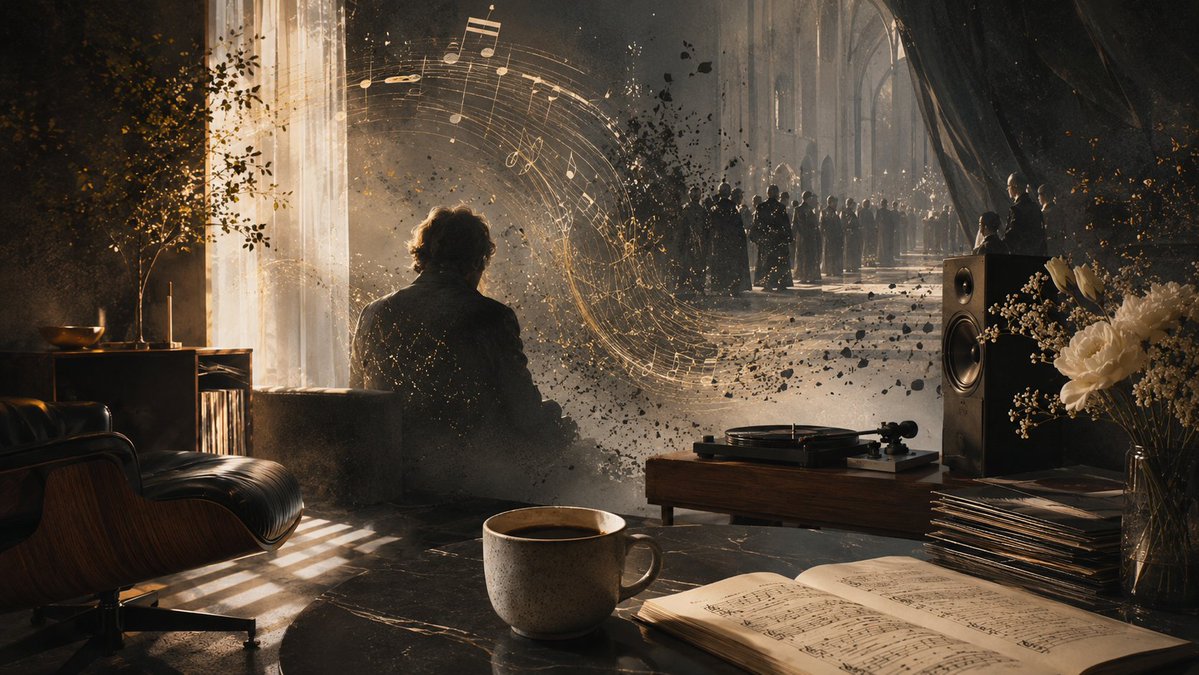
Intimate Secular Requiem Scene
A cinematic surreal living-room memorial scene with coffee, vinyl, sheet music, and a cathedral funeral vision for contemplative requiem artwork.
Dies ist ein GPT Image 2 -Prompt für Illustration & Kunst . Verwenden Sie den unten stehenden, kopierfertigen Prompt, um ähnliche Grafiken zu erstellen, und überprüfen Sie vor der Wiederverwendung Awesome GPT Image 2 Prompts -Quellenangaben sowie die kommerziellen Nutzungsrechte.
Benötigen Sie den vollständigen Prompt-Satz? Verwenden Sie den Illustration & Kunst Weitere verwandte Beispiele finden Sie im Themen-Hub oder öffnen Sie die GPT Image 2 Prompt-Katalog für das vollständige Beispielverzeichnis, wiederverwendbare Strukturen und Quellenangaben.
Free 1K preview
Generate one preview image instantly, no sign-up required.
1676/4000
Eingabeaufforderung
Kopierfertige Eingabeaufforderung
Create a cinematic surreal memorial scene about an intimate, secular requiem at home. A dim, elegant living room blends into the vast nave of a cathedral, as if the wall has dissolved into a funeral procession in the distance. In the foreground, place a ceramic cup of black coffee on a dark stone table beside an open book of sheet music; nearby are a turntable on a low wooden console, two tall stereo speakers, a neat stack of vinyl records, and a glass vase of white flowers. On the left, include a black leather lounge chair, a small side table with a bowl and slender candles, a potted tree, tall sheer curtains, and warm sunlight pouring through a high window, casting striped shadows across the floor. In the middle distance, show the back silhouette of one seated person, {argument name="central figure" default="a solitary mourner with curly hair in a dark jacket"}, partially dissolving into drifting dust and black leaf-like particles. From the turntable and the seated figure, glowing golden musical staff lines and notes should swirl in a graceful arc toward the cathedral space, forming the visual center of the image. In the background, show exactly one long funeral gathering: a line of many dark-clad mourners and clergy standing in the cathedral aisle under tall Gothic arches, lit by soft candles and haze, solemn but not theatrical. Use {argument name="mood" default="quiet, contemplative, half-atheist requiem melancholy"}, rich chiaroscuro lighting, warm gold highlights against deep charcoal shadows, volumetric dust, cinematic depth of field, painterly photorealism, ultra-detailed textures, 16:9 widescreen composition, no visible text, no watermark.Eingabeaufforderungsvariablen
In der Eingabeaufforderung befinden sich bearbeitbare Argumentplatzhalter mit ihren Standardwerten.
Variable
central figure
Standard
a solitary mourner with curly hair in a dark jacket
Variable
mood
Standard
quiet, contemplative, half-atheist requiem melancholy
Best for
- - Illustration & Kunst visual exploration
- - Image generation and reference-image edits
- - Reusable briefs that keep source attribution visible
Change these parts
- - Subject, product, character, or scene
- - Aspect ratio, camera, lighting, and background
- - Brand, text, color, and output constraints
Recommended model and settings
- - Model: gpt-image-2
- - Input mode: Text zu Bild
- - Aspect ratio: source
- - Commercial status: review original source
How to use this prompt
- 1. Copy the prompt and preserve its structure for the first test.
- 2. Replace the subject, context, and publishing channel.
- 3. Change one camera, lighting, or style variable per iteration.
- 4. Inspect the output, source, text, and rights before reuse.
Limitations, source, and reuse cautions
- - Generated output is an editable draft, not factual, legal, or rights evidence.
- - Review the linked source, people, brands, logos, text, and third-party media before commercial use.
Importiert von Awesome GPT Image 2 Prompts . Quellenangabe erforderlich. Status der kommerziellen Nutzung: allowed ; Rechte an der Quelle vor kostenpflichtiger Nutzung prüfen.
Weitere Fälle in dieser Kategorie
Priorisiert nach Kategorie, Kompatibilität der Eingabemodi, Qualität und geringerem Risiko.






Hinweise zur Wiederverwendung und Quellenangabe
Verwenden Sie diese Eingabeaufforderung sicher, nachdem Sie den Fall in der Vorschau angezeigt haben.
- 1.Kopieren Sie die Eingabeaufforderung oder öffnen Sie sie direkt in Dovoo mit der Schaltfläche „Generieren“.
- 2.Passen Sie Variablen, Seitenverhältnis und Referenzbilder an Ihren Anwendungsfall an.
- 3.Vor der Veröffentlichung oder kostenpflichtigen Nutzung sollten Sie die Rechte an der Quelle, die Anforderungen an die Namensnennung sowie die Risiken für die Marke oder das Abbild prüfen.