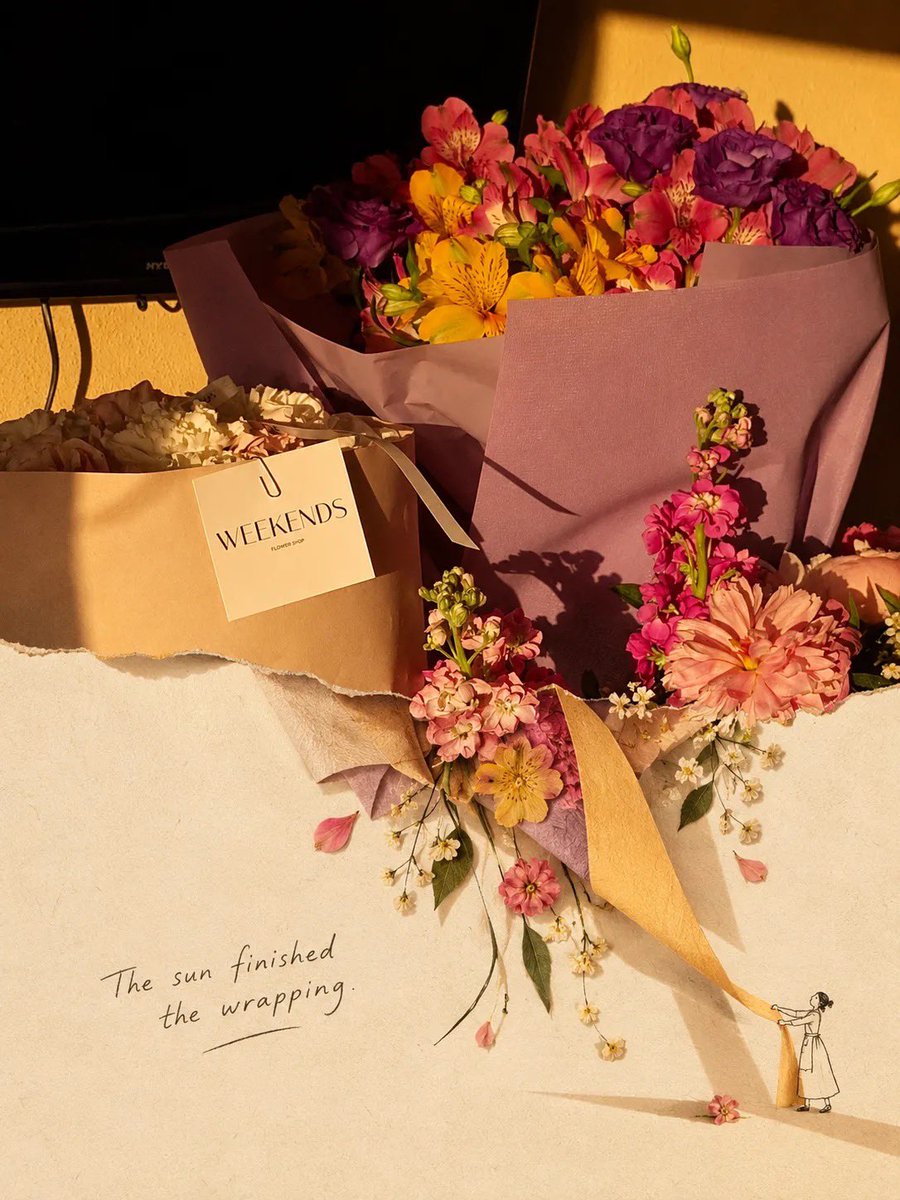
Scrapbook Collage Transformation Prompt
A detailed prompt for GPT Image 2 to transform an uploaded photo into a premium editorial scrapbook collage with torn-paper effects and hand-drawn illustrations.
Dies ist ein GPT Image 2 -Prompt für Illustration & Kunst . Verwenden Sie den unten stehenden, kopierfertigen Prompt, um ähnliche Grafiken zu erstellen, und überprüfen Sie vor der Wiederverwendung Awesome GPT Image 2 Prompts -Quellenangaben sowie die kommerziellen Nutzungsrechte.
Free 1K preview
Generate one preview image instantly, no sign-up required.
Free text preview doesn’t preserve reference-image consistency.
Eingabeaufforderung
Kopierfertige Eingabeaufforderung
Transform the uploaded photo into a premium editorial scrapbook / torn-paper collage artwork. Keep the main subject of the original photo photorealistic, sharp, and clearly recognizable, with natural lighting, realistic textures, and authentic colors. Place the photo on a warm ivory handmade paper background with subtle paper grain and an imperfect tactile texture. Create an organic ripped-paper transition where parts of the original photograph appear to tear open and naturally continue into the lower area as a minimal hand-drawn ink illustration / sketch, blending the real photograph with the illustrated extension.

Add subtle vintage editorial details, delicate handwritten-style typography, tiny hand-drawn doodles, imperfect ink lines, small decorative elements, and artistic negative space. Let selected objects from the photograph flow beyond the torn edge and interact with the illustration, creating a playful 3D collage effect. Use soft shadows beneath the paper layers and realistic paper edges for depth.

Color palette: warm cream, beige, muted brown, soft earthy tones with the original photo’s natural colors preserved.
Lighting: warm golden-hour / nostalgic sunlight, soft highlights and gentle shadows.
Composition: sophisticated, minimal, balanced, artistic, lots of breathing room, premium magazine/editorial aesthetic.
Texture: handmade paper, subtle grain, torn fibers, slightly imperfect printing and ink texture.

The final image should feel like a real photograph physically pasted onto handmade paper and partially transformed into a delicate illustration, rather than a digital filter.

Important: Do not alter the main subject’s identity, proportions, objects, or important details. Avoid excessive decorations, cartoonish rendering, overly clean digital edges, neon colors, or a generic AI-art look. High-end contemporary scrapbook editorial design, photorealistic + hand-drawn mixed-media collage, 4:5 or 3:4 vertical composition.

[OPTIONAL] Add this concept-specific element: {argument name="transformation_object" default="describe the object/scene you want the photograph to transform into"}

[OPTIONAL TEXT]: Add a short handwritten phrase: "{argument name="handwritten_text" default="your text"}" in a subtle black/charcoal ink style.
Eingabeaufforderungsvariablen
In der Eingabeaufforderung befinden sich bearbeitbare Argumentplatzhalter mit ihren Standardwerten.
Best for
- - Illustration & Kunst visual exploration
- - Image generation and reference-image edits
- - Reusable briefs that keep source attribution visible
Change these parts
- - Subject, product, character, or scene
- - Aspect ratio, camera, lighting, and background
- - Brand, text, color, and output constraints
Recommended model and settings
- - Model: gpt-image-2
- - Input mode: Bild zu Bild
- - Aspect ratio: source
- - Commercial status: review original source
How to use this prompt
- 1. Copy the prompt and preserve its structure for the first test.
- 2. Replace the subject, context, and publishing channel.
- 3. Change one camera, lighting, or style variable per iteration.
- 4. Inspect the output, source, text, and rights before reuse.
Limitations, source, and reuse cautions
- - Generated output is an editable draft, not factual, legal, or rights evidence.
- - Review the linked source, people, brands, logos, text, and third-party media before commercial use.
Weitere Fälle in dieser Kategorie
Priorisiert nach Kategorie, Kompatibilität der Eingabemodi, Qualität und geringerem Risiko.

Hinweise zur Wiederverwendung und Quellenangabe
Verwenden Sie diese Eingabeaufforderung sicher, nachdem Sie den Fall in der Vorschau angezeigt haben.
- 1.Kopieren Sie die Eingabeaufforderung oder öffnen Sie sie direkt in Dovoo mit der Schaltfläche „Generieren“.
- 2.Passen Sie Variablen, Seitenverhältnis und Referenzbilder an Ihren Anwendungsfall an.
- 3.Vor der Veröffentlichung oder kostenpflichtigen Nutzung sollten Sie die Rechte an der Quelle, die Anforderungen an die Namensnennung sowie die Risiken für die Marke oder das Abbild prüfen.