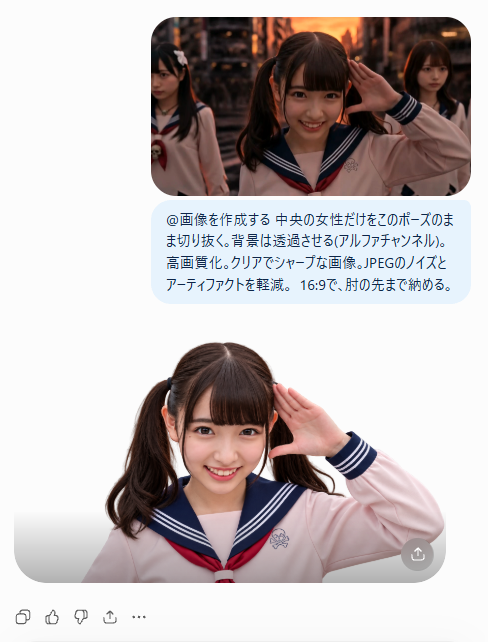
AI Cutout Demo Screenshot
A vertical mobile UI mockup showing a photorealistic schoolgirl background-removal before-and-after result for thumbnail creation.
Dies ist ein GPT Image 2 -Prompt für Produkt & Vertrieb . Verwenden Sie den unten stehenden, kopierfertigen Prompt, um ähnliche Grafiken zu erstellen, und überprüfen Sie vor der Wiederverwendung Awesome GPT Image 2 Prompts -Quellenangaben sowie die kommerziellen Nutzungsrechte.
Benötigen Sie den vollständigen Prompt-Satz? Verwenden Sie den Produkt & Vertrieb Weitere verwandte Beispiele finden Sie im Themen-Hub oder öffnen Sie die GPT Image 2 Prompt-Katalog für das vollständige Beispielverzeichnis, wiederverwendbare Strukturen und Quellenangaben.
Free 1K preview
Generate one preview image instantly, no sign-up required.
2823/4000
Eingabeaufforderung
Kopierfertige Eingabeaufforderung
Goal: Create a clean mobile-style social media screenshot demonstrating an AI background-removal result for a thumbnail image.

Canvas: Vertical 488×641 px composition on a pure white background, with generous margins and a centered content column.

Layout: At the top, place one rounded-corner rectangular photo, about 318 px wide, showing three Japanese schoolgirls in sailor-style uniforms in a warm sunset urban street scene. The central girl is closest to camera, smiling brightly and raising her right hand beside her face in a salute-like pose; the two other girls are behind her, one on the left partly cropped and looking serious, one on the right in the background. Use cinematic dusk lighting with orange highlights and shallow depth of field.

Prompt bubble: Directly below the top photo, add one pale light-blue rounded speech bubble containing Japanese text in dark navy. Preserve the text exactly as: 「@画像を作成する 中央の女性だけをそのポーズのまま切り抜く。背景は透過させる(アルファチャンネル)。高画質化。クリアでシャープな画像。JPEGのノイズとアーティファクトを軽減。16:9で、肘の先まで納める。」 The bubble should be aligned under the image and look like a chat prompt.

Result image: Below the bubble, show one large cut-out portrait of only the central girl from the top image, isolated against a white/transparent-looking background. She remains in the same salute pose, smiling, with twin ponytails, straight bangs, a pale pink sailor uniform, navy sailor collar with white stripes, and a red necktie. Re-light her cleanly and evenly so the face is sharper and brighter than in the top photo. Crop from upper torso to just past the raised elbow, with a soft rounded gray bottom container edge like an image preview. Add one small circular gray share/download button at the bottom-right corner of the result preview.

Bottom UI: Along the lower left margin, draw exactly five small gray interaction icons in a row: copy/duplicate, thumbs up, thumbs down, share/upload arrow, and ellipsis menu.

Customizable subject details: The main cutout subject is {argument name="character description" default="a smiling Japanese teenage schoolgirl with twin ponytails and straight bangs"}; the uniform is {argument name="outfit" default="pale pink sailor-style school uniform with navy collar, white stripes, and red necktie"}; the top background is {argument name="background scene" default="warm sunset urban street with cinematic bokeh"}; the chat bubble text is {argument name="prompt text" default="@画像を作成する 中央の女性だけをそのポーズのまま切り抜く。背景は透過させる(アルファチャンネル)。高画質化。クリアでシャープな画像。JPEGのノイズとアーティファクトを軽減。16:9で、肘の先まで納める。"}.

Visual style: Photorealistic portraits embedded in a minimal app interface, crisp shadows, rounded corners, clean white UI, high-resolution thumbnail demonstration. Avoid extra people beyond the three in the top image and the single isolated cutout below; avoid watermarks or additional text.
Eingabeaufforderungsvariablen
In der Eingabeaufforderung befinden sich bearbeitbare Argumentplatzhalter mit ihren Standardwerten.
Variable
character description
Standard
a smiling Japanese teenage schoolgirl with twin ponytails and straight bangs
Variable
outfit
Standard
pale pink sailor-style school uniform with navy collar, white stripes, and red necktie
Variable
background scene
Standard
warm sunset urban street with cinematic bokeh
Variable
prompt text
Standard
@画像を作成する 中央の女性だけをそのポーズのまま切り抜く。背景は透過させる(アルファチャンネル)。高画質化。クリアでシャープな画像。JPEGのノイズとアーティファクトを軽減。16:9で、肘の先まで納める。
Best for
- - Produkt & Vertrieb visual exploration
- - Image generation and reference-image edits
- - Reusable briefs that keep source attribution visible
Change these parts
- - Subject, product, character, or scene
- - Aspect ratio, camera, lighting, and background
- - Brand, text, color, and output constraints
Recommended model and settings
- - Model: gpt-image-2
- - Input mode: Text zu Bild
- - Aspect ratio: source
- - Commercial status: review original source
How to use this prompt
- 1. Copy the prompt and preserve its structure for the first test.
- 2. Replace the subject, context, and publishing channel.
- 3. Change one camera, lighting, or style variable per iteration.
- 4. Inspect the output, source, text, and rights before reuse.
Limitations, source, and reuse cautions
- - Generated output is an editable draft, not factual, legal, or rights evidence.
- - Review the linked source, people, brands, logos, text, and third-party media before commercial use.
Importiert von Awesome GPT Image 2 Prompts . Quellenangabe erforderlich. Status der kommerziellen Nutzung: allowed ; Rechte an der Quelle vor kostenpflichtiger Nutzung prüfen.
Weitere Fälle in dieser Kategorie
Priorisiert nach Kategorie, Kompatibilität der Eingabemodi, Qualität und geringerem Risiko.






Hinweise zur Wiederverwendung und Quellenangabe
Verwenden Sie diese Eingabeaufforderung sicher, nachdem Sie den Fall in der Vorschau angezeigt haben.
- 1.Kopieren Sie die Eingabeaufforderung oder öffnen Sie sie direkt in Dovoo mit der Schaltfläche „Generieren“.
- 2.Passen Sie Variablen, Seitenverhältnis und Referenzbilder an Ihren Anwendungsfall an.
- 3.Vor der Veröffentlichung oder kostenpflichtigen Nutzung sollten Sie die Rechte an der Quelle, die Anforderungen an die Namensnennung sowie die Risiken für die Marke oder das Abbild prüfen.