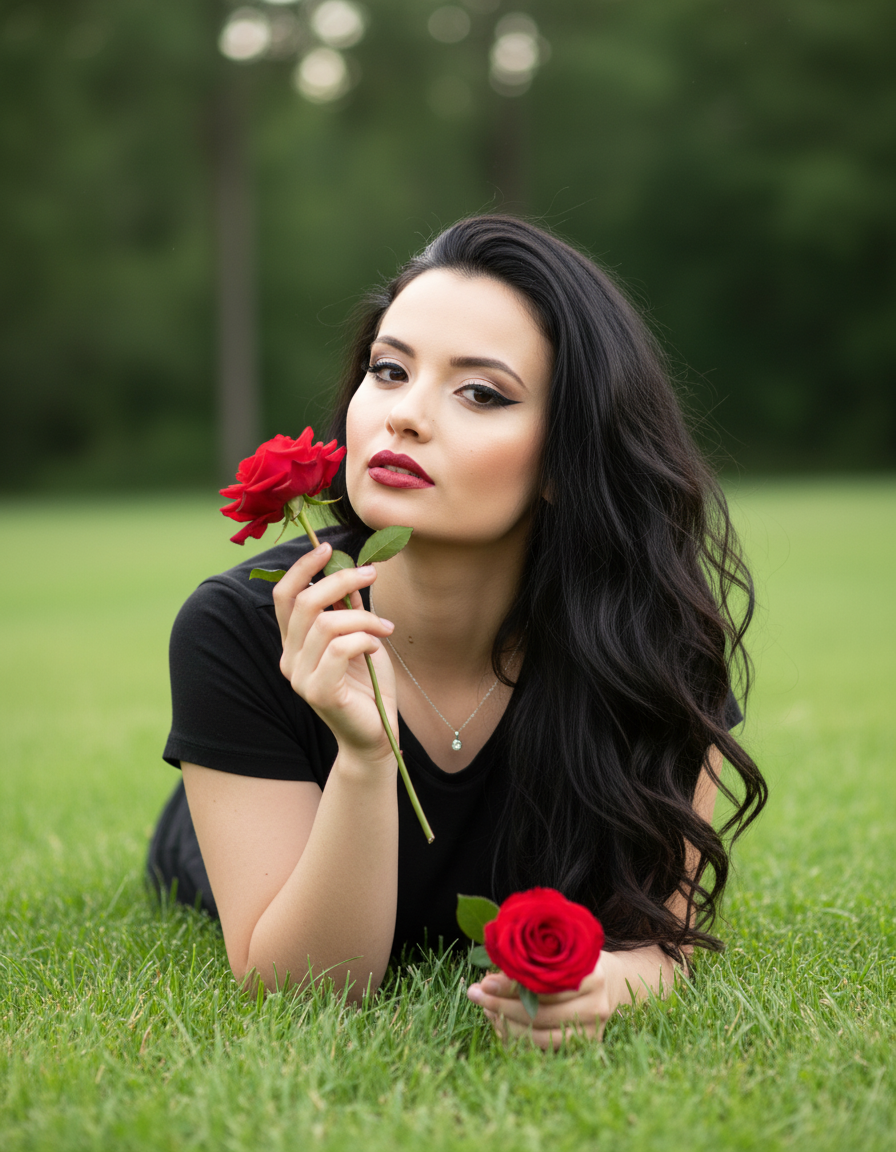
Scarlet Rose
Bildaufforderung für Nano Banana Pro mit Quellenangabe aus dem Awesome Nano Banana Pro Prompts-Repository mit Vorschaubild und Hinweisen zur Wiederverwendung.
Dies ist ein Nano Banana Pro -Prompt für Porträt & Charakter . Verwenden Sie den unten stehenden, kopierfertigen Prompt, um ähnliche Grafiken zu erstellen, und überprüfen Sie vor der Wiederverwendung Awesome Nano Banana Pro Prompts -Quellenangaben sowie die kommerziellen Nutzungsrechte.
Benötigen Sie den vollständigen Prompt-Satz? Verwenden Sie den Porträt & Charakter Weitere verwandte Beispiele finden Sie im Themen-Hub oder öffnen Sie die Nano Banana Pro Prompt-Katalog für das vollständige Beispielverzeichnis, wiederverwendbare Strukturen und Quellenangaben.
Eingabeaufforderung
Kopierfertige Eingabeaufforderung
A romantic and dreamy portrait, captured outdoors, shows a female figure lying on the grass. The subject is propped up on her elbows, her body slightly raised, and looks directly at the camera with a seductive and confident expression. One hand holds a vibrant red rose close to her face, as if inhaling its scent, while the other rests on the grass, holding another rose.

She wears a simple black T-shirt, which creates a strong contrast with her skin and the red roses. A delicate necklace is visible around her neck.

Her hair is long, dark, and voluminous, with lush waves falling over one shoulder. Her makeup is dramatic, with a well-defined cat-eye, long lashes, and lips painted a red or wine hue that complements the roses.

The background is a green lawn with a softly blurred grove or trees, bathed in soft light. The lighting is natural and diffuse, creating a soft glow on her skin and hair, and highlighting the vibrant colors of the flowers.

Camera Settings: Captured with a prime portrait lens (e.g., 85mm f/1.8 or 50mm f/1.4) on a full-frame camera for creamy bokeh and flattering compression. Aperture set between f/1.8 and f/2.8 to isolate the subject from the background with a shallow depth of field. ISO 100-200 for maximum image quality in natural light. Shutter speed 1/250s to 1/500s. Soft, natural lighting, possibly late afternoon or on a cloudy day.

Instructions for the "nano banana":

"Please use the user's reference image to capture and apply all of their facial features, facial structure, eye color, skin tone, style, and hair color with maximum fidelity. The goal is to create a version of the user in this romantic portrait. The clothing (black t-shirt), red roses, dramatic makeup, lying-on-the-grass pose, natural lighting, and grassy background must be generated as described, creating a perfect fusion between the user's identity and the aesthetics of the image."
Best for
- - Porträt & Charakter visual exploration
- - Image generation and reference-image edits
- - Reusable briefs that keep source attribution visible
Change these parts
- - Subject, product, character, or scene
- - Aspect ratio, camera, lighting, and background
- - Brand, text, color, and output constraints
Recommended model and settings
- - Model: nano-banana-pro
- - Input mode: Bild zu Bild
- - Aspect ratio: square
- - Commercial status: restricted
How to use this prompt
- 1. Copy the prompt and preserve its structure for the first test.
- 2. Replace the subject, context, and publishing channel.
- 3. Change one camera, lighting, or style variable per iteration.
- 4. Inspect the output, source, text, and rights before reuse.
Limitations, source, and reuse cautions
- - Generated output is an editable draft, not factual, legal, or rights evidence.
- - Review the linked source, people, brands, logos, text, and third-party media before commercial use.
Importiert von Awesome Nano Banana Pro Prompts . Quellenangabe erforderlich. Status der kommerziellen Nutzung: restricted ; Rechte an der Quelle vor kostenpflichtiger Nutzung prüfen.
Weitere Fälle in dieser Kategorie
Priorisiert nach Kategorie, Kompatibilität der Eingabemodi, Qualität und geringerem Risiko.
Hinweise zur Wiederverwendung und Quellenangabe
Verwenden Sie diese Eingabeaufforderung sicher, nachdem Sie den Fall in der Vorschau angezeigt haben.
- 1.Kopieren Sie die Eingabeaufforderung oder öffnen Sie sie direkt in Dovoo mit der Schaltfläche „Generieren“.
- 2.Passen Sie Variablen, Seitenverhältnis und Referenzbilder an Ihren Anwendungsfall an.
- 3.Vor der Veröffentlichung oder kostenpflichtigen Nutzung sollten Sie die Rechte an der Quelle, die Anforderungen an die Namensnennung sowie die Risiken für die Marke oder das Abbild prüfen.