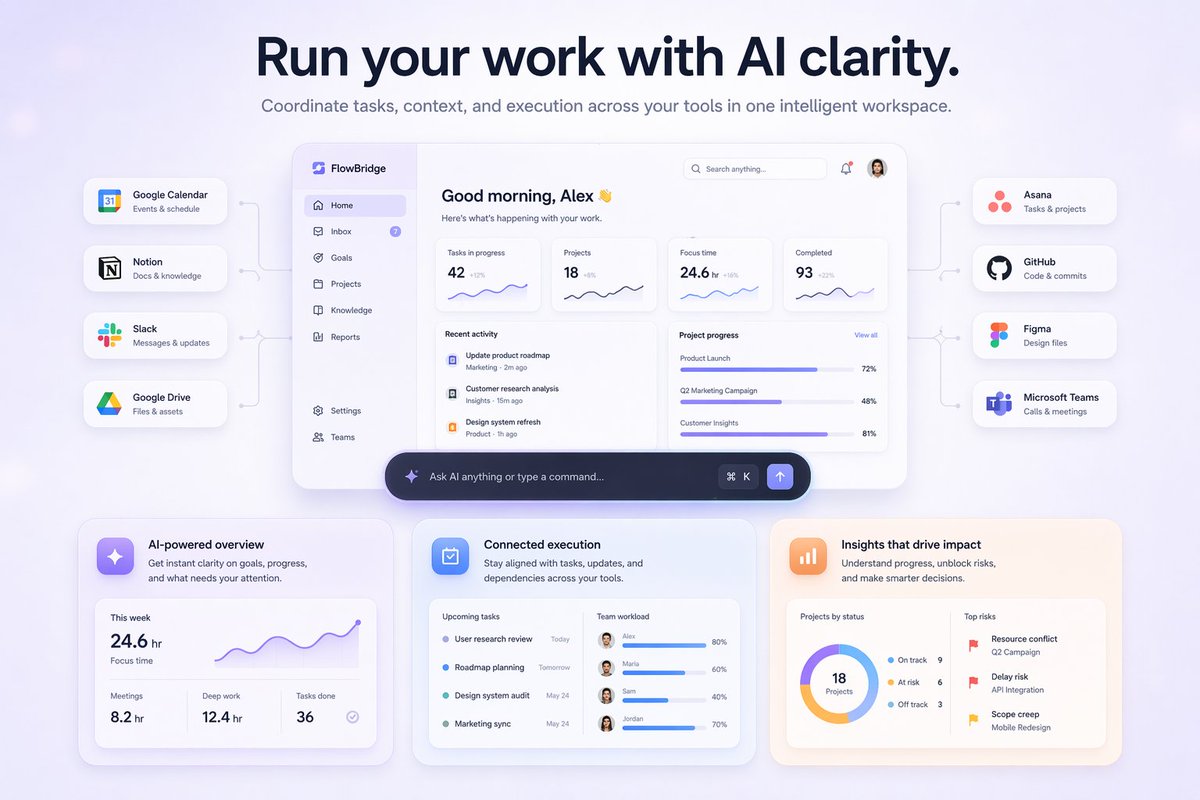
SaaS KI-Dashboard-Landingpage
Erzeugt einen modernen SaaS-Landingpage-Entwurf mit einem zentralen KI-Dashboard, das mit verschiedenen Tool-Integrationen verbunden ist, sowie detaillierten Feature-Highlight-Karten.
Dies ist ein GPT Image 2 -Prompt für Andere Inspiration . Verwenden Sie den unten stehenden, kopierfertigen Prompt, um ähnliche Grafiken zu erstellen, und überprüfen Sie vor der Wiederverwendung Awesome GPT Image 2 Prompts -Quellenangaben sowie die kommerziellen Nutzungsrechte.
Free 1K preview
Generate one preview image instantly, no sign-up required.
Eingabeaufforderung
Kopierfertige Eingabeaufforderung
{
  "type": "SaaS landing page hero graphic",
  "style": "Modern UI/UX, light theme, soft shadows, glassmorphism, {argument name=\"primary theme color\" default=\"purple and blue gradients\"}",
  "header": {
    "headline": "{argument name=\"main headline\" default=\"Run your work with AI clarity.\"}",
    "subheadline": "Coordinate tasks, context, and execution across your tools in one intelligent workspace."
  },
  "layout": {
    "center_dashboard": {
      "app_name": "{argument name=\"app name\" default=\"FlowBridge\"}",
      "greeting": "{argument name=\"user greeting\" default=\"Good morning, Alex 👋\"}",
      "sidebar_links": 8,
      "top_metrics_cards": 4,
      "recent_activity_items": 3,
      "project_progress_bars": 3,
      "floating_action_bar": "{argument name=\"floating bar text\" default=\"Ask AI anything or type a command...\"}"
    },
    "left_integrations": {
      "count": 4,
      "style": "pill-shaped cards connected by thin lines to the center dashboard",
      "labels": [
        "Google Calendar: Events & schedule",
        "Notion: Docs & knowledge",
        "Slack: Messages & updates",
        "Google Drive: Files & assets"
      ]
    },
    "right_integrations": {
      "count": 4,
      "style": "pill-shaped cards connected by thin lines to the center dashboard",
      "labels": [
        "Asana: Tasks & projects",
        "GitHub: Code & commits",
        "Figma: Design files",
        "Microsoft Teams: Calls & meetings"
      ]
    },
    "bottom_feature_cards": {
      "count": 3,
      "style": "rectangular cards with soft shadows",
      "cards": [
        {
          "title": "AI-powered overview",
          "description": "Get instant clarity on goals, progress, and what needs your attention.",
          "visuals": "Line chart showing 24.6 hr focus time, and 3 bottom metrics (Meetings, Deep work, Tasks done)"
        },
        {
          "title": "Connected execution",
          "description": "Stay aligned with tasks, updates, and dependencies across your tools.",
          "visuals": "List of 4 upcoming tasks and 4 team workload progress bars with user avatars"
        },
        {
          "title": "Insights that drive impact",
          "description": "Understand progress, unblock risks, and make smarter decisions.",
          "visuals": "Donut chart showing 18 projects by status, and a list of 3 top risks with red flag icons"
        }
      ]
    }
  }
}
Eingabeaufforderungsvariablen
In der Eingabeaufforderung befinden sich bearbeitbare Argumentplatzhalter mit ihren Standardwerten.
Best for
- - Andere Inspiration visual exploration
- - Image generation and reference-image edits
- - Reusable briefs that keep source attribution visible
Change these parts
- - Subject, product, character, or scene
- - Aspect ratio, camera, lighting, and background
- - Brand, text, color, and output constraints
Recommended model and settings
- - Model: gpt-image-2
- - Input mode: Text zu Bild
- - Aspect ratio: source
- - Commercial status: review original source
How to use this prompt
- 1. Copy the prompt and preserve its structure for the first test.
- 2. Replace the subject, context, and publishing channel.
- 3. Change one camera, lighting, or style variable per iteration.
- 4. Inspect the output, source, text, and rights before reuse.
Limitations, source, and reuse cautions
- - Generated output is an editable draft, not factual, legal, or rights evidence.
- - Review the linked source, people, brands, logos, text, and third-party media before commercial use.
Weitere Fälle in dieser Kategorie
Priorisiert nach Kategorie, Kompatibilität der Eingabemodi, Qualität und geringerem Risiko.






Hinweise zur Wiederverwendung und Quellenangabe
Verwenden Sie diese Eingabeaufforderung sicher, nachdem Sie den Fall in der Vorschau angezeigt haben.
- 1.Kopieren Sie die Eingabeaufforderung oder öffnen Sie sie direkt in Dovoo mit der Schaltfläche „Generieren“.
- 2.Passen Sie Variablen, Seitenverhältnis und Referenzbilder an Ihren Anwendungsfall an.
- 3.Vor der Veröffentlichung oder kostenpflichtigen Nutzung sollten Sie die Rechte an der Quelle, die Anforderungen an die Namensnennung sowie die Risiken für die Marke oder das Abbild prüfen.