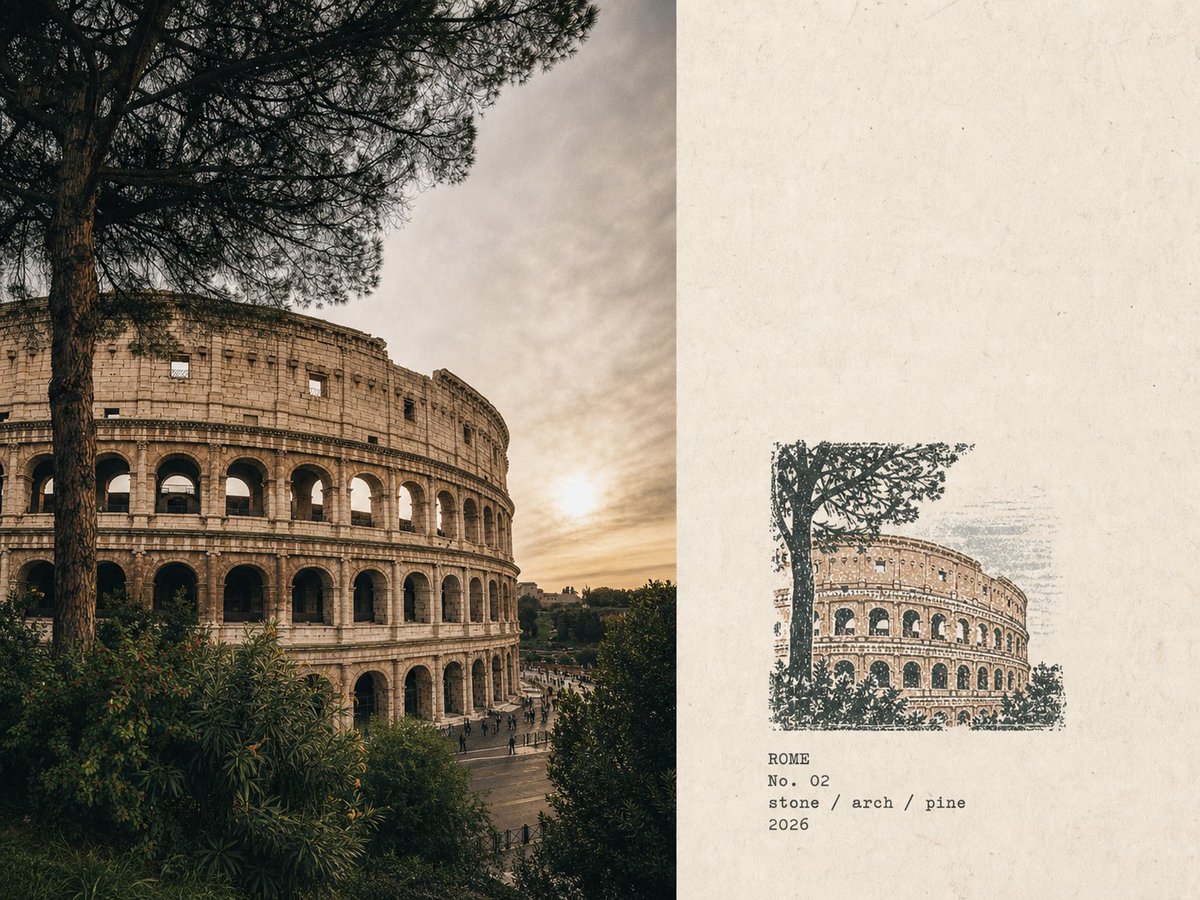
Travel Rubber Stamp Poster
This prompt transforms travel photographs into a field notes style poster, featuring a clean layout with original photos on one side and a minimalist rubber stamp illustration on the other.
Dies ist ein GPT Image 2 -Prompt für Grafik & Poster . Verwenden Sie den unten stehenden, kopierfertigen Prompt, um ähnliche Grafiken zu erstellen, und überprüfen Sie vor der Wiederverwendung Awesome GPT Image 2 Prompts -Quellenangaben sowie die kommerziellen Nutzungsrechte.
Benötigen Sie den vollständigen Prompt-Satz? Verwenden Sie den Grafik & Poster Weitere verwandte Beispiele finden Sie im Themen-Hub oder öffnen Sie die GPT Image 2 Prompt-Katalog für das vollständige Beispielverzeichnis, wiederverwendbare Strukturen und Quellenangaben.
Free 1K preview
Generate one preview image instantly, no sign-up required.
Free text preview doesn’t preserve reference-image consistency.
3875/4000
Eingabeaufforderung
Kopierfertige Eingabeaufforderung
Please turn every photo I upload into an independent 'Rubber Stamp Travel Field Notes Poster', outputting each photo separately without any multi-photo collage. The overall composition uses a 4:3 landscape layout, dividing the image into left and right areas without drawing obvious dividing lines. The left side accounts for about 58% of the image, faithfully preserving the original photo. Accurately maintain the identity of the subject, terrain, buildings, plants, people, spatial relationships, natural light and shadow, real texture, and original color atmosphere, performing only restrained art-publication-grade photographic color grading and adding extremely slight fine film grain. Natural cropping is allowed to fit the layout, but do not stretch, distort, move, replace, or redraw the subject. The right side accounts for about 42% of the image, using warm off-white old paper as a background. The paper has subtle fibers, natural grains, slight usage marks, and a matte touch, while retaining large areas of unprinted white space, making the blankness an important part of the layout. Analyze the original photo to extract the most recognizable subject outlines, architectural structures, terrain trends, plant postures, roads, shorelines, or other key visual relationships, and compress them into a small multi-color rubber stamp image. Do not copy all the contents of the photo item by item. Only keep the minimum information necessary to allow the original location, subject, and scene relationship to be recognized at a glance. Remove crowds, vehicles, dense windows, repetitive buildings, fine vegetation, decorative components, and irrelevant backgrounds. The stamp is located in the lower-middle part of the paper area on the right, occupying only about 30%-38% of the height of the right area, with sufficient white space reserved around it. The stamp must not be enlarged into a regular illustration, a full landscape painting, or a brand logo. Determine the organization of the stamp based on the composition of the original photo: - Iconic buildings: Keep the most recognizable outer outlines, roofs, domes, arches, towers, or main structures. - Mountain settlements: Compress buildings into a small number of stepped color blocks arranged along the terrain. - Coastal scenery: Keep the mountain trends, settlement levels, shorelines, and a few intermittent water ripples. - Urban vistas: Keep the main skyline, one iconic building, and one or two layers of distant mountains. - Natural landscapes: Keep the directional relationship of main mountains, trees, shorelines, or roads. - Close-up obstructions: If important to the original photo's narrative, they can be kept as foreground stamp outlines. Extract 2-4 spot color inks from the original photo. Prioritize desaturated colors like carbon black, dark green, brick red, ocher yellow, gray-blue, and taupe, but do not force a fixed color palette. Retain the most recognizable color character of the original photo, allowing only a small area of color as visual emphasis. Each color should be presented as a separate hand-stamped effect: real rubber stamp carving texture, manual cut marks, uneven hatching, outline gaps, broken edges, dry ink shortage, paper transparency, granular ink, uneven pressure, partial ghosting, and a slight color registration offset of about 1-2 mm. Natural misalignment between different color layers is allowed, and edges cannot be digitally smoothed. The imprint should look like a real rubber stamp pressed on old paper, not a filtered photo, smooth vector illustration, or line-art logo. Generate text based on the location, theme, and visual imagery in the photo: English Name of Location, No. Serial Number, Three short English keywords, Anno Domini Year. Place the text below the stamp or in the adjacent white space, using a small, restrained, and slightly...
Best for
- - Grafik & Poster visual exploration
- - Image generation and reference-image edits
- - Reusable briefs that keep source attribution visible
Change these parts
- - Subject, product, character, or scene
- - Aspect ratio, camera, lighting, and background
- - Brand, text, color, and output constraints
Recommended model and settings
- - Model: gpt-image-2
- - Input mode: Bild zu Bild
- - Aspect ratio: source
- - Commercial status: review original source
How to use this prompt
- 1. Copy the prompt and preserve its structure for the first test.
- 2. Replace the subject, context, and publishing channel.
- 3. Change one camera, lighting, or style variable per iteration.
- 4. Inspect the output, source, text, and rights before reuse.
Limitations, source, and reuse cautions
- - Generated output is an editable draft, not factual, legal, or rights evidence.
- - Review the linked source, people, brands, logos, text, and third-party media before commercial use.
Importiert von Awesome GPT Image 2 Prompts . Quellenangabe erforderlich. Status der kommerziellen Nutzung: allowed ; Rechte an der Quelle vor kostenpflichtiger Nutzung prüfen.
Weitere Fälle in dieser Kategorie
Priorisiert nach Kategorie, Kompatibilität der Eingabemodi, Qualität und geringerem Risiko.






Hinweise zur Wiederverwendung und Quellenangabe
Verwenden Sie diese Eingabeaufforderung sicher, nachdem Sie den Fall in der Vorschau angezeigt haben.
- 1.Kopieren Sie die Eingabeaufforderung oder öffnen Sie sie direkt in Dovoo mit der Schaltfläche „Generieren“.
- 2.Passen Sie Variablen, Seitenverhältnis und Referenzbilder an Ihren Anwendungsfall an.
- 3.Vor der Veröffentlichung oder kostenpflichtigen Nutzung sollten Sie die Rechte an der Quelle, die Anforderungen an die Namensnennung sowie die Risiken für die Marke oder das Abbild prüfen.