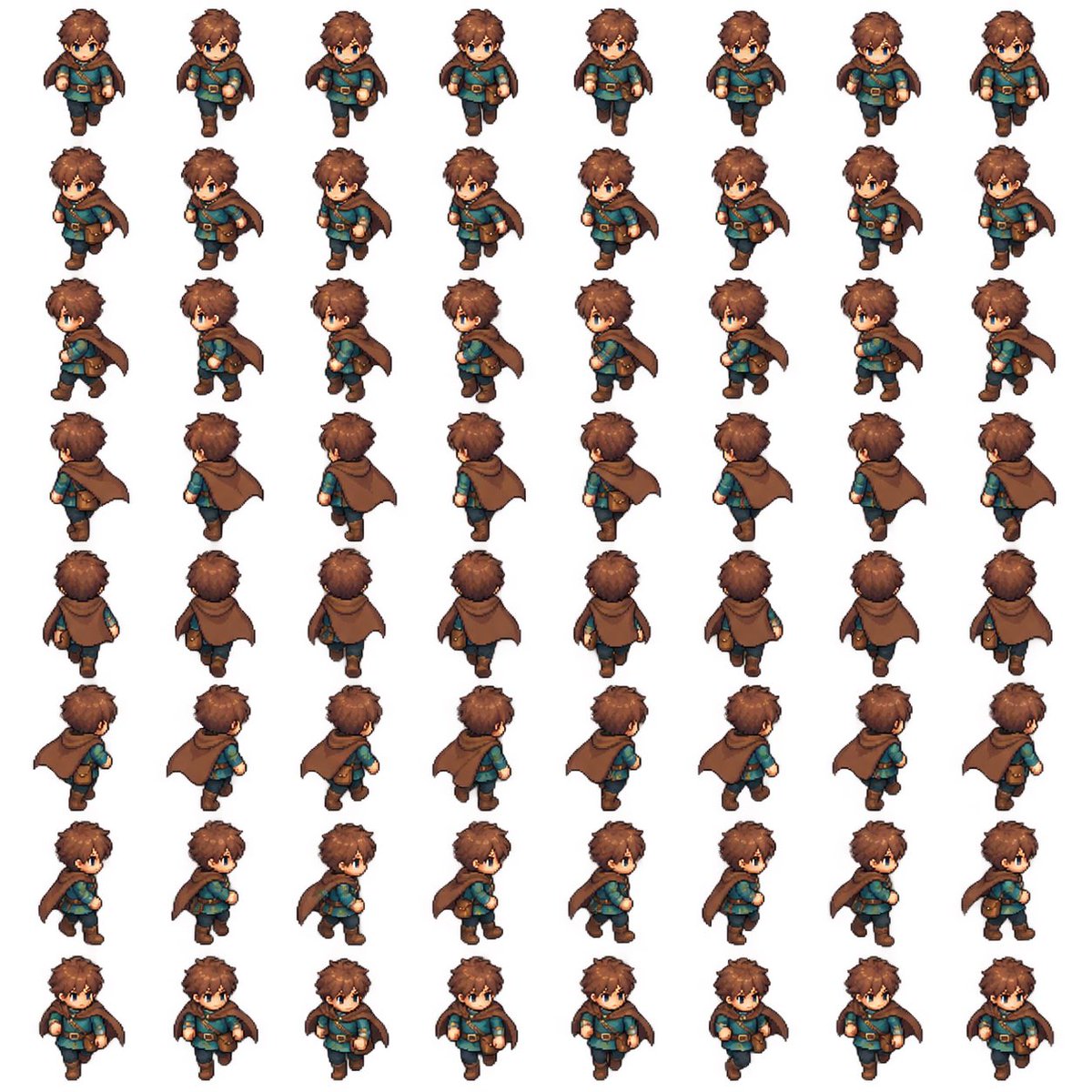
8-Direction RPG Hero Sprite Sheet
Generates a consistent 64-frame pixel-art walking sprite sheet for a fantasy Zelda-like game character.
Dies ist ein GPT Image 2 -Prompt für Anime & Spiel . Verwenden Sie den unten stehenden, kopierfertigen Prompt, um ähnliche Grafiken zu erstellen, und überprüfen Sie vor der Wiederverwendung Awesome GPT Image 2 Prompts -Quellenangaben sowie die kommerziellen Nutzungsrechte.
Benötigen Sie den vollständigen Prompt-Satz? Verwenden Sie den Anime & Spiel Weitere verwandte Beispiele finden Sie im Themen-Hub oder öffnen Sie die GPT Image 2 Prompt-Katalog für das vollständige Beispielverzeichnis, wiederverwendbare Strukturen und Quellenangaben.
Free 1K preview
Generate one preview image instantly, no sign-up required.
2223/4000
Eingabeaufforderung
Kopierfertige Eingabeaufforderung
Goal: Create a complete 2D pixel-art RPG walking sprite sheet for a Zelda-like game character, ready to cut into animation frames.

Canvas: Square white background, clean sprite-sheet presentation, evenly spaced grid with no borders, no labels, no shadows outside the sprites. Use a consistent top-down three-quarter RPG perspective.

Layout: Arrange exactly 64 discrete character sprites in an 8 columns by 8 rows grid. Each row is one walking direction and each column is one animation frame. Keep identical scale, centered alignment, and consistent spacing across all cells.

Directions and frame count: Include exactly 8 walking directions with 8 frames each: 1 front-facing walking toward camera, 2 front-right diagonal, 3 right side profile, 4 back-right diagonal, 5 back-facing walking away, 6 back-left diagonal, 7 left side profile, 8 front-left diagonal. The character identity, proportions, outfit, hair, face, cape, pouch, boots, and colors must remain consistent in all 64 frames. Animate legs, arms, cape swing, and body bob naturally without changing the character design.

Character details: A cute young fantasy adventurer boy named {argument name="character name" default="brown-haired cape adventurer"}, chibi proportions with a large head and small body, tousled {argument name="hair color" default="warm brown"} hair, blue eyes, fair skin, determined neutral expression, teal tunic, brown leather belt with gold buckle, dark trousers, brown boots, small brown satchel pouch at the hip, and a flowing {argument name="cape color" default="brown"} cloak fastened around the shoulders. Outfit style should feel like a classic action-adventure RPG hero.

Visual style: High-quality pixel art with crisp edges, hand-painted sprite detail, subtle cel shading, warm fantasy colors, readable silhouette, small-game-character scale, polished indie RPG look. Use a consistent light source and consistent pixel density across every frame.

Constraints: Exactly 64 sprites total, exactly 8 rows and 8 columns, no text, no UI, no weapon, no extra characters, no background scenery, no duplicated wrong-facing limbs, no flipped-inconsistent accessories, no changes in head shape or outfit between frames, no cropping.
Eingabeaufforderungsvariablen
In der Eingabeaufforderung befinden sich bearbeitbare Argumentplatzhalter mit ihren Standardwerten.
Variable
character name
Standard
brown-haired cape adventurer
Variable
hair color
Standard
warm brown
Variable
cape color
Standard
brown
Best for
- - Anime & Spiel visual exploration
- - Image generation and reference-image edits
- - Reusable briefs that keep source attribution visible
Change these parts
- - Subject, product, character, or scene
- - Aspect ratio, camera, lighting, and background
- - Brand, text, color, and output constraints
Recommended model and settings
- - Model: gpt-image-2
- - Input mode: Text zu Bild
- - Aspect ratio: source
- - Commercial status: review original source
How to use this prompt
- 1. Copy the prompt and preserve its structure for the first test.
- 2. Replace the subject, context, and publishing channel.
- 3. Change one camera, lighting, or style variable per iteration.
- 4. Inspect the output, source, text, and rights before reuse.
Limitations, source, and reuse cautions
- - Generated output is an editable draft, not factual, legal, or rights evidence.
- - Review the linked source, people, brands, logos, text, and third-party media before commercial use.
Importiert von Awesome GPT Image 2 Prompts . Quellenangabe erforderlich. Status der kommerziellen Nutzung: allowed ; Rechte an der Quelle vor kostenpflichtiger Nutzung prüfen.
Weitere Fälle in dieser Kategorie
Priorisiert nach Kategorie, Kompatibilität der Eingabemodi, Qualität und geringerem Risiko.






Hinweise zur Wiederverwendung und Quellenangabe
Verwenden Sie diese Eingabeaufforderung sicher, nachdem Sie den Fall in der Vorschau angezeigt haben.
- 1.Kopieren Sie die Eingabeaufforderung oder öffnen Sie sie direkt in Dovoo mit der Schaltfläche „Generieren“.
- 2.Passen Sie Variablen, Seitenverhältnis und Referenzbilder an Ihren Anwendungsfall an.
- 3.Vor der Veröffentlichung oder kostenpflichtigen Nutzung sollten Sie die Rechte an der Quelle, die Anforderungen an die Namensnennung sowie die Risiken für die Marke oder das Abbild prüfen.