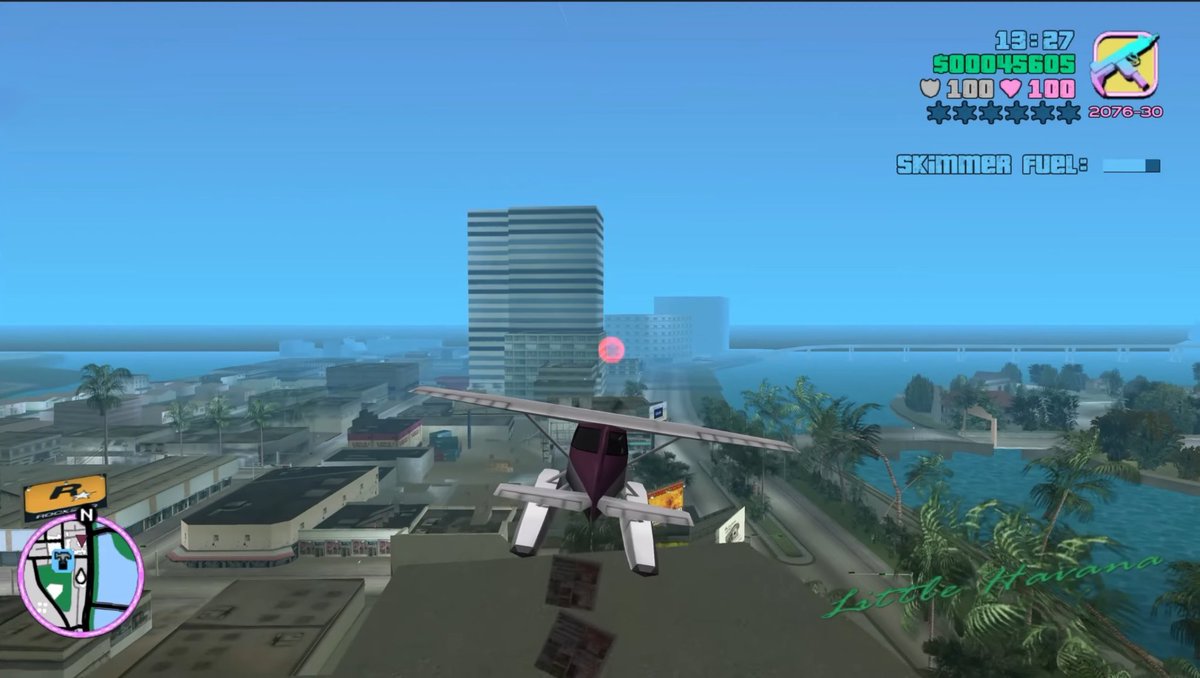
Screenshot aus einem Retro-Open-World-Wasserflugzeug
Diese Eingabeaufforderung erzeugt einen nostalgischen Screenshot eines Open-World-Spiels aus der PS2-Ära, der ein Wasserflugzeug über einer tropischen Stadt zeigt, inklusive vollständigem Retro-HUD. Dieser Screenshot eignet sich hervorragend zur Nachbildung klassischer Videospielgrafiken.
Dies ist ein GPT Image 2 -Prompt für Anime & Spiel . Verwenden Sie den unten stehenden, kopierfertigen Prompt, um ähnliche Grafiken zu erstellen, und überprüfen Sie vor der Wiederverwendung Awesome GPT Image 2 Prompts -Quellenangaben sowie die kommerziellen Nutzungsrechte.
Free 1K preview
Generate one preview image instantly, no sign-up required.
Eingabeaufforderung
Kopierfertige Eingabeaufforderung
A third-person gameplay screenshot styled exactly like an early-2000s open-world crime game, showing a small white and burgundy seaplane flying low over a tropical coastal city. The camera is positioned directly behind the aircraft, centered on its tail, with the plane heading toward a cluster of mid-rise buildings near the waterfront. The city below has flat-roofed buildings, palm-lined streets, canals, and bright turquoise water, with a hazy blue sky and light atmospheric fog that softens the distance. A tall striped office tower stands near the center background, and a glowing pink checkpoint ring floats in front of the buildings. On the right side, a curving shoreline and canal are lined with dense palm trees. Add a retro video game HUD in the top-right corner with the time reading 13:27, green money text reading 500045605, two lines of white health and armor values both reading 100, a row of 6 wanted stars with 2 lit and 4 unlit, a small weapon icon in a rounded square, and ammo text reading 2076-30. Beneath that, display the mission text “SKIMMER FUEL!” with a small horizontal blue progress bar. In the bottom-left corner, include a circular minimap with a pink border, black streets, pale land, blue water, a north marker labeled N, and a small player arrow. In the bottom-right corner, overlay the location name {argument name="location name" default="Little Havana"} in elegant green cursive script. Use low-polygon vehicles and buildings, simple textures, soft shadows, saturated tropical colors, slight screen blur, and the unmistakable nostalgic look of a PlayStation 2-era action game screenshot with a 16:9 frame.Eingabeaufforderungsvariablen
In der Eingabeaufforderung befinden sich bearbeitbare Argumentplatzhalter mit ihren Standardwerten.
Best for
- - Anime & Spiel visual exploration
- - Image generation and reference-image edits
- - Reusable briefs that keep source attribution visible
Change these parts
- - Subject, product, character, or scene
- - Aspect ratio, camera, lighting, and background
- - Brand, text, color, and output constraints
Recommended model and settings
- - Model: gpt-image-2
- - Input mode: Text zu Bild
- - Aspect ratio: source
- - Commercial status: review original source
How to use this prompt
- 1. Copy the prompt and preserve its structure for the first test.
- 2. Replace the subject, context, and publishing channel.
- 3. Change one camera, lighting, or style variable per iteration.
- 4. Inspect the output, source, text, and rights before reuse.
Limitations, source, and reuse cautions
- - Generated output is an editable draft, not factual, legal, or rights evidence.
- - Review the linked source, people, brands, logos, text, and third-party media before commercial use.
Weitere Fälle in dieser Kategorie
Priorisiert nach Kategorie, Kompatibilität der Eingabemodi, Qualität und geringerem Risiko.






Hinweise zur Wiederverwendung und Quellenangabe
Verwenden Sie diese Eingabeaufforderung sicher, nachdem Sie den Fall in der Vorschau angezeigt haben.
- 1.Kopieren Sie die Eingabeaufforderung oder öffnen Sie sie direkt in Dovoo mit der Schaltfläche „Generieren“.
- 2.Passen Sie Variablen, Seitenverhältnis und Referenzbilder an Ihren Anwendungsfall an.
- 3.Vor der Veröffentlichung oder kostenpflichtigen Nutzung sollten Sie die Rechte an der Quelle, die Anforderungen an die Namensnennung sowie die Risiken für die Marke oder das Abbild prüfen.