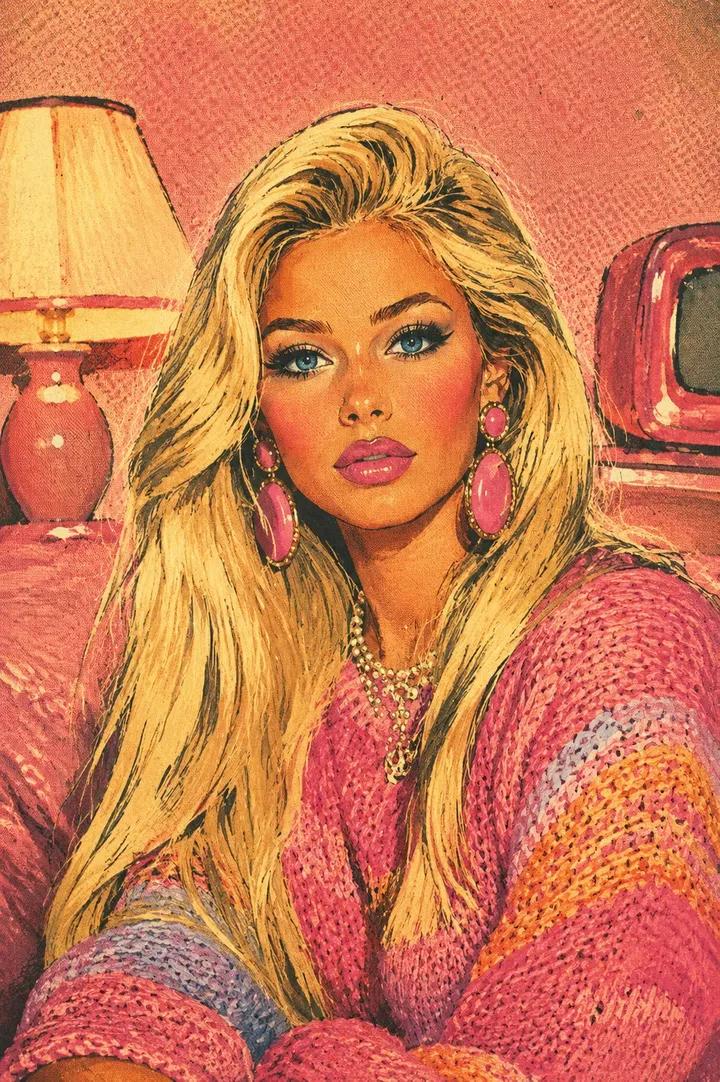
Retro Blonde Magazine Portrait
Generates a vintage 1950s-style illustrated portrait of a blonde woman in a colorful sweater with retro room details and aged print texture.
Dies ist ein GPT Image 2 -Prompt für Porträt & Charakter . Verwenden Sie den unten stehenden, kopierfertigen Prompt, um ähnliche Grafiken zu erstellen, und überprüfen Sie vor der Wiederverwendung Awesome GPT Image 2 Prompts -Quellenangaben sowie die kommerziellen Nutzungsrechte.
Benötigen Sie den vollständigen Prompt-Satz? Verwenden Sie den Porträt & Charakter Weitere verwandte Beispiele finden Sie im Themen-Hub oder öffnen Sie die GPT Image 2 Prompt-Katalog für das vollständige Beispielverzeichnis, wiederverwendbare Strukturen und Quellenangaben.
Free 1K preview
Generate one preview image instantly, no sign-up required.
1547/4000
Eingabeaufforderung
Kopierfertige Eingabeaufforderung
Create a vertical mid-century American beauty magazine illustration of {argument name="subject" default="a glamorous blonde woman seated indoors"}, shown from the chest up in a cozy retro room. Preserve a close portrait composition: the woman fills most of the frame, leaning slightly forward with both arms crossed or resting at the bottom edge, long voluminous platinum-blonde hair sweeping over both shoulders, face area intentionally covered by a centered opaque warm tan rectangular block. She wears oversized pink dangling earrings, layered pearl necklaces, and a chunky knitted sweater in {argument name="sweater colors" default="hot pink, coral, orange, lavender, and pale blue stripes"}. Background: a salmon-pink textured wall, a glowing cream lampshade on a coral table lamp on the left, and a small red vintage television on the right. Render the entire image as an authentic 1950s–1960s romance comic / vintage beauty advertisement: bold black ink outlines, hand-painted cel shading, simplified elegant forms, glamorous pin-up styling, warm rosy skin tones, vibrant pastel palette of {argument name="color palette" default="bubblegum pink, coral, turquoise accents, cream, pale yellow, lavender, and warm ivory"}. Add visible halftone dots, aged paper grain, faded ink edges, subtle color misregistration, screen-print texture, and minor offset-print imperfections so it looks like a preserved vintage magazine page. Use no captions, no typography, no watermark, and keep the tan face-covering rectangle perfectly flat and untextured.Eingabeaufforderungsvariablen
In der Eingabeaufforderung befinden sich bearbeitbare Argumentplatzhalter mit ihren Standardwerten.
Variable
subject
Standard
a glamorous blonde woman seated indoors
Variable
sweater colors
Standard
hot pink, coral, orange, lavender, and pale blue stripes
Variable
color palette
Standard
bubblegum pink, coral, turquoise accents, cream, pale yellow, lavender, and warm ivory
Best for
- - Porträt & Charakter visual exploration
- - Image generation and reference-image edits
- - Reusable briefs that keep source attribution visible
Change these parts
- - Subject, product, character, or scene
- - Aspect ratio, camera, lighting, and background
- - Brand, text, color, and output constraints
Recommended model and settings
- - Model: gpt-image-2
- - Input mode: Text zu Bild
- - Aspect ratio: source
- - Commercial status: review original source
How to use this prompt
- 1. Copy the prompt and preserve its structure for the first test.
- 2. Replace the subject, context, and publishing channel.
- 3. Change one camera, lighting, or style variable per iteration.
- 4. Inspect the output, source, text, and rights before reuse.
Limitations, source, and reuse cautions
- - Generated output is an editable draft, not factual, legal, or rights evidence.
- - Review the linked source, people, brands, logos, text, and third-party media before commercial use.
Importiert von Awesome GPT Image 2 Prompts . Quellenangabe erforderlich. Status der kommerziellen Nutzung: allowed ; Rechte an der Quelle vor kostenpflichtiger Nutzung prüfen.
Weitere Fälle in dieser Kategorie
Priorisiert nach Kategorie, Kompatibilität der Eingabemodi, Qualität und geringerem Risiko.






Hinweise zur Wiederverwendung und Quellenangabe
Verwenden Sie diese Eingabeaufforderung sicher, nachdem Sie den Fall in der Vorschau angezeigt haben.
- 1.Kopieren Sie die Eingabeaufforderung oder öffnen Sie sie direkt in Dovoo mit der Schaltfläche „Generieren“.
- 2.Passen Sie Variablen, Seitenverhältnis und Referenzbilder an Ihren Anwendungsfall an.
- 3.Vor der Veröffentlichung oder kostenpflichtigen Nutzung sollten Sie die Rechte an der Quelle, die Anforderungen an die Namensnennung sowie die Risiken für die Marke oder das Abbild prüfen.