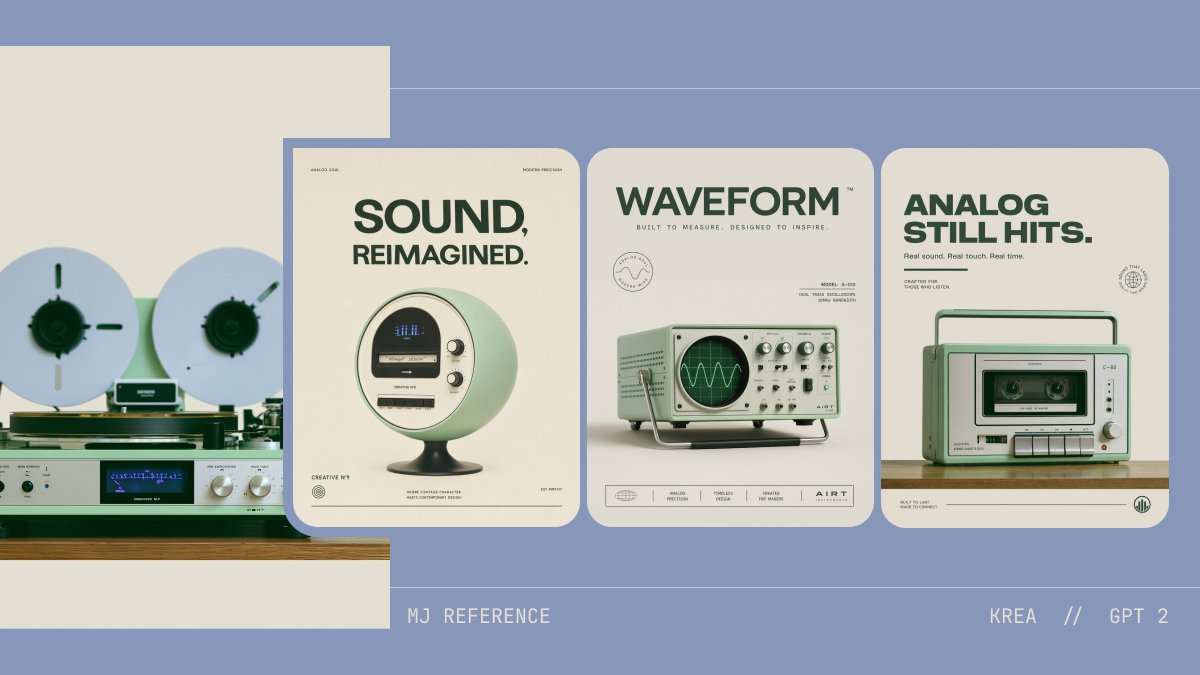
Retro-Audio-Konzept-Poster
Diese Vorgabe generiert ein stilvolles Designboard, das ein analoges Referenzfoto mit drei passenden Retro-Tech-Produktpostern kombiniert, um Konzepte zu präsentieren und die Markenästhetik zu erkunden.
Dies ist ein GPT Image 2 -Prompt für Grafik & Poster . Verwenden Sie den unten stehenden, kopierfertigen Prompt, um ähnliche Grafiken zu erstellen, und überprüfen Sie vor der Wiederverwendung Awesome GPT Image 2 Prompts -Quellenangaben sowie die kommerziellen Nutzungsrechte.
Free 1K preview
Generate one preview image instantly, no sign-up required.
Free text preview doesn’t preserve reference-image consistency.
Eingabeaufforderung
Kopierfertige Eingabeaufforderung
A clean retro-futurist presentation board on a muted periwinkle-blue background with a minimalist editorial layout, showing 4 analog-inspired audio product concept visuals arranged horizontally. On the far left, a partially cropped reference image of a vintage reel-to-reel tape deck and silver stereo receiver on a wooden shelf against a warm off-white wall; two large white reels with dark green centers, brushed metal knobs, a blue-lit display, and pale mint and silver hardware. To the right, 3 tall rounded-corner poster cards evenly spaced, all using the same cream paper tone, dark forest-green typography, mint-green product styling, and soft studio shadows. First poster: a spherical retro speaker/radio on a pedestal base, pale mint body with a circular front face, small display, and two side knobs, centered under a large bold uppercase headline reading {argument name="headline text 1" default="SOUND, REIMAGINED."}. Second poster: a mint-green vintage oscilloscope-like device with a CRT screen displaying a waveform, silver knobs and switches, and a metal tilt stand, centered under a bold uppercase headline reading {argument name="headline text 2" default="WAVEFORM"}. Third poster: a compact mint-green portable cassette recorder/boombox with handle, front cassette window, buttons, speaker grille, and silver knobs, centered under a bold uppercase headline reading {argument name="headline text 3" default="ANALOG STILL HITS."}. Each poster includes tiny microtype, fake brand marks, and footer icons in a refined Swiss-modern advertising style. Use a restrained palette of dusty blue, cream, sage mint, forest green, silver, black, and warm wood. Add thin horizontal guide lines across the background and small footer text at the bottom reading {argument name="left footer text" default="MJ REFERENCE"} on the left and {argument name="right footer text" default="KREA // GPT 2"} on the right. Overall look: premium concept design board, consistent aesthetic translation from analog hi-fi inspiration into three polished product posters, soft lighting, high-end graphic design, minimal clutter, crisp typography, and subtle nostalgic realism.Eingabeaufforderungsvariablen
In der Eingabeaufforderung befinden sich bearbeitbare Argumentplatzhalter mit ihren Standardwerten.
Best for
- - Grafik & Poster visual exploration
- - Image generation and reference-image edits
- - Reusable briefs that keep source attribution visible
Change these parts
- - Subject, product, character, or scene
- - Aspect ratio, camera, lighting, and background
- - Brand, text, color, and output constraints
Recommended model and settings
- - Model: gpt-image-2
- - Input mode: Bild zu Bild
- - Aspect ratio: source
- - Commercial status: review original source
How to use this prompt
- 1. Copy the prompt and preserve its structure for the first test.
- 2. Replace the subject, context, and publishing channel.
- 3. Change one camera, lighting, or style variable per iteration.
- 4. Inspect the output, source, text, and rights before reuse.
Limitations, source, and reuse cautions
- - Generated output is an editable draft, not factual, legal, or rights evidence.
- - Review the linked source, people, brands, logos, text, and third-party media before commercial use.
Weitere Fälle in dieser Kategorie
Priorisiert nach Kategorie, Kompatibilität der Eingabemodi, Qualität und geringerem Risiko.






Hinweise zur Wiederverwendung und Quellenangabe
Verwenden Sie diese Eingabeaufforderung sicher, nachdem Sie den Fall in der Vorschau angezeigt haben.
- 1.Kopieren Sie die Eingabeaufforderung oder öffnen Sie sie direkt in Dovoo mit der Schaltfläche „Generieren“.
- 2.Passen Sie Variablen, Seitenverhältnis und Referenzbilder an Ihren Anwendungsfall an.
- 3.Vor der Veröffentlichung oder kostenpflichtigen Nutzung sollten Sie die Rechte an der Quelle, die Anforderungen an die Namensnennung sowie die Risiken für die Marke oder das Abbild prüfen.