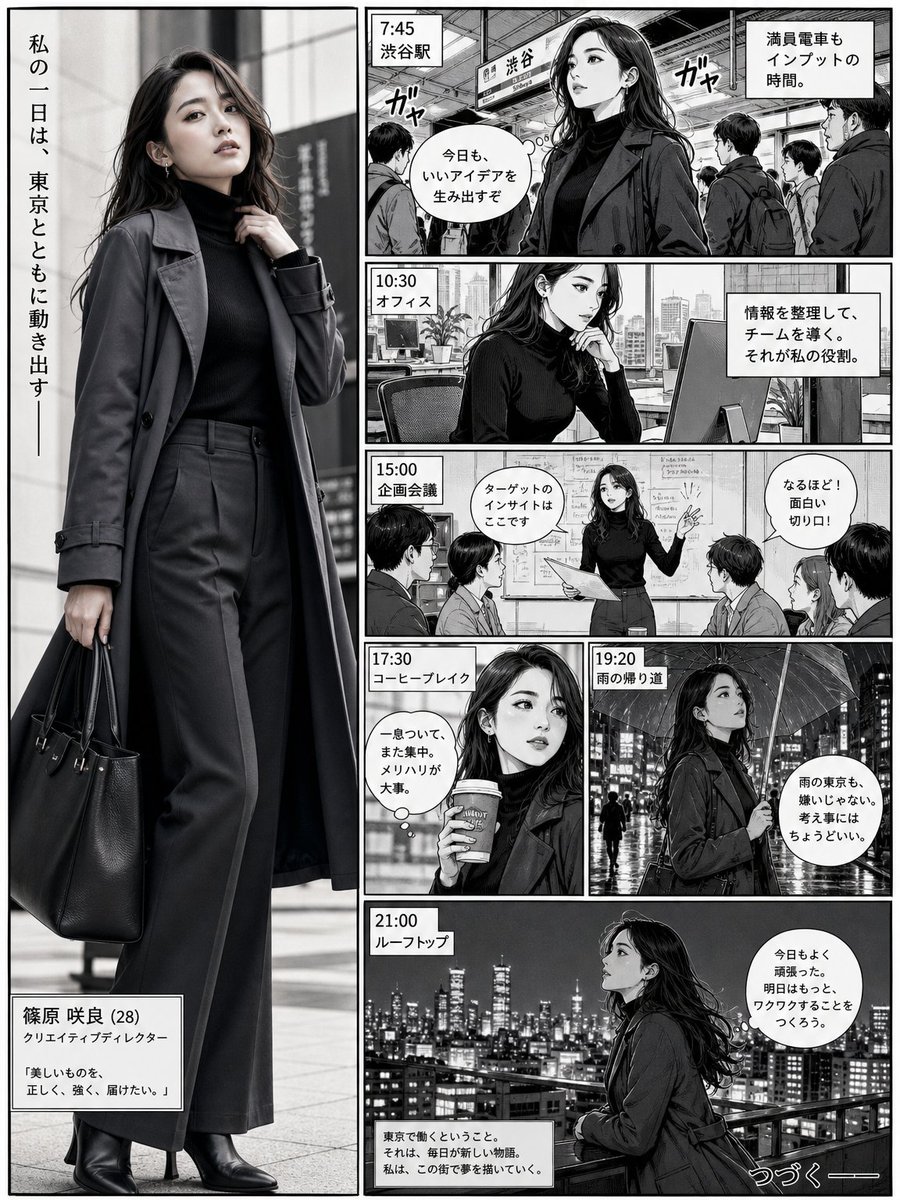
Realistic Professional Woman in Manga Page Layout
This prompt creates a sophisticated Japanese manga page layout that seamlessly integrates a highly realistic, full-body portrait of a character with stylized black-and-white narrative panels.
Dies ist ein GPT Image 2 -Prompt für Porträt & Charakter . Verwenden Sie den unten stehenden, kopierfertigen Prompt, um ähnliche Grafiken zu erstellen, und überprüfen Sie vor der Wiederverwendung Awesome GPT Image 2 Prompts -Quellenangaben sowie die kommerziellen Nutzungsrechte.
Free 1K preview
Generate one preview image instantly, no sign-up required.
Eingabeaufforderung
Kopierfertige Eingabeaufforderung
Ultra-realistic full-body portrait of a {argument name="character description" default="confident young professional woman"} integrated directly into a {argument name="comic style" default="Japanese manga"} page layout. She appears inside a tall vertical hero panel on the left, spanning almost the full page height, and feels visually connected to the surrounding story panels. She wears a {argument name="outfit" default="sleek charcoal trench coat layered over a fitted black turtleneck and tailored wide-leg trousers, with leather ankle boots and a structured work bag"}. Her pose is stylish and confident, one hand lightly adjusting her coat collar, the other holding the bag, body slightly turned with one leg forward.\n\nOn the right side, create smaller black-and-white manga panels showing a day in her life in Tokyo: train station, office desk, creative meeting, coffee break, rainy street, and rooftop skyline. Make the woman feel like the main character of the page, as if the realistic figure exists inside the manga story, not outside it. Use strong ink lines, screentones, speech bubbles, motion lines, and cinematic panel storytelling. Blend the realistic subject naturally into the comic narrative while keeping her more detailed and visually dominant.Eingabeaufforderungsvariablen
In der Eingabeaufforderung befinden sich bearbeitbare Argumentplatzhalter mit ihren Standardwerten.
Best for
- - Porträt & Charakter visual exploration
- - Image generation and reference-image edits
- - Reusable briefs that keep source attribution visible
Change these parts
- - Subject, product, character, or scene
- - Aspect ratio, camera, lighting, and background
- - Brand, text, color, and output constraints
Recommended model and settings
- - Model: gpt-image-2
- - Input mode: Text zu Bild
- - Aspect ratio: source
- - Commercial status: review original source
How to use this prompt
- 1. Copy the prompt and preserve its structure for the first test.
- 2. Replace the subject, context, and publishing channel.
- 3. Change one camera, lighting, or style variable per iteration.
- 4. Inspect the output, source, text, and rights before reuse.
Limitations, source, and reuse cautions
- - Generated output is an editable draft, not factual, legal, or rights evidence.
- - Review the linked source, people, brands, logos, text, and third-party media before commercial use.
Weitere Fälle in dieser Kategorie
Priorisiert nach Kategorie, Kompatibilität der Eingabemodi, Qualität und geringerem Risiko.






Hinweise zur Wiederverwendung und Quellenangabe
Verwenden Sie diese Eingabeaufforderung sicher, nachdem Sie den Fall in der Vorschau angezeigt haben.
- 1.Kopieren Sie die Eingabeaufforderung oder öffnen Sie sie direkt in Dovoo mit der Schaltfläche „Generieren“.
- 2.Passen Sie Variablen, Seitenverhältnis und Referenzbilder an Ihren Anwendungsfall an.
- 3.Vor der Veröffentlichung oder kostenpflichtigen Nutzung sollten Sie die Rechte an der Quelle, die Anforderungen an die Namensnennung sowie die Risiken für die Marke oder das Abbild prüfen.