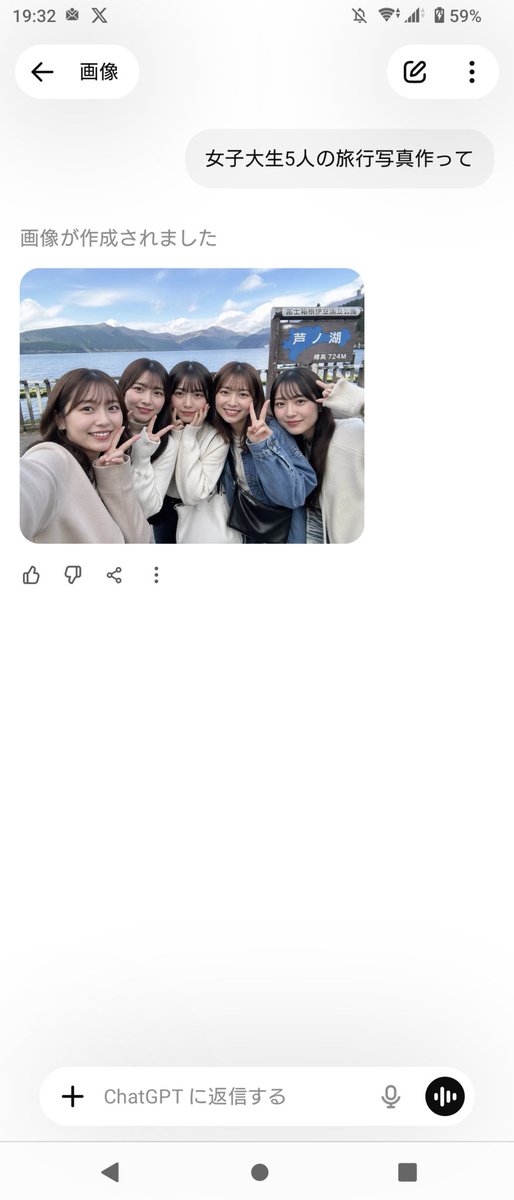
Realistisches Freundes-Selfie am Ashi-See
Erzeugt realistische Gruppen-Reise-Selfies japanischer Studentinnen im Smartphone-Stil an einem malerischen Seeufer, ideal für Social Media oder als Mockups für ungezwungene Urlaubsfotos.
Dies ist ein GPT Image 2 -Prompt für Porträt & Charakter . Verwenden Sie den unten stehenden, kopierfertigen Prompt, um ähnliche Grafiken zu erstellen, und überprüfen Sie vor der Wiederverwendung Awesome GPT Image 2 Prompts -Quellenangaben sowie die kommerziellen Nutzungsrechte.
Free 1K preview
Generate one preview image instantly, no sign-up required.
Eingabeaufforderung
Kopierfertige Eingabeaufforderung
A candid, smartphone-style travel selfie of {argument name="group size" default="five"} Japanese female college students standing closely together at the shore of {argument name="location" default="Lake Ashi, Hakone"}, shot at arm’s length with a slightly wide-angle front camera feel. They are grouped tightly shoulder-to-shoulder, smiling and making peace signs toward the camera, with a casual cheerful friends-on-a-trip mood. Their styling is realistic and contemporary, with dark brown to black medium-to-long hair, natural makeup, and soft autumn outfits in light neutral tones: cream and white knit sweaters, a blue denim jacket, and a black shoulder bag visible near the center-right. Behind them is a lakeside scenic background with calm blue water, distant mountains under a bright sky with scattered clouds, and a wooden tourist signboard on the right side that clearly includes the Japanese text {argument name="sign text" default="芦ノ湖"} and a smaller elevation marking reading 724M. Composition should look like an authentic social-media travel photo, slightly cropped at the edges as if one person is holding the phone from the left, with natural daylight, realistic skin tones, soft depth, and documentary-style photo realism. Include exactly {argument name="peace sign count" default="three"} visible peace-sign hand gestures. Make it feel like a believable group souvenir photo taken during a day trip in Japan.Eingabeaufforderungsvariablen
In der Eingabeaufforderung befinden sich bearbeitbare Argumentplatzhalter mit ihren Standardwerten.
Best for
- - Porträt & Charakter visual exploration
- - Image generation and reference-image edits
- - Reusable briefs that keep source attribution visible
Change these parts
- - Subject, product, character, or scene
- - Aspect ratio, camera, lighting, and background
- - Brand, text, color, and output constraints
Recommended model and settings
- - Model: gpt-image-2
- - Input mode: Text zu Bild
- - Aspect ratio: source
- - Commercial status: review original source
How to use this prompt
- 1. Copy the prompt and preserve its structure for the first test.
- 2. Replace the subject, context, and publishing channel.
- 3. Change one camera, lighting, or style variable per iteration.
- 4. Inspect the output, source, text, and rights before reuse.
Limitations, source, and reuse cautions
- - Generated output is an editable draft, not factual, legal, or rights evidence.
- - Review the linked source, people, brands, logos, text, and third-party media before commercial use.
Weitere Fälle in dieser Kategorie
Priorisiert nach Kategorie, Kompatibilität der Eingabemodi, Qualität und geringerem Risiko.






Hinweise zur Wiederverwendung und Quellenangabe
Verwenden Sie diese Eingabeaufforderung sicher, nachdem Sie den Fall in der Vorschau angezeigt haben.
- 1.Kopieren Sie die Eingabeaufforderung oder öffnen Sie sie direkt in Dovoo mit der Schaltfläche „Generieren“.
- 2.Passen Sie Variablen, Seitenverhältnis und Referenzbilder an Ihren Anwendungsfall an.
- 3.Vor der Veröffentlichung oder kostenpflichtigen Nutzung sollten Sie die Rechte an der Quelle, die Anforderungen an die Namensnennung sowie die Risiken für die Marke oder das Abbild prüfen.