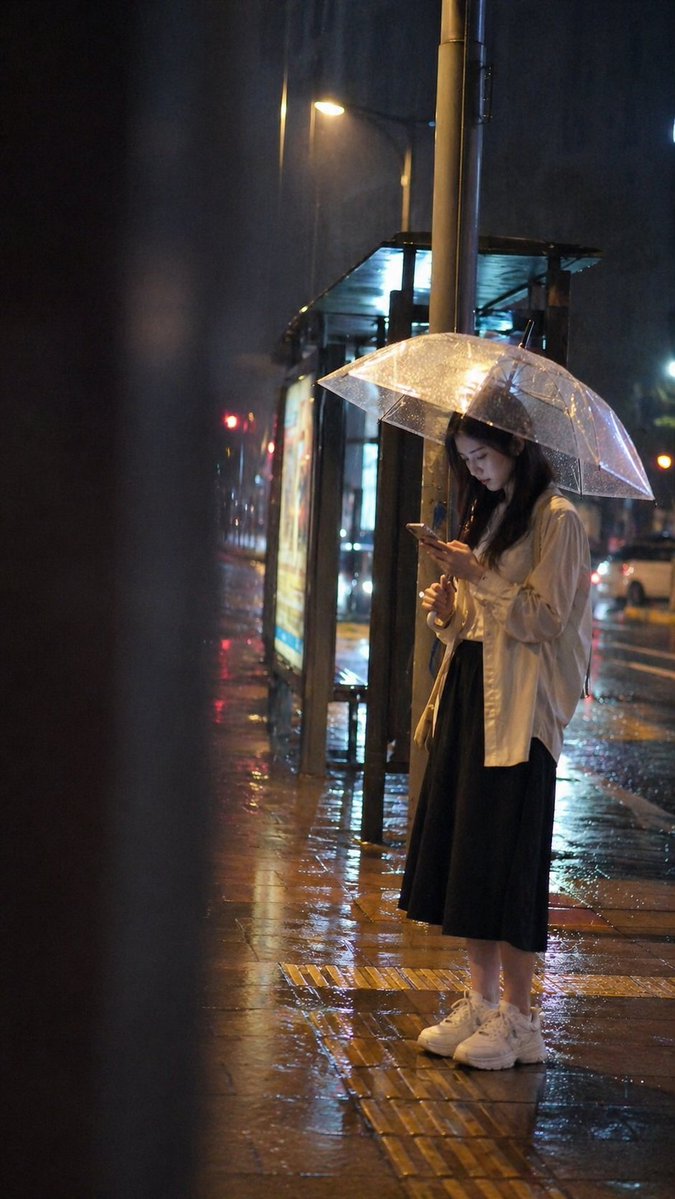
Filmreife Bushaltestellenankündigung in einer regnerischen Nacht
Eine äußerst detaillierte und stimmungsvolle Vorgabe für eine realistische, spontane Momentaufnahme einer Person an einer Bushaltestelle in einer regnerischen Nacht.
Dies ist ein GPT Image 2 -Prompt für Porträt & Charakter . Verwenden Sie den unten stehenden, kopierfertigen Prompt, um ähnliche Grafiken zu erstellen, und überprüfen Sie vor der Wiederverwendung Awesome GPT Image 2 Prompts -Quellenangaben sowie die kommerziellen Nutzungsrechte.
Free 1K preview
Generate one preview image instantly, no sign-up required.
Eingabeaufforderung
Kopierfertige Eingabeaufforderung
At a city bus stop on a rainy night, a {argument name="person" default="young adult female"} stands alone under the dim yellow streetlights and bus stop lightboxes, slightly looking down at her phone, not looking at the camera, showing a natural state of waiting. She is wearing {argument name="clothing" default="a light thin jacket, dark skirt, and white sneakers"}, with her long hair falling naturally, holding a phone in one hand and a transparent umbrella in the other. The person is located in the right third of the frame, with blurred foreground obstruction on the left, like a moment caught by chance from a street crowd or the edge of a car window. Bus stop signs, advertising lightboxes, lamp posts, and umbrella edges form clear vertical and diagonal lines to guide the eye. The ground has rain reflections, and distant car lights and neon are blurred into soft spots. The overall lighting is a real urban light mix of a cold blue rainy night environment and warm yellow streetlights, with soft top and side lighting and no strong sense of posing. Shallow depth of field keeps the subject clear while the background is slightly blurred; the image has real camera grain, slight motion blur, and imperfect composition, presenting a real moment captured on the fly. The photo style is real and natural, not a photoshoot or commercial blockbuster, with no text watermarks.Eingabeaufforderungsvariablen
In der Eingabeaufforderung befinden sich bearbeitbare Argumentplatzhalter mit ihren Standardwerten.
Best for
- - Porträt & Charakter visual exploration
- - Image generation and reference-image edits
- - Reusable briefs that keep source attribution visible
Change these parts
- - Subject, product, character, or scene
- - Aspect ratio, camera, lighting, and background
- - Brand, text, color, and output constraints
Recommended model and settings
- - Model: gpt-image-2
- - Input mode: Text zu Bild
- - Aspect ratio: source
- - Commercial status: review original source
How to use this prompt
- 1. Copy the prompt and preserve its structure for the first test.
- 2. Replace the subject, context, and publishing channel.
- 3. Change one camera, lighting, or style variable per iteration.
- 4. Inspect the output, source, text, and rights before reuse.
Limitations, source, and reuse cautions
- - Generated output is an editable draft, not factual, legal, or rights evidence.
- - Review the linked source, people, brands, logos, text, and third-party media before commercial use.
Weitere Fälle in dieser Kategorie
Priorisiert nach Kategorie, Kompatibilität der Eingabemodi, Qualität und geringerem Risiko.






Hinweise zur Wiederverwendung und Quellenangabe
Verwenden Sie diese Eingabeaufforderung sicher, nachdem Sie den Fall in der Vorschau angezeigt haben.
- 1.Kopieren Sie die Eingabeaufforderung oder öffnen Sie sie direkt in Dovoo mit der Schaltfläche „Generieren“.
- 2.Passen Sie Variablen, Seitenverhältnis und Referenzbilder an Ihren Anwendungsfall an.
- 3.Vor der Veröffentlichung oder kostenpflichtigen Nutzung sollten Sie die Rechte an der Quelle, die Anforderungen an die Namensnennung sowie die Risiken für die Marke oder das Abbild prüfen.