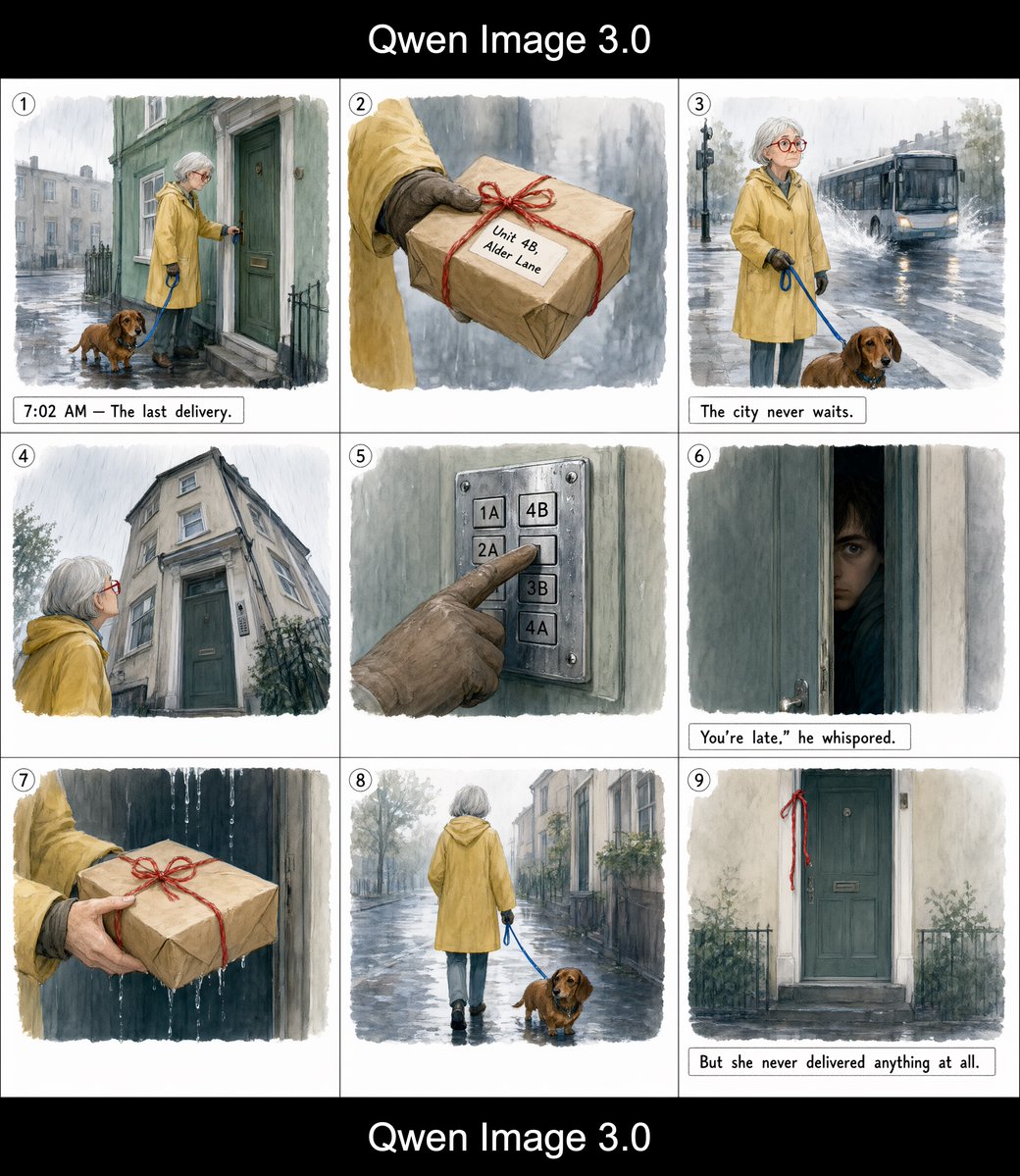
Rainy Courier Storyboard
A 3x3 watercolor storyboard depicting an elderly courier, her dachshund, and a mysterious final delivery in a rainy city.
Dies ist ein GPT Image 2 -Prompt für Illustration & Kunst . Verwenden Sie den unten stehenden, kopierfertigen Prompt, um ähnliche Grafiken zu erstellen, und überprüfen Sie vor der Wiederverwendung Awesome GPT Image 2 Prompts -Quellenangaben sowie die kommerziellen Nutzungsrechte.
Free 1K preview
Generate one preview image instantly, no sign-up required.
Free text preview doesn’t preserve reference-image consistency.
Eingabeaufforderung
Kopierfertige Eingabeaufforderung
Goal: Create a watercolor storyboard page showing a quiet, mysterious delivery story starring {argument name="character name" default="an elderly woman courier"} and her dog.

Canvas: Square image with a 3x3 storyboard grid on white paper, thin black gutters, soft watercolor-and-ink illustration. Add a black horizontal band at the top and bottom, each with centered white text reading “Qwen Image 3.0”.

Visual style: Gentle rainy-city watercolor, muted grays and greens, loose ink outlines, softly washed backgrounds, slightly vignetted panel edges, cinematic but hand-painted. Keep the same protagonist in every relevant panel: a woman in her 60s with short silver hair, round red glasses, a {argument name="raincoat color" default="mustard yellow"} raincoat, dark gloves, boots, and a small brown dachshund on a blue leash. The mood is quiet, suspenseful, and melancholic.

Layout: Exactly 9 panels in a 3 by 3 grid. Each panel has a small white circle with a black outline and black number at the top-left corner, numbered 1 through 9. Use thin black dividers between panels. Some panels include small caption boxes in a handwritten typewriter-like font.

Panel-by-panel content, exactly 9 panels:
1. Numbered 1. Wide view at dawn in heavy rain: the elderly woman stands at the green front door of an old townhouse, reaching toward the doorbell or knob, with her brown dachshund beside her on the wet pavement. Georgian-style street in the background, reflective puddles, iron railings. Caption box: “7:02 AM — The last delivery.”
2. Numbered 2. Close-up of her gloved hands holding a brown paper parcel tied with red string. The parcel label reads {argument name="parcel label" default="Unit 4B, Alder Lane"}. Rainy gray background.
3. Numbered 3. Street scene: the woman and dachshund wait near a curb in rain while a city bus passes in the background, headlights reflected in the wet road. Caption box: “The city never waits.”
4. Numbered 4. Low-angle view of the old apartment building facade: pale stone walls, tall windows, green door, iron fence, rain falling. The woman looks up at the building from the lower left, her red glasses visible.
5. Numbered 5. Close-up of a metal apartment buzzer panel with exactly six visible buttons labeled 1A, 4B, 2A, 3B, 4A, and one partially visible lower button. A muddy gloved finger presses the 4B button.
6. Numbered 6. Dark, narrow door opening: a young man’s face peers through the crack from inside, half hidden in shadow, anxious expression. Caption box: {argument name="whisper caption" default="You’re late,” he whispered."}
7. Numbered 7. Close-up of the parcel being handed forward against a dark rainy doorway, red string tied in a neat bow, water streaks in the background.
8. Numbered 8. Rear view of the elderly woman walking away down the rainy street with her dachshund on the blue leash. Empty city sidewalk, reflective pavement, quiet townhouses and trees fading into mist.
9. Numbered 9. Final static shot of the same green townhouse door from outside, now closed, with the red string hanging from or tied near the door. Wet pavement and sparse plants by the railings. Caption box: {argument name="final caption" default="But she never delivered anything at all."}

Constraints: Keep the protagonist consistent across all panels. Use exactly 9 numbered panels and exactly the captions specified. Do not add extra speech bubbles, extra characters, or extra panels. Maintain a mysterious rainy morning atmosphere and a hand-painted storyboard look.
Eingabeaufforderungsvariablen
In der Eingabeaufforderung befinden sich bearbeitbare Argumentplatzhalter mit ihren Standardwerten.
Best for
- - Illustration & Kunst visual exploration
- - Image generation and reference-image edits
- - Reusable briefs that keep source attribution visible
Change these parts
- - Subject, product, character, or scene
- - Aspect ratio, camera, lighting, and background
- - Brand, text, color, and output constraints
Recommended model and settings
- - Model: gpt-image-2
- - Input mode: Bild zu Bild
- - Aspect ratio: source
- - Commercial status: review original source
How to use this prompt
- 1. Copy the prompt and preserve its structure for the first test.
- 2. Replace the subject, context, and publishing channel.
- 3. Change one camera, lighting, or style variable per iteration.
- 4. Inspect the output, source, text, and rights before reuse.
Limitations, source, and reuse cautions
- - Generated output is an editable draft, not factual, legal, or rights evidence.
- - Review the linked source, people, brands, logos, text, and third-party media before commercial use.
Weitere Fälle in dieser Kategorie
Priorisiert nach Kategorie, Kompatibilität der Eingabemodi, Qualität und geringerem Risiko.






Hinweise zur Wiederverwendung und Quellenangabe
Verwenden Sie diese Eingabeaufforderung sicher, nachdem Sie den Fall in der Vorschau angezeigt haben.
- 1.Kopieren Sie die Eingabeaufforderung oder öffnen Sie sie direkt in Dovoo mit der Schaltfläche „Generieren“.
- 2.Passen Sie Variablen, Seitenverhältnis und Referenzbilder an Ihren Anwendungsfall an.
- 3.Vor der Veröffentlichung oder kostenpflichtigen Nutzung sollten Sie die Rechte an der Quelle, die Anforderungen an die Namensnennung sowie die Risiken für die Marke oder das Abbild prüfen.