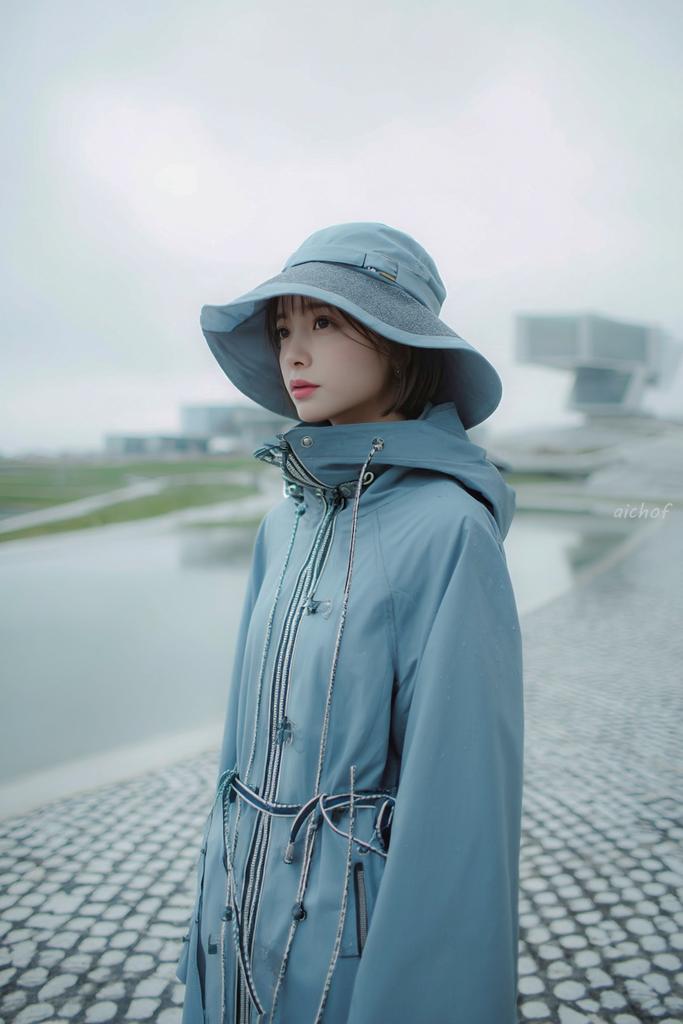
Editorial-Porträt in Rainy Blue
Diese Vorgabe erzeugt ein sanftes, minimalistisches Modeporträt einer Frau in einem monochromen Regenoutfit, ideal für redaktionelle Zwecke, Lookbooks oder stimmungsvolle Streetwear-Bilder.
Dies ist ein GPT Image 2 -Prompt für Mode & Schönheit . Verwenden Sie den unten stehenden, kopierfertigen Prompt, um ähnliche Grafiken zu erstellen, und überprüfen Sie vor der Wiederverwendung Awesome GPT Image 2 Prompts -Quellenangaben sowie die kommerziellen Nutzungsrechte.
Free 1K preview
Generate one preview image instantly, no sign-up required.
Eingabeaufforderung
Kopierfertige Eingabeaufforderung
A dreamy fashion editorial portrait of a young woman standing outdoors on a rainy, overcast day beside a shallow reflecting pool and a pebled stone walkway, shown from about mid-thigh up in a vertical composition. She wears a monochrome pale powder-blue rain outfit consisting of a wide-brim waterproof sun hat and a high-collared technical raincoat with a hood, shiny silver front zippers, multiple drawstrings, toggles, and cord details around the waist and chest. The coat is zipped high so the collar covers part of the lower face, giving a cocooned, utilitarian look. Her short dark bob hair peeks out from under the hat. Pose her turned slightly to the side, body angled right, head facing the camera, with a calm, quiet, introspective mood. Use soft diffused light, muted cool tones, misty atmosphere, and very shallow depth of field so the modern architectural structures in the background are blurred and minimal. The setting should feel futuristic and serene, with wet surfaces, faint raindrops, pale gray sky, gentle reflections in the water, and a clean minimalist color palette dominated by {argument name="outfit color" default="pale powder blue"}. Make the image look like high-end contemporary streetwear photography, slightly cinematic, airy, soft focus, delicate contrast, and subtle film-like texture. Add a small handwritten-style watermark reading {argument name="watermark text" default="aichof"} near the right-center edge.Eingabeaufforderungsvariablen
In der Eingabeaufforderung befinden sich bearbeitbare Argumentplatzhalter mit ihren Standardwerten.
Best for
- - Mode & Schönheit visual exploration
- - Image generation and reference-image edits
- - Reusable briefs that keep source attribution visible
Change these parts
- - Subject, product, character, or scene
- - Aspect ratio, camera, lighting, and background
- - Brand, text, color, and output constraints
Recommended model and settings
- - Model: gpt-image-2
- - Input mode: Text zu Bild
- - Aspect ratio: source
- - Commercial status: review original source
How to use this prompt
- 1. Copy the prompt and preserve its structure for the first test.
- 2. Replace the subject, context, and publishing channel.
- 3. Change one camera, lighting, or style variable per iteration.
- 4. Inspect the output, source, text, and rights before reuse.
Limitations, source, and reuse cautions
- - Generated output is an editable draft, not factual, legal, or rights evidence.
- - Review the linked source, people, brands, logos, text, and third-party media before commercial use.
Weitere Fälle in dieser Kategorie
Priorisiert nach Kategorie, Kompatibilität der Eingabemodi, Qualität und geringerem Risiko.






Hinweise zur Wiederverwendung und Quellenangabe
Verwenden Sie diese Eingabeaufforderung sicher, nachdem Sie den Fall in der Vorschau angezeigt haben.
- 1.Kopieren Sie die Eingabeaufforderung oder öffnen Sie sie direkt in Dovoo mit der Schaltfläche „Generieren“.
- 2.Passen Sie Variablen, Seitenverhältnis und Referenzbilder an Ihren Anwendungsfall an.
- 3.Vor der Veröffentlichung oder kostenpflichtigen Nutzung sollten Sie die Rechte an der Quelle, die Anforderungen an die Namensnennung sowie die Risiken für die Marke oder das Abbild prüfen.