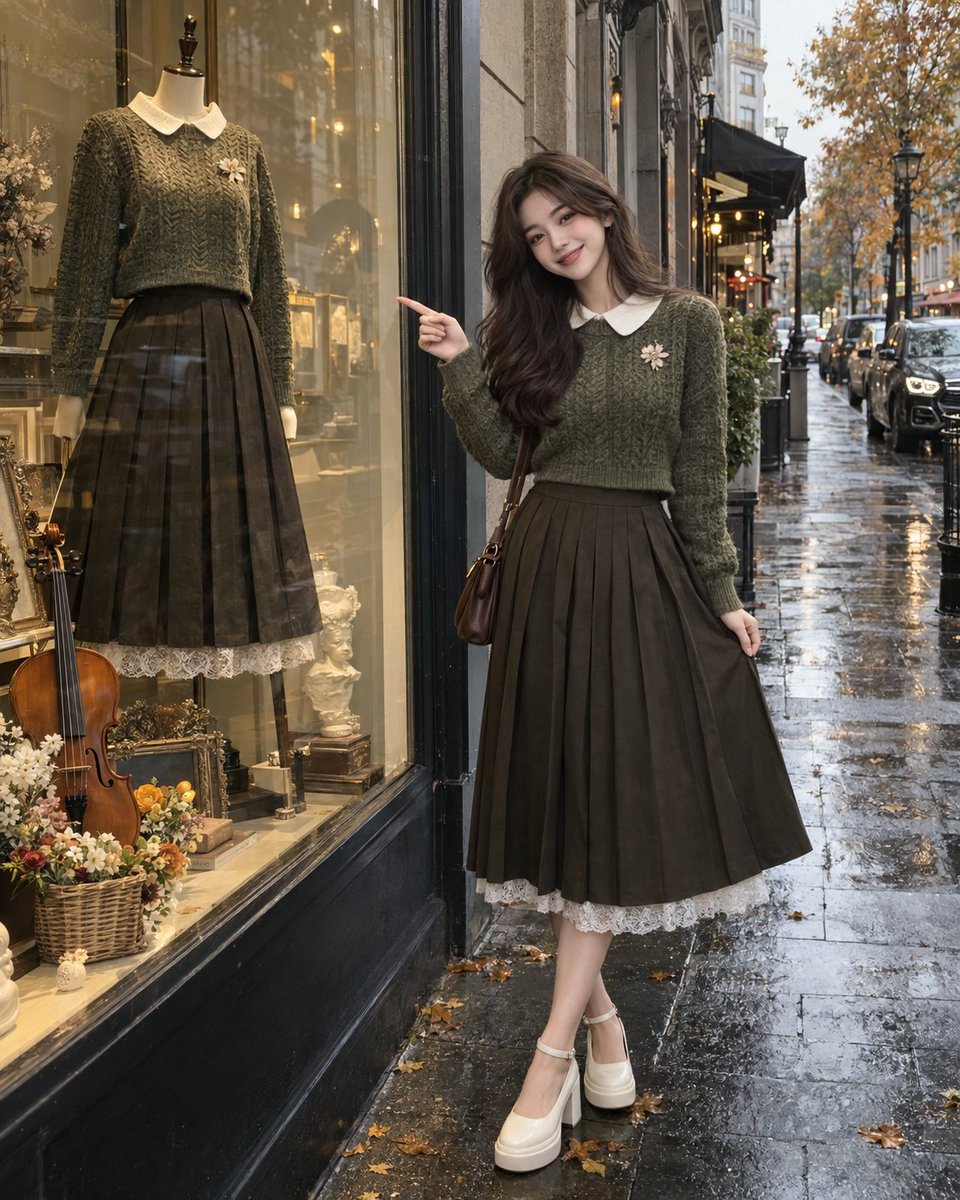
Rainy Autumn Street Fashion GPT Image 2
A prompt for a full-body street-fashion portrait of a woman outside a boutique on a rainy autumn day, created with ChatGPT Image 2.
Dies ist ein GPT Image 2 -Prompt für Mode & Schönheit . Verwenden Sie den unten stehenden, kopierfertigen Prompt, um ähnliche Grafiken zu erstellen, und überprüfen Sie vor der Wiederverwendung Awesome GPT Image 2 Prompts -Quellenangaben sowie die kommerziellen Nutzungsrechte.
Benötigen Sie den vollständigen Prompt-Satz? Verwenden Sie den Mode & Schönheit Weitere verwandte Beispiele finden Sie im Themen-Hub oder öffnen Sie die GPT Image 2 Prompt-Katalog für das vollständige Beispielverzeichnis, wiederverwendbare Strukturen und Quellenangaben.
Free 1K preview
Generate one preview image instantly, no sign-up required.
2244/4000
Eingabeaufforderung
Kopierfertige Eingabeaufforderung
A photorealistic full-body street-fashion portrait of a young woman standing outside an elegant boutique on a rainy autumn day. She has long, voluminous wavy dark brown hair, soft natural makeup, fair skin, and a bright genuine smile. She is standing beside a large glass storefront display and playfully pointing toward the outfit displayed on the mannequin.
She is wearing a vintage-inspired olive-green textured cropped knit sweater with a crisp white Peter Pan collar and a small floral brooch on the chest. The sweater is paired with a high-waisted dark olive-brown pleated midi skirt with a flowing A-line silhouette. A delicate white lace layer peeks out beneath the skirt. She wears chunky white Mary Jane-style platform shoes with ankle straps.
Beside her is a large boutique display window containing a mannequin dressed in a matching olive-green cropped sweater, white collar, dark pleated skirt, and lace-trimmed hem. A violin and a small basket of colorful flowers are arranged at the bottom of the display, creating a charming artistic storefront scene.
The street is wet from recent rain, reflecting soft ambient light. Behind her are textured stone buildings, parked cars, storefronts, and a cozy coffee shop. The overall atmosphere feels romantic, sophisticated, vintage, and autumnal.
Composition: vertical 4:5 portrait, full-body framing, woman positioned on the right side, mannequin and storefront clearly visible on the left, eye-level camera angle, natural candid fashion photography.
Lighting: soft overcast daylight after rain, subtle reflections on wet pavement, gentle diffused highlights, natural shadows, muted earthy color palette.
Photography style: ultra-realistic fashion photography, authentic street photography, realistic skin texture, detailed knit fabric, natural hair strands, realistic glass reflections, cinematic depth of field, subtle film grain, high detail, 4K.
Negative prompt: anime, cartoon, illustration, CGI, 3D render, plastic skin, excessive beauty filter, distorted face, malformed hands, extra fingers, missing fingers, unnatural anatomy, warped mannequin, distorted clothing, unrealistic shoes, oversaturated colors, fake reflections, excessive blur, low resolution, text, watermark, logo.
Best for
- - Mode & Schönheit visual exploration
- - Image generation and reference-image edits
- - Reusable briefs that keep source attribution visible
Change these parts
- - Subject, product, character, or scene
- - Aspect ratio, camera, lighting, and background
- - Brand, text, color, and output constraints
Recommended model and settings
- - Model: gpt-image-2
- - Input mode: Text zu Bild
- - Aspect ratio: source
- - Commercial status: review original source
How to use this prompt
- 1. Copy the prompt and preserve its structure for the first test.
- 2. Replace the subject, context, and publishing channel.
- 3. Change one camera, lighting, or style variable per iteration.
- 4. Inspect the output, source, text, and rights before reuse.
Limitations, source, and reuse cautions
- - Generated output is an editable draft, not factual, legal, or rights evidence.
- - Review the linked source, people, brands, logos, text, and third-party media before commercial use.
Importiert von Awesome GPT Image 2 Prompts . Quellenangabe erforderlich. Status der kommerziellen Nutzung: allowed ; Rechte an der Quelle vor kostenpflichtiger Nutzung prüfen.
Weitere Fälle in dieser Kategorie
Priorisiert nach Kategorie, Kompatibilität der Eingabemodi, Qualität und geringerem Risiko.






Hinweise zur Wiederverwendung und Quellenangabe
Verwenden Sie diese Eingabeaufforderung sicher, nachdem Sie den Fall in der Vorschau angezeigt haben.
- 1.Kopieren Sie die Eingabeaufforderung oder öffnen Sie sie direkt in Dovoo mit der Schaltfläche „Generieren“.
- 2.Passen Sie Variablen, Seitenverhältnis und Referenzbilder an Ihren Anwendungsfall an.
- 3.Vor der Veröffentlichung oder kostenpflichtigen Nutzung sollten Sie die Rechte an der Quelle, die Anforderungen an die Namensnennung sowie die Risiken für die Marke oder das Abbild prüfen.