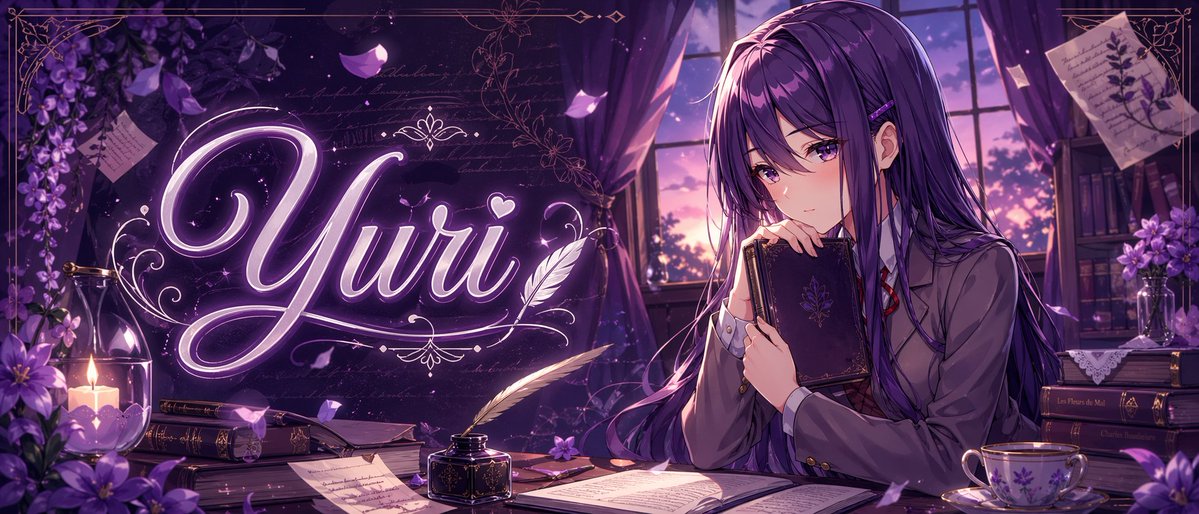
Lila Anime-Yuri-Banner
Diese Eingabeaufforderung generiert ein stylisches Anime-Banner mit einem lilahaarigen Schulmädchen in einem literarischen Dämmerraum mit leuchtender Titeltypografie, ideal für Thumbnails, Header oder charakterbezogene Social-Media-Grafiken.
Dies ist ein GPT Image 2 -Prompt für Anime & Spiel . Verwenden Sie den unten stehenden, kopierfertigen Prompt, um ähnliche Grafiken zu erstellen, und überprüfen Sie vor der Wiederverwendung Awesome GPT Image 2 Prompts -Quellenangaben sowie die kommerziellen Nutzungsrechte.
Free 1K preview
Generate one preview image instantly, no sign-up required.
Eingabeaufforderung
Kopierfertige Eingabeaufforderung
A polished anime-style banner illustration in a dreamy violet palette, wide cinematic composition, showing a quiet literary room at twilight. On the right side, a beautiful teenage anime girl named {argument name="character name" default="Yuri"} sits at a wooden desk beside a large window with purple curtains, holding a dark ornate hardcover book close to her chest and gazing softly downward with a shy, introspective expression. She has very long straight {argument name="hair color" default="deep violet"} hair with glossy highlights, side bangs, a small hair clip, and violet eyes, wearing a Japanese school uniform with a gray blazer, white shirt, red ribbon tie, and dark skirt. Across the left-center of the image, the glowing calligraphic word {argument name="title text" default="Yuri"} appears large in luminous neon-lavender script with elegant flourishes, a small heart, and decorative filigree, integrated into the scene like magical typography. The desk contains exactly 8 visible item groups: 1 open book in the foreground center, 1 black inkwell with a white feather quill, 1 closed book near the candle, 1 stack of books under papers, 1 loose handwritten page in front, 1 small purple flower on the desk, 1 floral porcelain teacup with saucer on the right, and 1 dark book stack at the far right. Additional background details include exactly 6 decorative environmental elements: 1 lit candle in a glass holder on the left, 1 cluster of purple flowers in the left foreground, 1 hanging spray of purple blossoms in the upper left, 1 pinned botanical note in the upper right, 1 bookshelf with books and flowers in the right background, and 1 sunset sky visible through the window. Add drifting flower petals, faint handwritten script textures, ornate gold border lines around the frame, soft volumetric window light, subtle sparkles, rich shadows, and a romantic melancholic atmosphere. Highly detailed, clean line art, glossy anime rendering, premium visual-novel key art, perfect for a niche anime banner or character-themed thumbnail.Eingabeaufforderungsvariablen
In der Eingabeaufforderung befinden sich bearbeitbare Argumentplatzhalter mit ihren Standardwerten.
Best for
- - Anime & Spiel visual exploration
- - Image generation and reference-image edits
- - Reusable briefs that keep source attribution visible
Change these parts
- - Subject, product, character, or scene
- - Aspect ratio, camera, lighting, and background
- - Brand, text, color, and output constraints
Recommended model and settings
- - Model: gpt-image-2
- - Input mode: Text zu Bild
- - Aspect ratio: source
- - Commercial status: review original source
How to use this prompt
- 1. Copy the prompt and preserve its structure for the first test.
- 2. Replace the subject, context, and publishing channel.
- 3. Change one camera, lighting, or style variable per iteration.
- 4. Inspect the output, source, text, and rights before reuse.
Limitations, source, and reuse cautions
- - Generated output is an editable draft, not factual, legal, or rights evidence.
- - Review the linked source, people, brands, logos, text, and third-party media before commercial use.
Weitere Fälle in dieser Kategorie
Priorisiert nach Kategorie, Kompatibilität der Eingabemodi, Qualität und geringerem Risiko.






Hinweise zur Wiederverwendung und Quellenangabe
Verwenden Sie diese Eingabeaufforderung sicher, nachdem Sie den Fall in der Vorschau angezeigt haben.
- 1.Kopieren Sie die Eingabeaufforderung oder öffnen Sie sie direkt in Dovoo mit der Schaltfläche „Generieren“.
- 2.Passen Sie Variablen, Seitenverhältnis und Referenzbilder an Ihren Anwendungsfall an.
- 3.Vor der Veröffentlichung oder kostenpflichtigen Nutzung sollten Sie die Rechte an der Quelle, die Anforderungen an die Namensnennung sowie die Risiken für die Marke oder das Abbild prüfen.