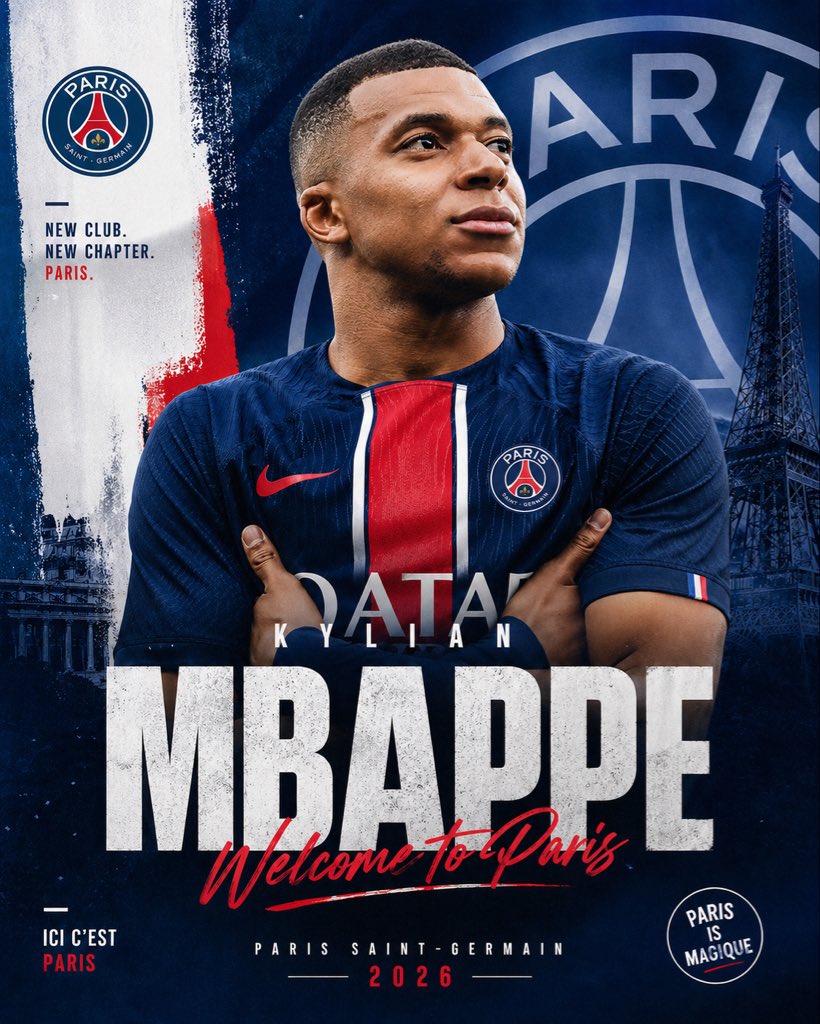
PSG-Transferankündigungsplakat
Ein auffälliges, professionelles Fußball-Transferplakat zur Bekanntgabe des Wechsels eines Spielers zu Paris Saint-Germain in den sozialen Medien oder für Sport-Werbegrafiken.
Dies ist ein GPT Image 2 -Prompt für Grafik & Poster . Verwenden Sie den unten stehenden, kopierfertigen Prompt, um ähnliche Grafiken zu erstellen, und überprüfen Sie vor der Wiederverwendung Awesome GPT Image 2 Prompts -Quellenangaben sowie die kommerziellen Nutzungsrechte.
Free 1K preview
Generate one preview image instantly, no sign-up required.
Eingabeaufforderung
Kopierfertige Eingabeaufforderung
Create a dramatic football transfer announcement poster in a vertical social-media format, centered on a photorealistic adult male soccer player wearing a modern Paris Saint-Germain home jersey, arms crossed, chest-up framing, strong athletic build, face mostly obscured by a soft rectangular blur block for anonymity, short close-cropped hair visible around the edges. Use a deep navy blue PSG-themed color palette with bold red and white accents. The jersey should feature a central red vertical stripe bordered by white, a red swoosh-style sports logo on the left side from the viewer's perspective, the PSG crest on the opposite chest, and faint sponsor lettering across the torso. Place the player in front of a layered graphic background featuring an oversized faded PSG crest filling most of the upper-right background, a dark Eiffel Tower silhouette on the right side, painterly brush-stroke textures, subtle grunge, and a white vertical paint strip on the left with a rough red brush accent near the middle. Include the PSG club badge near the upper left. Add left-side stacked slogan text in bold uppercase sans serif reading: "NEW CLUB. NEW CHAPTER. PARIS." with the last word in red. Add a huge distressed white block headline across the lower middle reading "{argument name="player surname" default="MBAPPE"}", with smaller spaced uppercase first name above it reading "{argument name="player first name" default="KYLIAN"}". Overlay a red handwritten script across the big surname saying "{argument name="welcome text" default="Welcome To Paris"}". At the bottom center, add small uppercase text "PARIS SAINT-GERMAIN" and beneath it the year "{argument name="year" default="2026"}" in red with thin divider lines on each side. In the lower left, include small stacked text "ICI C'EST PARIS" with "PARIS" in red. In the lower right, add a circular stamp-style badge reading "PARIS IS MAGIQUE". Use cinematic lighting, high contrast, premium sports-brand poster design, sharp fabric texture, moody shadows, gritty editorial finish, and polished transfer-window announcement aesthetics.Eingabeaufforderungsvariablen
In der Eingabeaufforderung befinden sich bearbeitbare Argumentplatzhalter mit ihren Standardwerten.
Best for
- - Grafik & Poster visual exploration
- - Image generation and reference-image edits
- - Reusable briefs that keep source attribution visible
Change these parts
- - Subject, product, character, or scene
- - Aspect ratio, camera, lighting, and background
- - Brand, text, color, and output constraints
Recommended model and settings
- - Model: gpt-image-2
- - Input mode: Text zu Bild
- - Aspect ratio: source
- - Commercial status: review original source
How to use this prompt
- 1. Copy the prompt and preserve its structure for the first test.
- 2. Replace the subject, context, and publishing channel.
- 3. Change one camera, lighting, or style variable per iteration.
- 4. Inspect the output, source, text, and rights before reuse.
Limitations, source, and reuse cautions
- - Generated output is an editable draft, not factual, legal, or rights evidence.
- - Review the linked source, people, brands, logos, text, and third-party media before commercial use.
Weitere Fälle in dieser Kategorie
Priorisiert nach Kategorie, Kompatibilität der Eingabemodi, Qualität und geringerem Risiko.






Hinweise zur Wiederverwendung und Quellenangabe
Verwenden Sie diese Eingabeaufforderung sicher, nachdem Sie den Fall in der Vorschau angezeigt haben.
- 1.Kopieren Sie die Eingabeaufforderung oder öffnen Sie sie direkt in Dovoo mit der Schaltfläche „Generieren“.
- 2.Passen Sie Variablen, Seitenverhältnis und Referenzbilder an Ihren Anwendungsfall an.
- 3.Vor der Veröffentlichung oder kostenpflichtigen Nutzung sollten Sie die Rechte an der Quelle, die Anforderungen an die Namensnennung sowie die Risiken für die Marke oder das Abbild prüfen.